
The Acer Nitro 5 Review: Renoir And Turing On A Budget
Wireless
In a somewhat sad state of affairs, in the PC space there is really only one good wireless adapter, and that is Intel. Although there are a few competitors, they tend to not offer the reliability of the Intel drivers, nor the performance. Intel continues to improve their wireless products every year, to integrated them into their new laptop platforms, so Intel offers the most current standards as well. Despite being a budget system, Acer has outfitted the Nitro 5 with the Intel AX200 network card, which is a Wi-Fi 6 adapter offering 160 MHz channel support and all of the other accoutrements that go along with Wi-Fi 6.
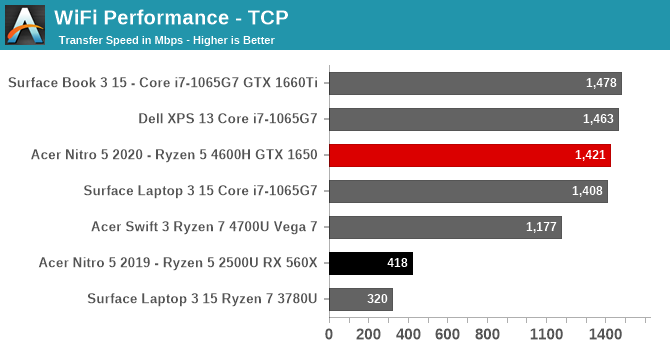
For speed, it is as good as anything on the market, offering over 1.4 Gbps peak transfer rate on the 2x2 card. Reliability was perfect, with the laptop never waking without network, or randomly disconnecting. This years Intel wireless continues to improve on the company’s already large lead over the competition.
Audio
Acer’s Nitro 5 feautres dts:X Ultra audio processing, as well as two speakers firing downward at the front of the laptop.

The speakers themselves are below-average in terms of sound quality, with very little bass, even for a laptop. The stereo separation is excellent though, and the speakers get reasonably loud, hitting about 75 dB(A) measured 1-inch over the trackpad.
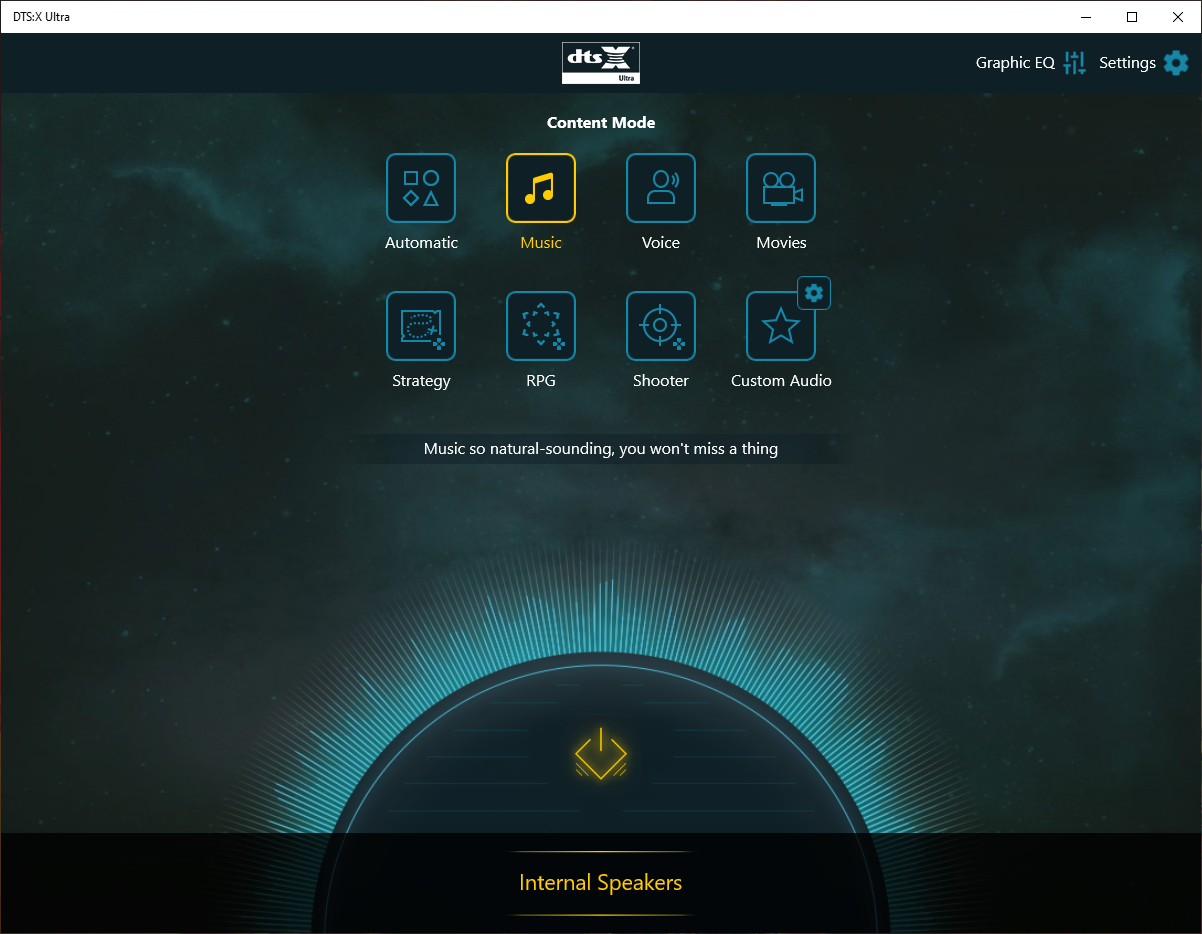
The dts:X software offers some nice functionality, with various pre-canned equalizer settings, as well as a graphical EQ option if you want to tweak it yourself. It is a simple, yet useful program, and is a nice inclusion.
Thermals
Cooling is a key component of a gaming system, as no one wants to have GPU temperatures spike during a long gaming session causing the GPU frequency to drop. The Acer Nitro 5, as a 15.6-inch laptop, is a mid-sized gaming system, but at 5.3 lbs and almost an inch thick, there is quite a bit of mass and space to facilitate cooling. Acer has intakes placed on the bottom, and four exhaust vents placed on the rear and side of the system. There are two fans, and their speed can be controlled via Acer’s NitroSense software which offers a CoolBoost option to increase the fan speeds for better cooling, at the expense of increased noise.

For our testing we left the fan speed set at auto, and enabled CoolBoost. At these settings, at idle the system was completely silent, but under load, noise was a factor with the system hitting about 53 dB(A) measured an inch over the trackpad.
To see how the system responded to load, first it was put under a CPU stress test using AIDA64.

There was some fluctuations in CPU frequency, although not out of what seems normal on Ryzen 4000, with the system hitting 4.0 GHz peak, and a maximum power draw of the SoC of 50 Watts. But once the system moved past its peak power draw, it settled in right on 35 Watts for the duration of the test.
To see how the system handles gaming loads, it was again loaded up with Far Cry 5 for a long gaming session, with the GPU and CPU temperatures logged, as well as other GPU metrics.

The result was about perfect, with almost flat lines across the graph. There was no reduction in performance even under 100% GPU load over long periods.
The noise levels were not excessive, although like most gaming laptops, under load it is loud enough that you would want to use closed-back headphones if possible. Overall, the cooling system was more than capable of handling the demands of the Ryzen 5 4600H and GTX 1650.
Software
As a low-cost system, it perhaps should not be a huge surprise that the Acer Nitro 5 comes loaded with not just system utilities, but also some software that is less than necessary. The system ships with a Norton Antivirus trial, along with several ad-generating notification systems and a couple of links pre-bookmarked in the browser. None of the software is too difficult to remove if you do not want it, but just be aware that it is there.
There is of course also the necessary utilities like Acer’s NitroSense already demonstrated above. Acer Care Center lets you check for device driver updates, and manage support, and works well.
Interestingly, there is the Killer Control Center, even though the default wireless adapter is the Intel AX200, so the Killer software is only there for the Ethernet connection.

It is also very interesting to see both the AMD Radeon Settings application and the NVIDIA GeForce software on the same system, but such is life when you have the Vega integrated GPU coupled with an NVIDIA discrete GPU.

Overall, there is too much software, too much bloat, and too many unwanted pop-ups when the system is first set up. It is generally a sign that Acer needs to increase the margins on the hardware, but with the entry-level price of this system, it is somewhat forgivable, although still not enjoyable for the end-user.
Originally published at https://www.anandtech.com/show/16153/the-acer-nitro-5-review-renoir-and-turing-on-a-budget (Wayback Machine).