
EasyShare DX7590: Kodak's Second Ultra-Zoom Digicam
- Posted in
- Digital Camera
General Image Quality
For these pictures, the camera was reset to its factory default setting. Then, it was set to its highest quality recording setting. The pictures were then taken in Auto mode unless stated otherwise. Click on a thumbnail to view the full-size image. All images are in sRGB color space. (ISO 80, 1/1000 sec., f/2.8) Click to enlarge. |
 (ISO 80, 1/800 sec., f/3.1) Click to enlarge. |
 (ISO 80, 1/800 sec., f/2.8) Click to enlarge. |
 |
 |
 |
 (ISO 80, 1/640 sec., f/2.8) Click to enlarge. |
 (ISO 140, 1/250 sec., f/3.5) Click to enlarge. |
 (P, ISO 80, 1/400 sec., f/3.7, +1.0 EV) Click to enlarge. |
 |
 |
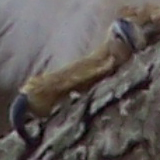 |
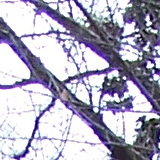
In the first two samples above, we can see that although the DX7590 is able to capture a decent amount of information, the fine details have a soft appearance. In addition, the first crop shows some JPEG artifacts along the edges of the window. We are a bit surprised to see JPEG artifacts at all when shooting with the highest quality setting. The next two samples demonstrate a fairly common problem of purple fringing with the DX7590. Although it won't be a major problem unless you plan on printing larger than 8"x10", it is an important issue to bring to light. In the fifth sample, the DX7590 shows off the capabilities of its 10x zoom lens capturing this unsuspecting squirrel. In the final sample, we were able to take a reasonable shot of this bird from approximately 25' away without getting attacked. In Auto mode, we found that the camera had trouble focusing on our subject. So, we quickly switched to Program mode with center-zone focus and applied a +1.0 EV compensation to counter the strong backlighting. Purple fringing is also quite evident in this shot.
Overall, the image quality of the DX7590 is pretty good. Despite the purple fringing and JPEG artifacts, the camera generally produces very good exposures without over-saturating/sharpening the images. The softness issue is most likely due to an aggressive noise reduction process. Although you shouldn't always expect ultra-crisp 11"x14" pictures with this camera, it can no doubt produce some very excellent prints up to 8"x10". It is really too bad that the JPEG compression is so high at the "Fine" setting because it results in some noticeable detail loss.
Night Shot
 ((Manual, ISO 80, 5 sec., f/3.1) Click to enlarge. |
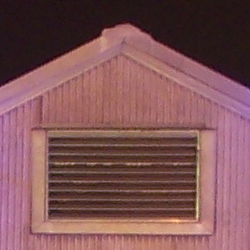 |
The DX7590 is only able to reach its longest shutter speed (16 seconds) in either Shutter-priority or Manual mode. In this shot taken in Manual mode, the camera handles noise very well. Unfortunately, JPEG artifacts are abundant along fine edges/lines in this shot, resulting in a significant loss of detail and clarity.
Movie Mode
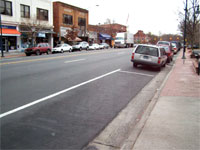 (640x480, 12 fps) Click to view. |
Other than the fact that the DX7590 can record unlimited video and audio at 640x480, the movie mode is rather disappointing. When set to 640x480, the video is very choppy due to its 12 fps capture ability. When the camera is set to record at 320x240, the clips become noticeably smoother with the video at 20 fps. Overall, however, we are disappointed with the slow frame rates.
Originally published at https://www.anandtech.com/show/1612 (Wayback Machine).