
Winter Audio Reference: On-Board, Consumer, and Pro Solutions
- Posted in
- Smartphones
- Mobile
Gaming Performance Tests
As game frame rates in modern systems are not heavily impacted by various audio settings, one of the best measures of "goodness" for games will be simply the maximum number and type of hardware buffers that the card supports. Beyond that, the RightMark 3DSound synthetic test can give an indication of what CPU usage will be like in gaming situations. Listed below are the number and type of hardware buffers that each card supports:
Intel HD Audio: 32 buffers 2D, 3D, EAX 2
Gina3G: 128 buffers 2D only
SoundBlaster Audigy 2 ZS PPro: 62 buffers 2D, 3D, EAX 4 Advanced HD
SoundBlaster Audigy 4 Pro: 62 buffers 2D, 3D, EAX 4 Advanced HD
The fact that the Gina3G can open over twice as many DirectSound buffers as the Audigy gives it an advantage in its ability to push audio. But the target is definitely more of a home studio multi-track editing environment rather than a gaming environment. The Gina3G's lack of any 3D accelerated buffer support does make it less of a gaming audio card, as is to be expected. While the Realtek Intel solution provides EAX 2, it's able to provide adequate support for most games on the market.
There are titles out with support for EAX 3 and 4, and they do sound good. Games like Thief 3 and The Chronicles of Riddick make good use of audio to help the gamer actually play the game. Understanding an environment is becoming truly necessary in modern gaming. But we would prefer to see unique personal innovation or the adoption of open standards rather than consumption of proprietary technology.
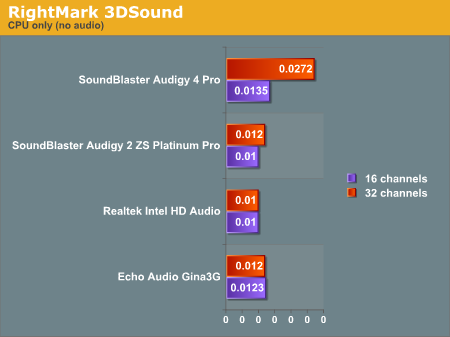
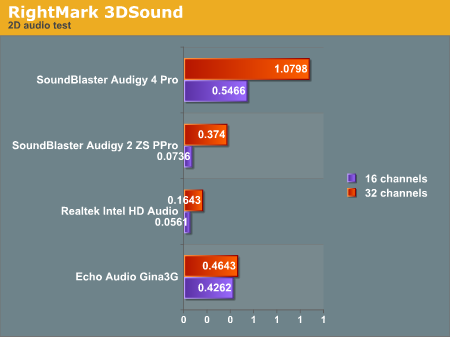
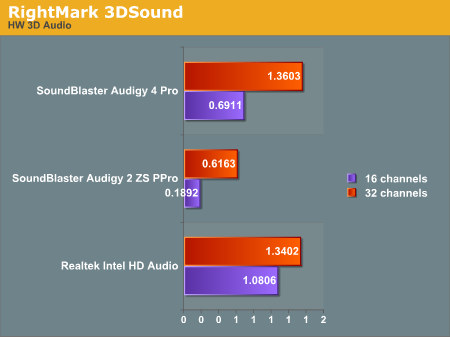
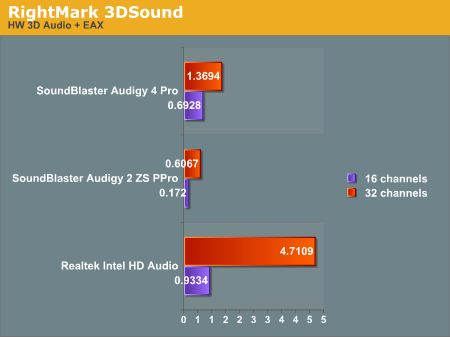
The RightMark test simulates some normal positional audio effects and internally checks CPU usage every half second. Overall, CPU usage is averaged together at the end of the run. This is the number that we will look at here. Our graphs are broken into multiple series for 16 and 32 buffers, and we've done graphs for the "no audio" case, simple stereo, hardware 3D, and hardware 3D + EAX. Positional audio, in this case, is done via DirectX.
In our tests, we see the Audigy 2 outperforming the Audigy 4 in our DS3D and EAX tests. The Intel solution puts in a good showing as well, though Creative naturally does EAX better. In the 2D realm, the Gina3G doesn't do too poorly either. Note also, that we are talking about percent CPU usage here, so a score of 0.1 is 0.1% of the CPU. The heaviest hitting test comes in at under 5% CPU usage, which just goes to show how little impact even our least efficient HW 3D + EAX implementation has on overall game performance.
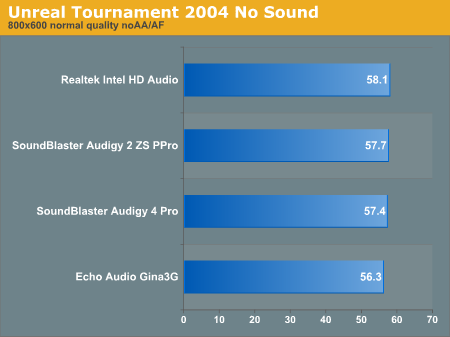
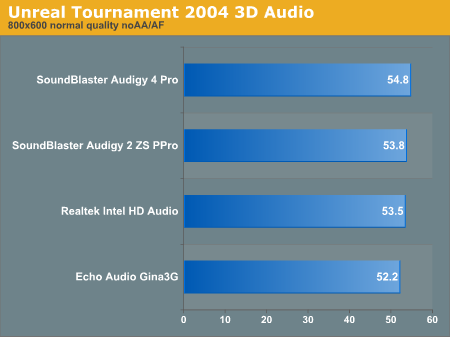
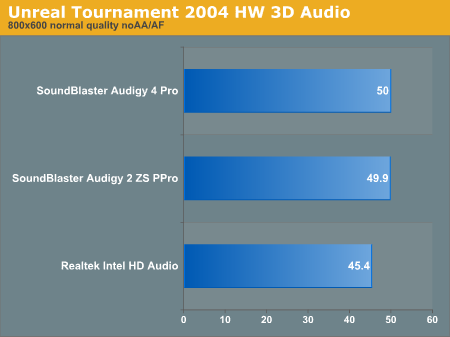
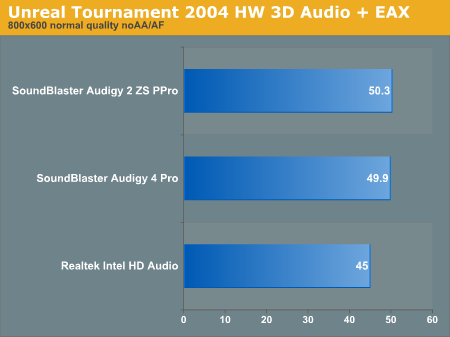
To round out our gaming performance analysis, we'll take a look at Unreal Tournament 2004. All the in-game graphics details were set to "normal" and resolution was set to 800x600. Higher settings pushed the rest of the system too high and drowned out the effect of the audio (as the graphics card became the limiting factor rather than the CPU). Call this artificial if you like, but showing that it takes this much to get a performance delta out of enabling audio is a useful test in and of itself. Especially considering the fact that these differences are bigger than what we saw with Doom 3 no matter what we did.
Originally published at https://www.anandtech.com/show/1606 (Wayback Machine).