
ASRock Z490 Aqua Motherboard Review: The $1100 LC Monoblock Flagship
Overclocking
Experience with the ASRock Z490 Aqua
One of the common misconceptions when overclocking processors is that the cooler the CPU is, the faster it can run. To a degree, better and more aggressive cooling methods can certainly unlock extra potential and headroom when compared to conventional air tower coolers, but the biggest limitation is within the silicon itself. Due to the nature of how Intel's Comet Lake Desktop processors are binned, with aggressive turbo boosts such as Intel's Thermal Velocity Boost. processors are lucky to have much headroom at all.
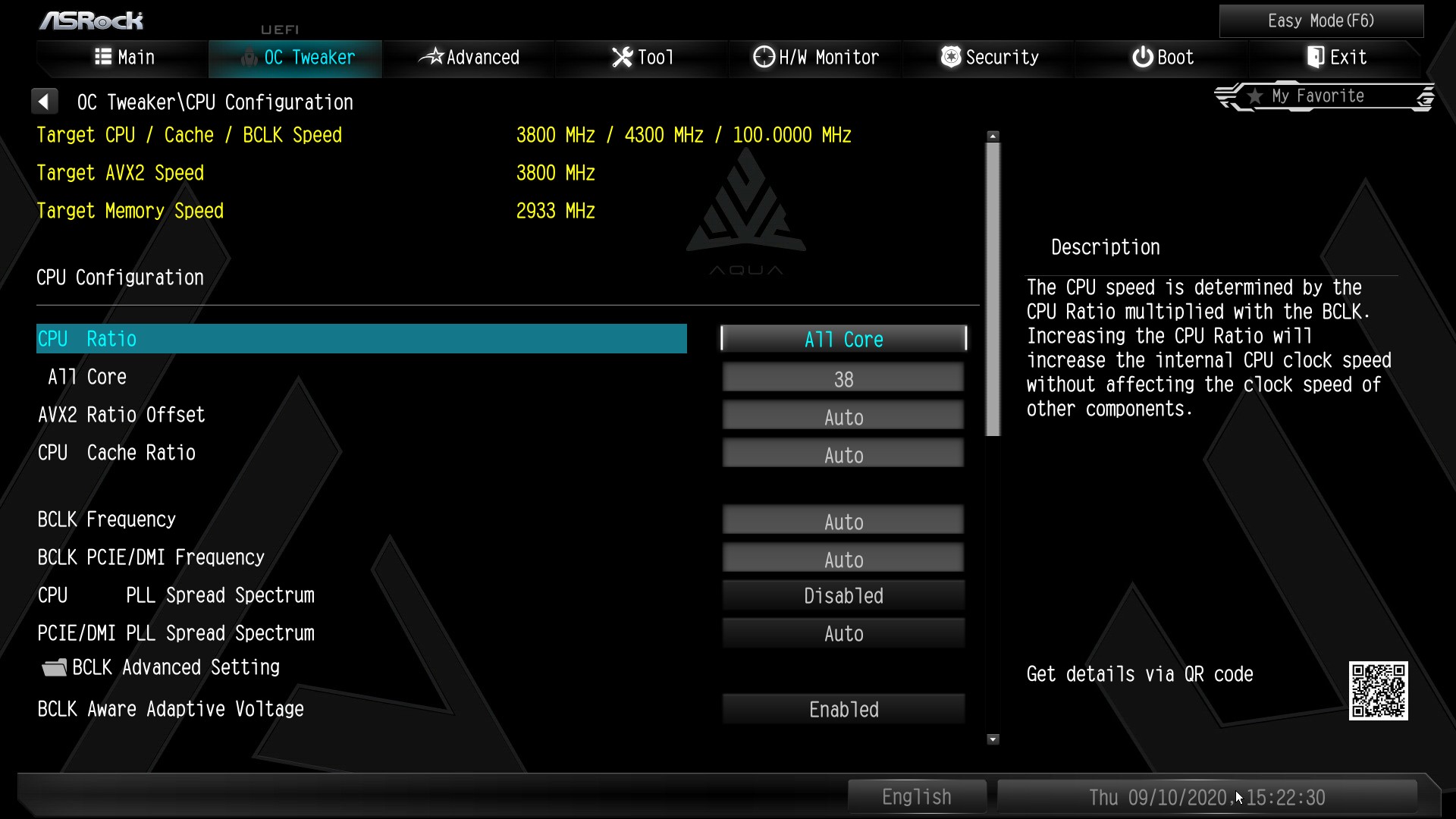
Overclocking our Core i7-10700K testbed processor using the ASRock UEFI firmware was the same as other ASRock Z490 models we have tested. The OC Tweaker hosts all of the board's relevant overclock settings. ASRock has uniformed the main three areas into three sub-menus, CPU, DRAM, and Voltage. This makes specific settings easier to find, although it does mean a lot of switching between menus, so it's advisable for the sake of saving time to at least work out the variables, including CPU ratio, CPU VCore, and memory settings prior to changing them.
ASRock's firmware has a wide variety of different settings, with the CPU section within the OC Tweaker menu offering options to change the CPU ratio and BCLK ratio, as well as alter all of the CPU related power settings such as SpeedStep and the board's Thermal Velocity Boost settings. Within the DRAM section is the option to enable memory X.M.P 2.0 profiles, as well as sift through the copious amounts of memory latency settings. All of the board's voltage settings can be found under the voltage sub-menu, with some of the most notable including CPU VCore, VCCSA, DRAM, and CPU PLL voltage.

One of the most interesting overclocking features is the include ASRock memory profiles for different types of memory based on IC manufacturer and type. This includes specific presets for Samsung B-Die memory designed for different revisions of the IC's, including A2 and A0. These profiles are more geared towards sub-zero overclockers and users with high-binned memory, although looking at the DRAM Voltage of the profiles, these wouldn't be suitable for use in 24/7 settings, and more catered towards specific benchmarking runs.
Overclocking Methodology
Our standard overclocking methodology is as follows. We select the automatic overclock options and test for stability with POV-Ray and Prime95 to simulate high-end workloads. These stability tests aim to catch any immediate causes for memory or CPU errors.
For manual overclocks, based on the information gathered from the previous testing, starts off at a nominal voltage and CPU multiplier, and the multiplier is increased until the stability tests are failed. The CPU voltage is increased gradually until the stability tests are passed, and the process repeated until the motherboard reduces the multiplier automatically (due to safety protocol) or the CPU temperature reaches a stupidly high level (105ºC+). Our testbed is not in a case, which should push overclocks higher with fresher (cooler) air.
Overclocking Results
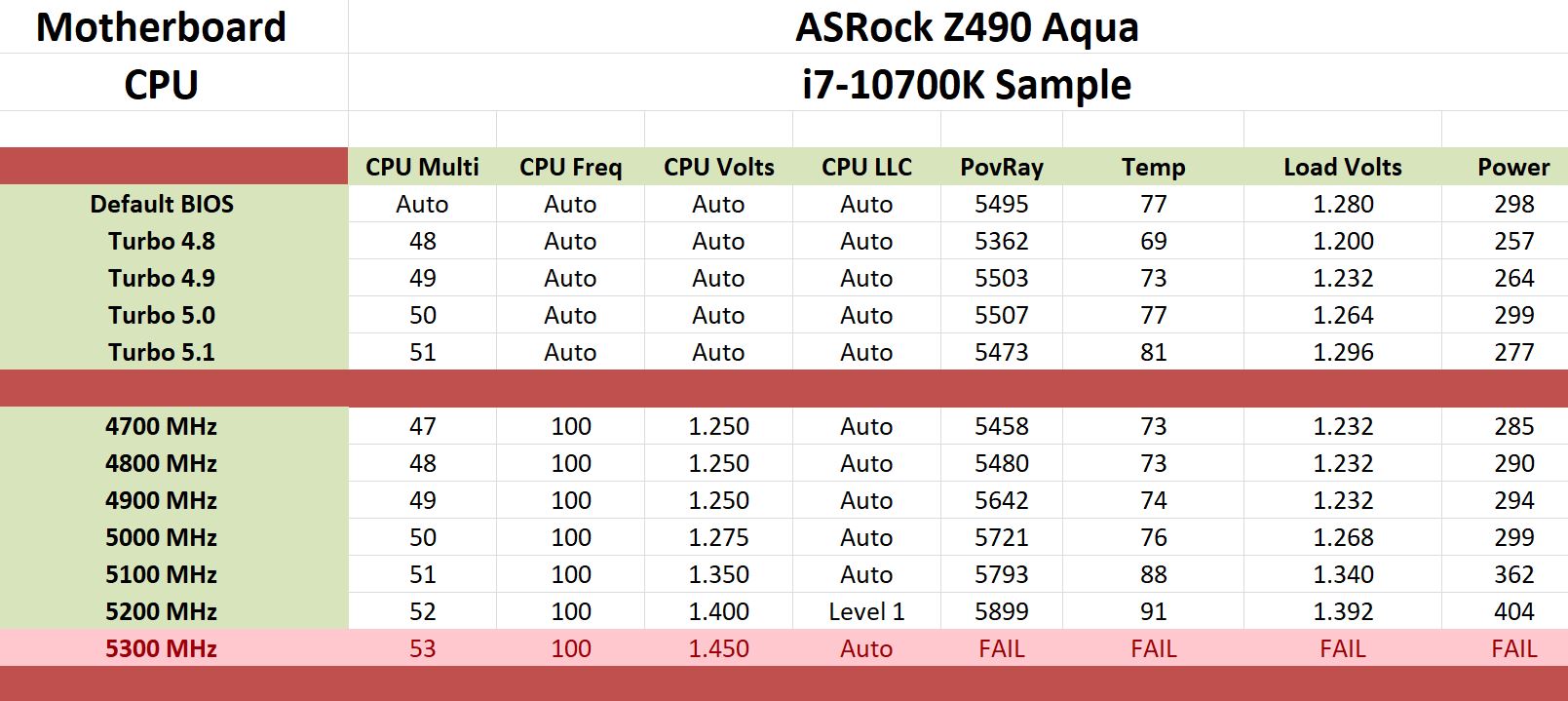
Included within the firmware with the ASRock Z490 Aqua is four overclocking presets which most vendors have avoided implementing on Z490; this is most likely due to the high turbo clock speeds on Comet Lake. There are profiles for 4.8, 4.9, 5.0, and 5.1 GHz, which all work well with custom loop cooling. The fastest of these profiles is 5.1 GHz, which operates with a load CPU VCore voltage of 1.296 V, which is very conservative compared to some vendors with its models.
Testing each of the overclocks manually ranging from 4.7 to 5.3 GHz, the first thing that became apparent was that water cooling didn't enable us to go further than 5.3 GHz on our i7-10700K silicon. We managed to boot into Windows at 5.3 GHz and 1.450 V on the CPU VCore, but it was very unstable and any load would crash the system. When changing the CPU VCore within the BIOS, the firmware would automatically revert the loadline calibration profile to level 1, which meant very tight VDroop and shows consistency between the VCore voltage set in the firmware, and the load voltage monitored at full load. For the first time, our overclock with our testbed processor ran 5.2 GHz without thermally throttling, but unfortunately, 5.3 GHz was just a stretch too far for the silicon.
As a natural consequence of feeding more CPU VCore into the CPU as we went up in frequency, we experienced more heat and power draw, although due to monoblock design, these temperatures were much better under full-load than conventional air/AIO coolers. The firmware itself is very stable and easy to use, with a robust selection of settings designed for overclockers and enthusiasts to get the most out of.
Originally published at https://www.anandtech.com/show/16023/the-asrock-z490-aqua-motherboard-review- (Wayback Machine).