
A Month with a Mac - Part II: The Mobile Experience
- Posted in
- Mac
The Display and Fiber Optic Keyboard Lighting
The display on the PowerBook is one of its strong points. While it doesn't hold a candle to Apple's desktop Cinema Displays, it is quite strong as a notebook display. I'd say that the display on the PowerBook G4 is one of the best, if not the best, display which I've ever used on a notebook. The 15" display has a native resolution of 1280 x 854, which is what you can expect from just about any current generation 15.2" widescreen display.Apple outfitted the Powerbook with ambient light sensors to control two things: the brightness of the display, and the fiber optic backlighting of the keyboard. The light sensors for the screen are located behind the grilles for the speakers, on the left and right of the keyboard.
Both features can be overridden, but their pros generally outweigh their cons. The best example of their use occurred while I was writing this very sentence on a flight over to Taiwan. Given the length of the flight, there are many times when the lights in the cabin are dimmed as well as brought back up again. I started writing while the cabin lights were dimmed, which caused the Powerbook's sensors to activate the keyboard lighting and dim the screen. About two hours before I landed, the cabin lights were turned up for breakfast service. Almost instantaneously when the lights went up, the brightness on the screen increased (to compensate for the higher ambient light) and the illumination on the keyboard turned off. The same types of features are useful for office environments when the lights are turned on after the end of a presentation, or in a school environment when the same occurs.
The fiber optic lighting on the keyboard is fairly impressive. Instead of being lit by a few LEDs causing bright spots on the keyboard, the face of each individual key is lit using a fiber optic network of lights. Only the letter or number on the key is illuminated; for example, the majority of the F key remains unlit, but the letter "F" itself is lit creating a very unique effect that is very well appreciated by someone who has to type in the dark a lot on airplanes.
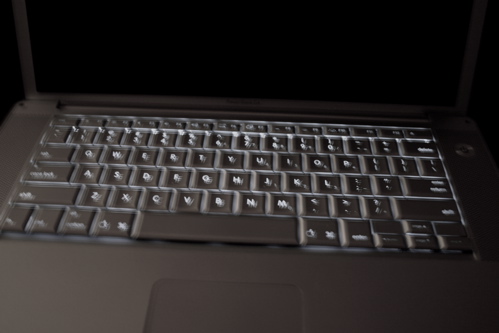
We apologize for the blurriness of the image, but you get the point.
The fiber optic lighting isn't without its weaknesses; for starters, it does help contribute to the cost of the PowerBook, but that's not a huge issue.
You can control the degree of lighting by using the F8 - F10 keys on the keyboard. F8 will turn the keyboard lighting off, F9 will decrease the level of illumination and F10 will increase the level. Depending on how you have your keyboard settings configured, you may or may not have to hold down the "fn" key.
Originally published at https://www.anandtech.com/show/1594 (Wayback Machine).