
ASUS ROG Maximus XII Hero Wi-Fi Review: The Tale of Two Motherboards
Overclocking
Experience with the ASUS ROG Maximus XII Hero WiFi
Overclocking on LGA1200 platform can be as simple or complicated as you make it. The problematic part with overclocking the Intel Comet Lake processors comes from gauging CPU VCore voltages and thus the heat any overclocking over default settings can do. These chips, in particular, the Core i7-10700K and the bigger i9-10900K already run to high levels at stock settings. Any user intending to overclock with Comet Lake needs to factor in capable cooling, with a 240 mm recommended as the absolute minimum for the i7 model, and a 280 mm AIO as the minimum for the 10-core i9. Some of the extra performance available from Intel's Comet Lake comes when the processor is cooler, with Thermal Velocity Boost which is good for an additional 100 MHz in regards to turbo when kept under 70°C, which is no easy thing to do. Overclocking beyond the default settings also risks thermal throttling which chokes the processor down to try and reduce the overall heat, which can drastically drop performance.
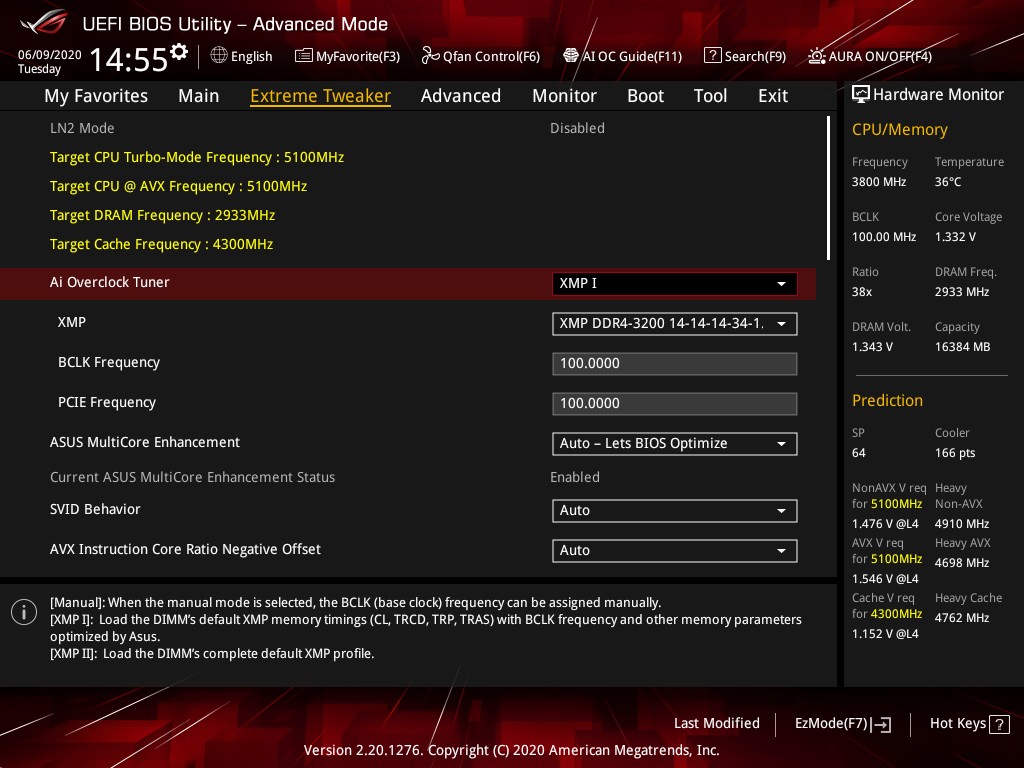
One aspect ASUS tends to focus on with its ROG branded Maximus (Intel), and Crosshair (AMD) models is overclocking. The ROG Maximus XII Hero WiFi is no exception to this rule. It has a wide variety of options for users to tweak, prod, and ultimately configure to get a capable overclock. The ASUS ROG firmware itself is easy to use, with a long scroll down list of options starting with CPU, then onto memory settings, then further down is a vast host of voltage options. The CPU options are extensive with plenty of submenus which include power delivery tweaking which includes load-line calibration settings and a dedicated section to Intel's VF Curve settings, in which users can dial in less aggressive or overzealous settings at their whim.
There is an extensive selection of memory-related settings too including frequency, BLCK which overclocks the processor and PCIe also, as well as a list of preset memory overclocking profiles designed for users with high bin memory. Included in the memory latency settings is a long list of customizable primary, secondary, and tertiary timings for memory performance enthusiasts, as well as an option to favor Intel's XTU benchmark for competitive overclocking.
Overall overclocking with the ASUS Maximus XII Hero WiFi is one to consider carefully, as users may be tempted to use options which are simply not required. Users can change the primary voltage settings, including CPU VCore and DRAM voltage, as well as dial in the desired frequency. Due to the heat of Comet Lake processors, we wouldn't recommend going over 1.35 V without at least a high-end cooling solution such as a 280 mm AIO or 360 mm AIO, or even a custom water cooling loop with at least a 240 mm radiator.
Overclocking Methodology
Our standard overclocking methodology is as follows. We select the automatic overclock options and test for stability with POV-Ray and Prime95 to simulate high-end workloads. These stability tests aim to catch any immediate causes for memory or CPU errors.
For manual overclocks, based on the information gathered from the previous testing, starts off at a nominal voltage and CPU multiplier, and the multiplier is increased until the stability tests are failed. The CPU voltage is increased gradually until the stability tests are passed, and the process repeated until the motherboard reduces the multiplier automatically (due to safety protocol) or the CPU temperature reaches a stupidly high level (105ºC+). Our testbed is not in a case, which should push overclocks higher with fresher (cooler) air.
Overclocking Results

Although the ASUS ROG Maximus XII Hero WiFi doesn't technically have any preset overclocking profiles, ASUS has included two choices when entering POST from a freshly cleared BIOS. This includes Intel Default settings which will apply settings to Intel's specifications or ASUS optimized which essentially removes all of Intel's power limits. In our testing, the ASUS Optimized settings gained around 2.3% in POV-Ray performance, with a slightly lower power draw, and very marginal temperature differences. Using ASUS AI automatic overclocking function, we saw a more significant jump in performance of around 3.7%, with even lower CPU temperatures and a much lower overall power draw, with a maximum CPU VCore load voltage of 1.181 V; this is impressive.
Testing manual overclocks from 4.7 GHz to our maximum stable overclock achieved of 5.3 GHz, we noticed a gradual increase in POV-Ray performance. With the rise in CPU Core frequency and CPU VCore voltage comes more heat and power draw, which goes hand in hand. At our test of 5.2 GHz all-cores at 1.400 V, we did experience thermal throttling which dropped performance down to levels between what would be expected at 4.9 to 5.0 GHz. At our lower settings, including 4.7, 4.8, and 4.9 GHz, we noticed large amounts of VDroop with a lot of under voting. The overclocks, however, remained stable and as a direct consequence, we saw drastic drops to the heat output compared to other boards we've tested. As we went to 5.0 GHz and beyond, VDroop control tightened up, and the load voltage was much closer to the CPU Vcore settings entered into the BIOS.
Another thing we are adding to our Z490 motherboard reviews is DDR4-5000 XMP validation. We reviewed a kit of Corsair's Vengeance LPX DDR4-5000 at the beginning of the year, and although the ROG Maximus XII Hero WiFi doesn't officially support DDR4-5000, we tried anyway. Unfortunately, this didn't POST, and so far hasn't POSTed on any of the Z490 models we have tested so far.
Originally published at https://www.anandtech.com/show/15833/the-asus-rog-maximus-xii-hero-wifi-motherboard-review (Wayback Machine).