
Digicam Roundup: $150
- Posted in
- Digital Camera
Playback Features
To review previously taken pictures, simply press the Review button. By default, images are displayed one at a time, but you can view them as thumbnails by pressing the down arrow button. To move to different pictures, you must press the left/right arrow buttons. To delete an image or video, press the Delete button. A confirmation screen will appear with the following options: Picture/Video, Exit, or All.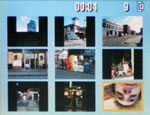 Thumbnail view |
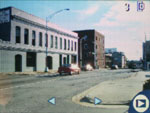 Image regular view |
 Image magnified 4x |
By pressing the OK button, you can magnify images up to 4x. Each press of the OK button has the following effect: 2x, 4x, original state. By pressing the Menu button, there are some additional options available:
| Playback Menu | |
| Magnify | Magnify/Play Video |
| Share | Cancel Prints, Print All, Print, E-mail, Favorite |
| Protect | On, Off |
| Image Storage | Auto, Internal Memory |
| Album | Select |
| Slide Show | Begin Show, Interval (5 - 60 sec.), Loop (On, Off), Exit |
| Copy | Picture, All, Exit |
| Video Date Display | Select |
| Multi-Up | OK |
| Picture Info | OK |
| Setup Menu | Enter |
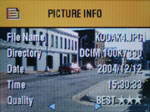
Picture Info
The "Magnify/Play Video" option can also be accomplished by simply pressing the center of the multi-directional controller. By selecting the "Share" option, the camera displays a list of ways that you can tag images. You can tag pictures as favorites, to print, or to email. This information is used later when viewing the pictures with the included software. The "Slide Show" option will cycle through your images with an interval of 5 - 60 seconds. You also have the option of looping the show. The Copy function enables you to copy images from a memory card to the internal memory or vice versa. The "Video Date Display" simply changes the way that the date appears with video clips. "Multi-up" shows images as thumbnails. The same thing can be accomplished by pressing the down arrow button while viewing a picture/video. The "Picture Info" option displays a screen with the following information: filename, directory, date, time, and picture quality. The "Setup Menu" option brings up the same menu as in record mode.
Originally published at https://www.anandtech.com/show/1579 (Wayback Machine).