
Digicam Roundup: $150
- Posted in
- Digital Camera
Playback Features
To review previously taken pictures, you can do one of two things. If the camera is off, you can hold down the Play button to start up the camera without extending the lens. If the camera is already on, holding down the Play button will switch the camera over to review mode. The lens will retract automatically after approximately 7 seconds.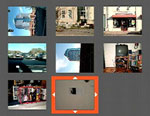 Thumbnail view |
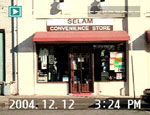 Image regular view |
 Image magnified |
To move to different images, you can use the buttons on either side of the zoom controller. By pressing forward on the zoom controller, you can magnify an image in 14 increments. To view a specific portion of the image, you must first press the left or right button to enter "panning" mode. After entering "panning" mode, you can use the zoom controller to move up and down and the left and right buttons to move across the image. To fit the image to screen again, simply press the Disp/Back button twice. While viewing a single image, the default information on the screen indicates the file number, date, and time. By pressing the Display button, all information will be removed from the image. Another press of the Display button changes the screen to a 3x3 thumbnail display. This enables you to see 9 images at a time and you can select an image by moving the highlighted box up/down or left/right.
To erase an image, you must press the Menu button. Then, you can choose to erase the current image or all images. Another option in the menu is DPOF (Digital Print Order Format). With this option, you can tag specific images for printing with a DPOF-compatible printer. You can also choose to stamp the images with the date on which they were taken. Also, in the menu is a Protect option, which allows you to mark images as "protected". This simply keeps them from being deleted if you select "All Frames" from the Erase menu. There is a slideshow option in the menu that offers two types of transitions and two intervals from which to choose. Finally, there is a "Trimming" option that allows you to specify a portion of an image that you would like to crop. The process is achieved exactly the same as if you were magnifying an image. When you have the image framed and magnified to your desire, simply press the OK button to save the cropped image as a new file.
In the main menu, there is a Set-up option with several settings for adjusting operational functions of the camera. Below is a table with the available options:
| Set-up Menu | |
| Image Display | On, Off |
| Power Save | 2, 5 min. |
| Format | OK, Cancel |
| Beep | Off, Low, High |
| Date/Time | Set |
| Time Difference | Home/Local, Set |
| LCD | On, Off |
| Frame NO. | Cont., Renew |
| USB Mode | Printer, PC, Web |
| Language | Select |
| Video System | NTSC, PAL |
| Discharge | OK, Cancel |
| Reset | OK, Cancel |
The Image Display option refers to whether or not the camera will show a review of an image immediately after it is taken. With the Power Save option, you can select how long you would like the camera to wait before shutting down automatically. The Beep options change the behavior of the operational beep sound. Low and high refer to the pitch, not the volume. The A330 allows you to specify both a home and local time. This would be handy if you are frequently traveling between time zones. The USB mode options allow you to specify the hardware to which the camera is connected. As you can see, the camera can also be used as a webcam. Selecting OK to the Discharge option tells the camera to drain the batteries of their charge. In order to help maintain the maximum charge capacity, the manual recommends using the Discharge option when using new Ni-MH batteries or when your batteries do not seem to be holding the same charge that they once did. Something known as the "Memory Effect" can occur with rechargeable batteries. This causes the batteries to hold a lesser charge than they are capable of. The Reset option allows you to reset the camera to its factory default settings.
Originally published at https://www.anandtech.com/show/1579 (Wayback Machine).