
December 2004 HTPC Case Roundup
- Posted in
- Cases/Cooling/PSUs
CoolerMaster Cavalier 2 (cont'd)
To remove the cover, we need to remove three screws at the back, then slide the cover back about an inch and lift up. Though not as tedious as the six screws that we dealt with on the D.Vine 5, we would like to see thumbscrews replace the standard ones. This can also be done by the user.Internal Design
Looking at the underside of the top cover, we see the vent that we noticed before opening up the Cavalier 2. There is also a circular duct, which will guide fresh air from the outside directly to the CPU heatsink fan. No matter the external temperature, the CPU will receive an "untouched", and definitely cooler supply of air.
Click to enlarge.
We took one look at the design of the chassis and realized it was almost exactly like the D.Vine 4 with a few minor variations. First, the 5-1/4" drive bays sit at the right of the chassis. To the right of those, however, we see a wall that splits the rest of the case from an inch wide section, which contains an extra 3-1/2" drive bay mount for a HDD.

Click to enlarge.
Second, a removable dual 3-1/2" drive cage is placed in the same spot as on the D.Vine 4, but CoolerMaster has decided to make it even easier to remove by installing a tool-less device here. All we need to do is push down on the flexible steel clip and pull the drive cage back. There is also a tab with a screw hole to secure the cage further. We were disappointed that they made these bays external instead of HDD applications. A single external bay would have been more than sufficient, even if used as only a desktop PC.

Click to enlarge.
To the left of the drive bays, we see the circuit board for the sound meter, as well as an 80mm fan mounted on the left side of the case where we saw the vent on the Cavalier's shell. This is an intake fan and blows air at the side of the 3-1/2" drive cage.
The motherboard tray in the Cavalier 2, like the D.Vine 5, supports both ATX and uATX boards as we see in the picture. There are plenty of holes available to use the screw-in stand-offs.
The expansion card slots, again like the D.Vine 5, are not tool-less, but then also again, we should not expect any of these features to be implemented in HTPC cases just yet.
Cooling
With the addition of an 80mm on the side, the Cavalier matches the D.Vine 5 with dual 60mm fans at the back behind the CPU area. Both are mounted as exhausts and help create a system that moves air from the front left side and out through the back.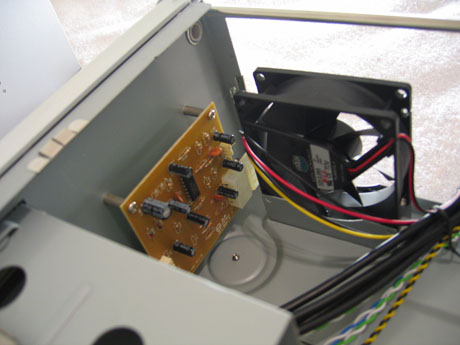
The CPU duct that we mentioned earlier will also assist in bringing in air from the outside especially for the CPU heatsink. This should help cool the CPU by a few degrees.

Click to enlarge.
CoolerMaster also includes a proprietary 300W Macron Power PSU, model MPT-301, which supports two SATA drives, four standard drives (MOLEX), two floppy drives, and also has a 6-pin P4 connector.
Construction
Since the Cavalier's body is made of steel, we searched for sharp edges around the inside. We did find a few around the drive bays and we advise users to take care during drive installations.Using steel will ultimately keep the price of the Cavalier 2 down, well below that of the D.Vine 5 in the end.
Originally published at https://www.anandtech.com/show/1577 (Wayback Machine).