
Intel Ghost Canyon NUC9i9QNX Review: NUC 9 Extreme Realizes the SFF Dream
Power Consumption and Thermal Performance
The power consumption at the wall was measured with a 4K display being driven through the HDMI port of the discrete GPU. In the graphs below, we compare the idle and load power of the Intel NUC9i9QNX (Ghost Canyon) with other SFF PCs evaluated before. For load power consumption, we ran the AIDA64 System Stability Test with various stress components, as well as a combination of Prime95 and Furmark, and noted the maximum sustained power consumption at the wall.
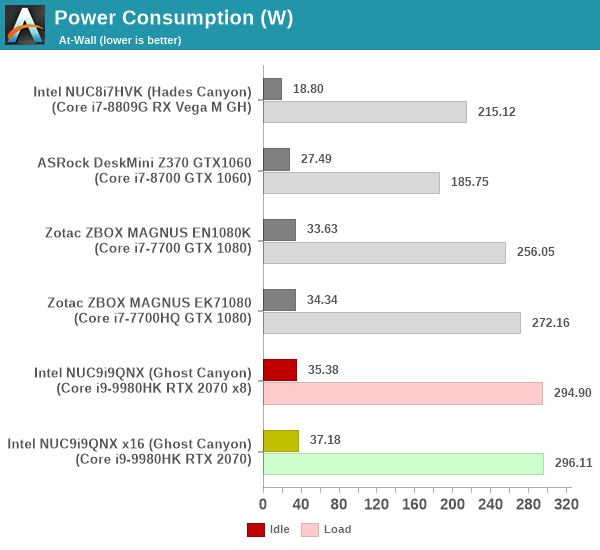
The power consumption numbers are along expected lines, matching what we had observed for a similar mobile CPU / desktop GPU combination in the Kaby Lake / Pascal generation (Zotac ZBOX MAGNUS EK71080). The additional factors leading to the slightly higher numbers (295W vs 272W) include a dedicated secondary drive, a power-hungry 905p series Optane SSD, and a relaxation in the permissible sustained package power consumption that we analyze further down.
Our thermal stress routine starts with the system at idle, followed by four stages of different system loading profiles using the AIDA64 System Stability Test (each of 30 minutes duration). In the first stage, we stress the CPU, caches and RAM. In the second stage, we add the GPU to the above list. In the third stage, we stress the GPU standalone. In the final stage, we stress all the system components (including the disks). Beyond this, we leave the unit idle in order to determine how quickly the various temperatures in the system can come back to normal idling range. The various clocks, temperatures and power consumption numbers for the system during the above routine are presented in the graphs below.
| Intel NUC9i9QNX (Ghost Canyon) System Loading with the AIDA64 System Stability Test | |||
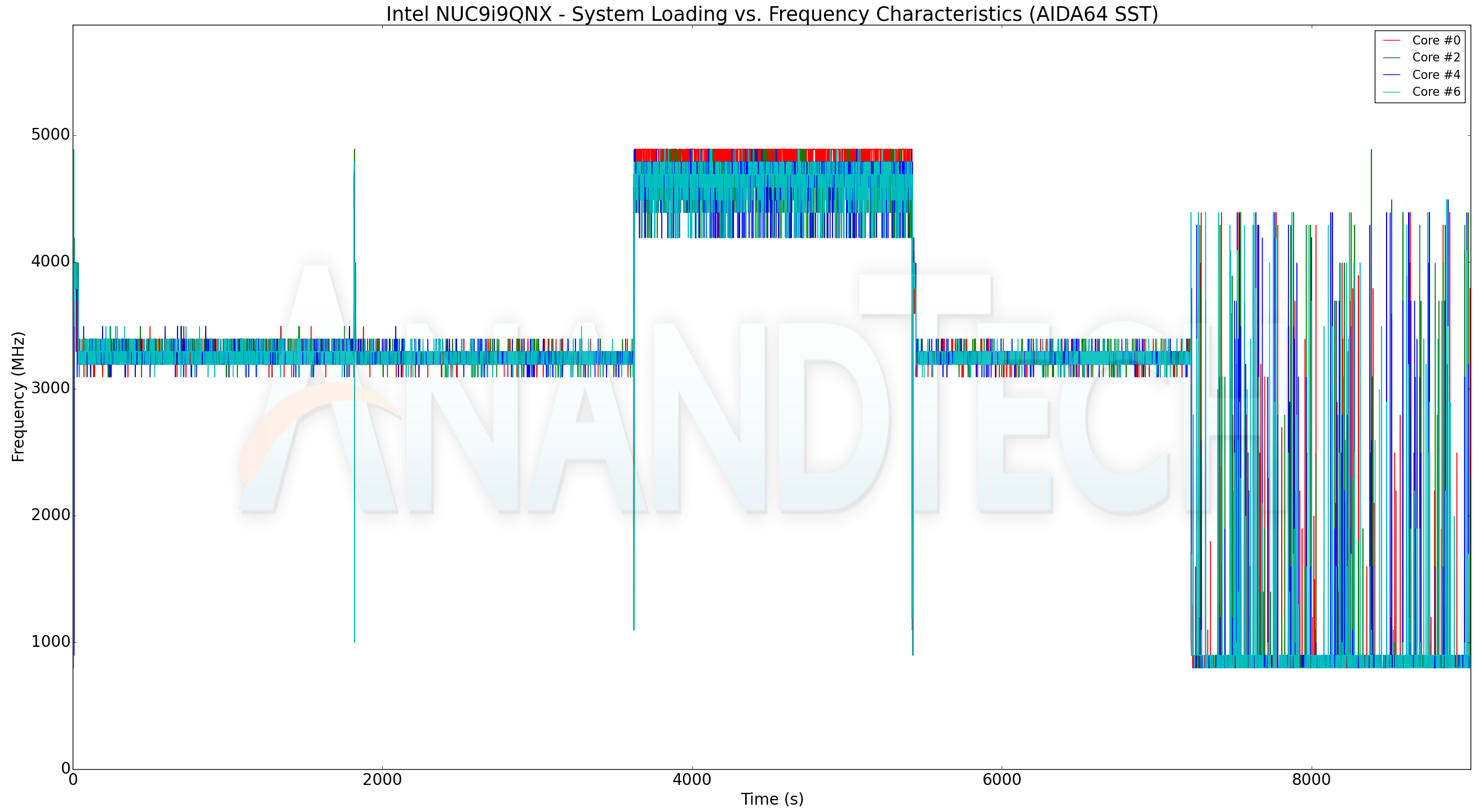
The AIDA64 system stability test does not have many surprises in store. The core frequencies stay well above the advertised base speeds of 2.4 GHz throughout the loading period. The package and core temperature stay around 90C for the most part, though they do momentarily reach the junction temperature (100C) as the transition from a full-stress to a standalone GPU stress scenario takes place. Things do get to a stable state quite soon. Meanwhile the RTX 2070 never crosses 70C, pointing to a well-designed thermal solution by ASUS.
On the power consumption side, we have the first surprise - the CPU package is allowed its PL2 limits for a short duration (close to 100W) in the beginning. In the steady loading stage, the number drops down to 65W (compared to the 45W we saw for the Core i7-7700HQ in the Zotac ZBOX MAGNUS EK71080). This accounts for the additional load power consumption identified in the beginning of this section. The GPU power consumption tops out around 165W in the AIDA64 stress test. The at-wall numbers show spikes of up to 325W, but the steady loading state numbers are around 280W with all stress components enabled.
| Intel NUC9i9QNX (Ghost Canyon) System Loading with Prime95 and Furmark | |||
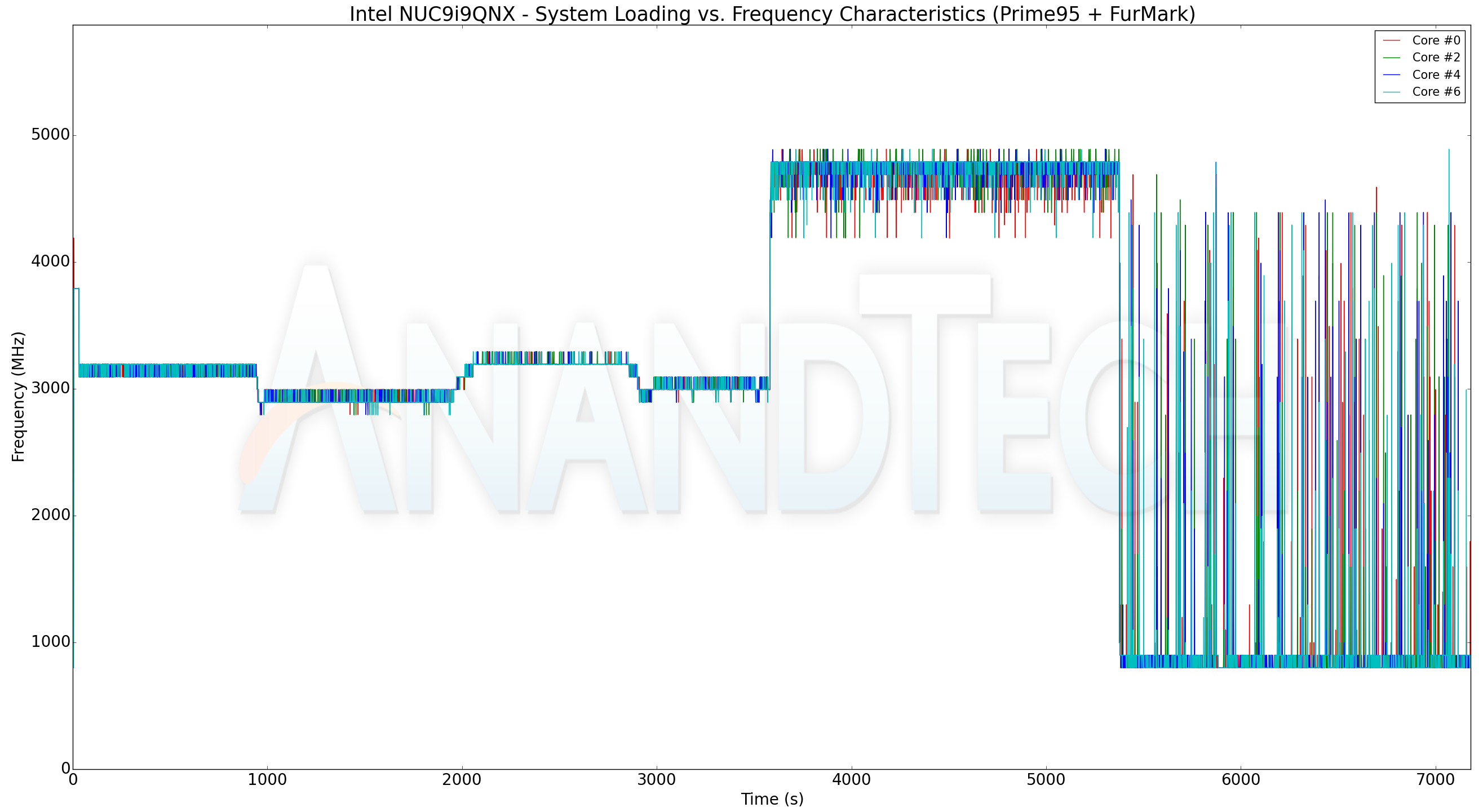
The frequency-related observations made in the AIDA64 system stability test hold true for our artificial power virus test involving Prime95 and Furmark also. The clocks stay well above the advertised base numbers. The temperature numbers tell a similar story too, though the absolute numbers are a bit lower, coming in around 80C instead of 90C for the package. The GPU temperature stays south of 70C throughout. On the power consumption side, we again see the CPU package allowed to dissipate up to 65W in the steady state. The at-wall numbers are slightly north of 290W in the steady state, as graphed in the beginning of this section.
Overall, our power consumption and thermal solution testing revealed a few surprises - the CPU package power budget is 65W (instead of the 45W we saw with mobile CPUs used in SFF PCs in the previous generation). The system as a whole is able to handle this without any undue cause for alarm with respect to the temperatures. ASUS does deserve plaudits for a well-designed thermal solution that doesn't allow the GPU to go beyond 70C even in high-stress scenarios. The system as a whole is surprisingly quiet at idle given the dimensions of the chassis and the number of fans in the system.
Originally published at https://www.anandtech.com/show/15720/intel-ghost-canyon-nuc9i9qnx-review (Wayback Machine).