
AMD’s Mobile Revival: Redefining the Notebook Business with the Ryzen 9 4900HS (A Review)
Testing the Ryzen 9 4900HS Integrated Graphics
Under the hood of the Ryzen 9 4900HS, aside from the eight Zen 2 cores, is an enhanced Vega 8 graphics solution. For this generation of mobile processors, AMD is keeping the top number of compute units to 8, whereas in the previous generation it went up to Vega 11. Just by the name, one would assume that AMD has lowered the performance of the integrated graphics. This is not the case.
For the new Ryzen Mobile 4000 processors, the Vega graphics here are enhanced in three main ways over the previous generation. First is that it is built on the 7nm process node, and AMD put a lot of effort into physical design, allowing for a more optimized version that has a wider voltage/frequency window compared to the previous generation. Secondly, and somewhat connected, is the frequency: the new processors top out at 1750 MHz, rather than 1400 MHz, which would naturally give a simple 25 % boost with all other things being equal. Third on the list is memory, as the new platform supports up to DDR4-3200, rather than DDR4-2400, providing an immediate bandwidth boost which is what integrated graphics loves. There’s also the nature of the CPU cores themselves, having larger L3 caches, which often improves integrated graphics workloads that interact a lot with the CPU.
Normally, with the ASUS Zephryus G14, the switching between the integrated graphics and the discrete graphics should be automatic. There is a setting in the NVIDIA Control Panel to let the system auto-switch between integrated and discrete, and we would expect the system to be on the IGP when off the wall power, but on the discrete card when gaming (note, we had issues in our battery life test where the discrete card was on, but ASUS couldn’t reproduce the issue). In order to force the integrated graphics for our testing, because the NVIDIA Control Panel didn’t seem to catch all of our tests to force them onto the integrated graphics, we went into the device manager and actually disabled the NVIDIA graphics.
This left us with AMD’s best integrated graphics in its Ryzen Mobile 4000 series: 1750 MHz of enhanced Vega 8 running at DDR4-3200.

Renoir with Vega 8 – updated to 20.4 after this screenshot was taken
Our comparison point here is actually a fairly tricky one to set up. Unfortunately we do not have a Ryzen 7 3750H from the previous generation for comparison, but we do have an Honor Magicbook 14, which has a Ryzen 5 3500U.

Picasso with Vega 8
This is a 15 W processor, running at 1200 MHz and DDR4-2400, which again makes the comparison a little tricky, but it is better than comparing it to the Intel HD630 graphics in the Razer Blade.
We also re-ran the benchmarks on the latest drivers with AMD's 65 Desktop APUs, the Ryzen 5 3400G (with Vega11) and the Ryzen 3 3200G (with Vega 8). These are running at DDR4-2933, the AMD maximum officially supported by these APUs (which means anything above this is overclocking).
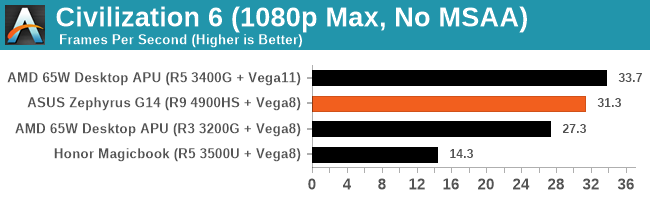
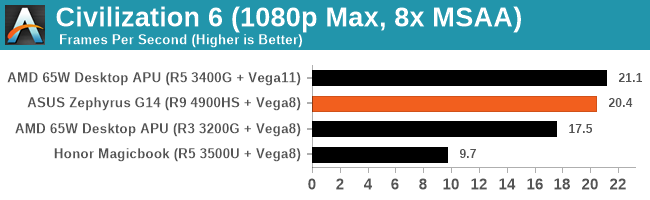
This is a pretty substantial difference, no joke.
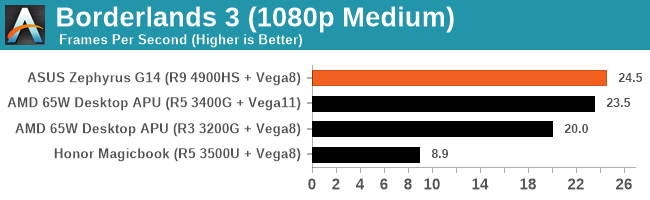
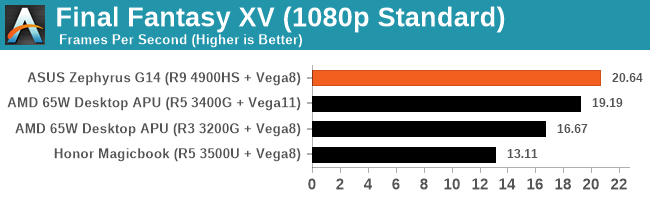
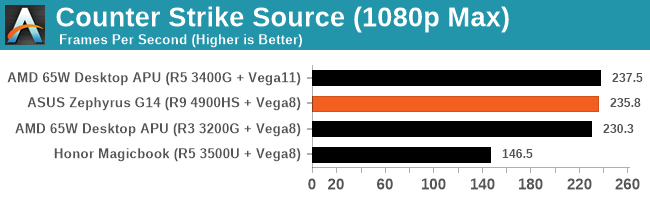
Hopefully we will get more variants of the Ryzen integrated graphics to test, along with an Ice Lake system.
Originally published at https://www.anandtech.com/show/15708/amds-mobile-revival-redefining-the-notebook-business-with-the-ryzen-9-4900hs-a-review (Wayback Machine).