
Dell Inspiron 700M - Taking the Widescreen Display to Ultraportables
- Posted in
- Laptops
Battery Info & Performance
There are two battery pack options:- 4 cell standard battery (14.8V, 2.2AH, 32WH)
- 8 cell extended battery (14.8V, 4.4AH, 65WH)
 Click to enlarge. |
 Click to enlarge. |
| Left: 700M with standard battery Right: Extended and standard batteries side by side | |
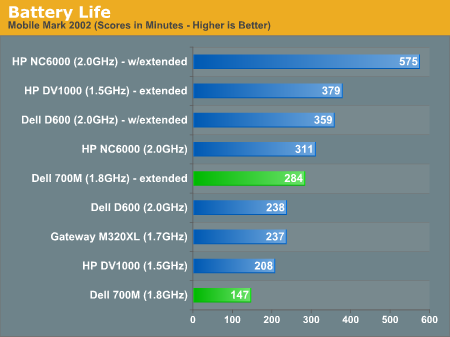
It costs $53 dollars more to upgrade from a standard battery to the extended, or $116 to just add on the 8 cell extended battery. Our recommendation is just to add the extended battery if you can. The extra battery life will go a long way, especially for an ultraportable, since you are likely trying to avoid using a power outlet as much as possible. We should note that unlike other notebook designs, the extended battery doesn't limit the range of how far back the display can bend.
If your battery power is low, the battery stats icon will blink green even if the system is turned off, and there will be a BIOS warning along with an override prompt once you turn on your system (displayed after BIOS initializes). If the battery power is actually at 0%, there will be no blinking low power indicator.
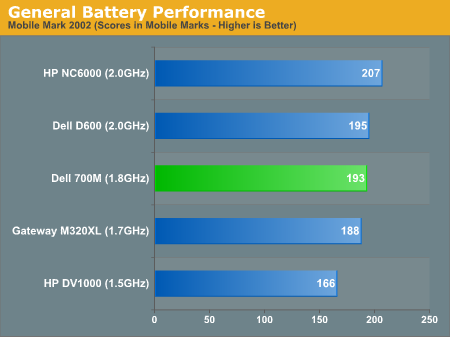
We have redone the way we benchmark notebooks for battery tests. In the past, we have always run under "Always On" for the battery scheme under the power settings in Windows XP. This puts the CPU to max performance, but the side-effect is that power is going to be drawn from the battery rather liberally.
The main reason we did this in the past was two-fold:Because performance has increased to such a degree that even automatic power management isn't a hindrance, our benchmark method was long overdue for an overhaul. These scores are reflective of what you should expect in the typical day-to-day use.
- you would know what you should at least get with your notebook; and
- using the recommended Bapco setting of "Portable/Laptop", which has automatic CPU speed management, often times wasn't up to par with what normal users in the past needed for something as simple as visualizations in WMP.
Our past benchmarks can be referenced, but with those laptops, keep in mind that it is the minimum score that you should expec, and automatic power management increases the scores from roughly 10% to 35%.
Originally published at https://www.anandtech.com/show/1564 (Wayback Machine).