
FIRST LOOK: Gigabyte K8NXP-SLI
- Posted in
- Motherboards
Features: Gigabyte K8NXP-SLI
Consider the K8NXP-SLI as an K8NXP-9 with SLI. Gigabyte has added all the BIOS options promised for the production boards and then some. Particularly interesting are the 0.5MHz increments available for very fine tweaking in the most used 200-270 CPU clock range, with 1MHz increments to the top speed of 400. The only item that proved too large a challenge for the production board was a wider range of memory voltages. Gigabyte states that future revisions of their nForce4 boards may see an increased memory voltage range, but that a boost in vDIMM options now would have required a board redesign. Gigabyte has tweaked the available vDIMM options to provide an adjustment range from 2.6V to 2.8V. As you will see in our overclocking tests, this had little impact on overclocking abilities, although a broader range is preferred and would have likely facilitated higher memory overclocking.| Gigabyte K8NXP-SLI Specifications | |
| CPU Interface | Socket 939 Athlon 64 |
| Chipset | nVidia nForce 4 Ultra (Single-Chip) |
| Bus Speeds | 200 to 400 200 - 270 in 0.5MHz increments 271 - 400 in 1MHz increments |
| PCI Express Speeds | 100 - 150 fixed in 1MHz increments |
| Core Voltage | 0.8V to 1.75V in 0.025V increments |
| CPU Clock Multiplier | 4x-20x in 1X increments |
| HyperTransport Frequency | 1000MHz (1GHz) |
| HyperTransport Multiplier | 1X, 2X, 3x, 4X, 5x, Auto |
| DRAM Voltage | 2.6V to 2.8V in 0.1V increments (Normal, +0.1, +0.2) |
| PCIe Voltage | Normal, + 0.1v, +0.2v, +0.3v |
| HyperTransport Voltage | Normal, + 0.1V, +0.2V, +0.3V |
| Robust Graphics Booster | Auto, Fast, Turbo |
| Memory Slots | Four 184-pin DDR DIMM Slots Dual-Channel Configuration Regular Unbuffered Memory to 4GB Total |
| Expansion Slots | 2 x8/x16 (Programmable) PCIe Slot 2 x1 PCIe Slots 2 PCI Slots |
| Onboard SATA/SATA RAID | 8 SATA Drive Total 4 SATA 300 Drives by nForce4 (RAID 0, 1, 0+1, JBOD) Can be combined with IDE drives in RAID 4 SATA 150 Drives by Sil3114CT176 (RAID 0, 1, 0+1, JBOD) |
| Onboard IDE/IDE RAID | Two Standard ATA133/100/66 (4 drives) Drives may be as IDE RAID or combined with nF4 SATA drives in a RAID Array |
| Onboard USB 2.0/IEEE-1394 | 10 USB 2.0 ports supported by nForce4 2 Firewire High-Speed 1394B by TI 46A9C3W |
| Onboard LAN | Dual Gigabit LAN On-chip Gigabit LAN by nF4/Cicada 8201 PHY PCI Express Gigabit LAN by Marvel 88E8053 |
| Wireless LAN | PCI 802.11b/g Wireless LAN Card Included |
| Onboard Audio | AC '97 2.3 8-Channel by Realtek ALC850 |
| BIOS Revision | Award K8NXP-SLI F2c 11/22/2004 |
The updated Gigabyte BIOS for the K8NXP-9/K8NXP-SLI family provides a very wide and useful range of adjustments for other features. Continuing with the Gigabyte custom in recent designs, Advanced Chipset Features (and Memory Timings) can only be seen when you press CTRL+F1 while in the BIOS. HyperTransport adjustments are also provided in the hidden Advanced Chipset Features menu.
There are no BIOS options for adjusting or controlling SLI. This is handled in the nForce4 platform drivers and the nVidia graphics drivers.
A new properties section appears in the Advanced properties GeForce tab for boards supporting SLI. This tells you that SLI is possible by installing a second video card. When the board between the PCIe video slots is turned to the SLI position and a second video card is installed with an SLI connector or bridge on top, new messages pop up telling you how to enable SLI.
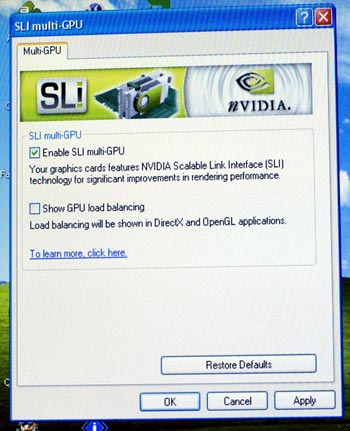
The process is very easy, but don't assume that anything is wrong if you don't see SLI on the first boot. The first boot identified the video card. After we rebooted, the SLI was recognized and pop-ups led us though enabling SLI. The only boards currently working in SLI are the nVidia 6600GT, 6800GT, and 6800 Ultra. nVidia has stated that future 6800 video cards will also support SLI.
The Gigabyte K8NXP-SLI, like the sister K8NXP-9, was designed as a top-of-the-line nForce4 motherboard. As the flagship model, it sports all the top Gigabyte features.
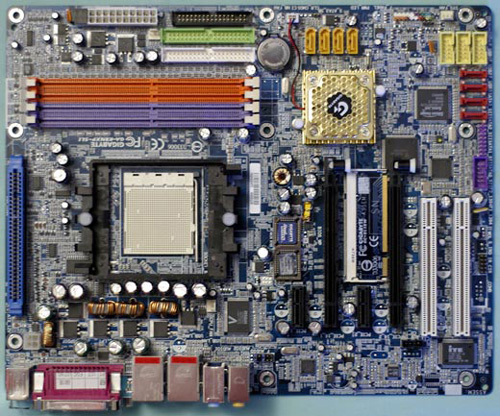
The SLI version also supports the trademark DPS daughter to increase power reserves and stability by increasing the board to 6-phase power. You can see the DPS slot to the left of the CPU. You will also see dual BIOS chips to the left of the main PCIe video slot. This Gigabyte feature provides back-up BIOS in the event of a bad flash or unstable BIOS setting. The K8NXP-SLI can boot from the good backup BIOS if problems arise with the main BIOS.
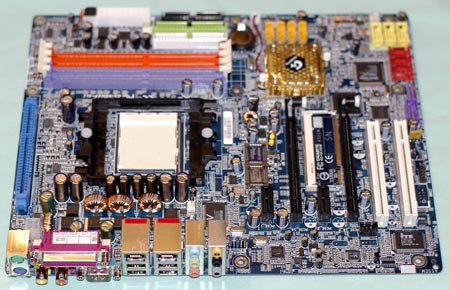
Continuing the theme of "more than you might expect", Gigabyte provides eight SATA ports. Four ports are 3Gb/s ports provided by the nForce4 chip, and the other are four 1.5Gb/s ports driven by the PCI bus.
In the nForce4 family, Gigabyte adheres to nVidia's feature set. This time, we see Gigabyte use the nF4 on-chip Gigabit LAN by supporting it with a Vitesse (Cicada) Gigabit PHY. Gigabyte then goes one step further by including a second Gigabit LAN on the PCI Express Bus. This second LAN is also removed from the constraints of the slower PCI bus as it resides on the much faster PCIe bus.
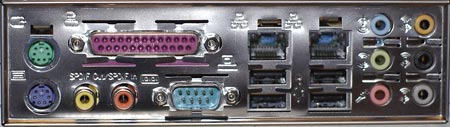
Audio is AC '97 2.3, but Gigabyte uses the popular 8-channel Realtek ALC850. The K8NXP-SLI includes the same wide range of audio I/O provided on the K8NXP-9 to make the most of the 850 chip. This includes 6 programmable audio mini-jacks and coax SPDIF in and out - all on the rear panel. For more information on the Realtek 850, you can check the specifications at the Realtek web site.
Another pioneering feature for Gigabyte has been their support of high-speed 1394B Firewire on their boards. This continues with the K8NXP-SLI with 2 ports capable of 800MB/s. This is double the speed of 1394A, for those looking for fast Firewire access.
From a feature, board layout, and BIOS options point of view, the K8NXP-SLI can be considered the twin of the K8NXP-9. The only real change is the replacement of one PCI slot with a second PCIe video slot. All the good things about the features and layout of the K8NXP-9 are still here in the K8NXP-SLI.
Originally published at https://www.anandtech.com/show/1553 (Wayback Machine).