
NVIDIA's GeForce 6 SLI: Demolishing Performance Barriers
- Posted in
- GPUs
Doom 3 Performance
As you can expect, SLI offers no benefits at 1024 x 768, but as early as 1280 x 1024 we start to see some reasonable performance gains. The 6800 Ultra gets a 22% increase in performance, while the 6800GT gets a slightly bigger bump of 26% thanks to SLI. The big winner here is the GeForce 6600GT whose frame rate jumps 43% from 63.6 up to 91.1 thanks to SLI. Here we begin to see some of the upgrade potential of SLI, with two 6600GTs offering slightly greater performance than a single GeForce 6800 Ultra at 1280 x 1024.
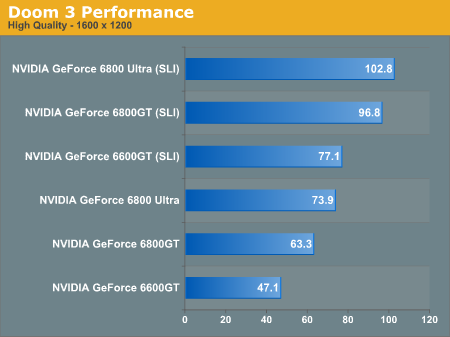
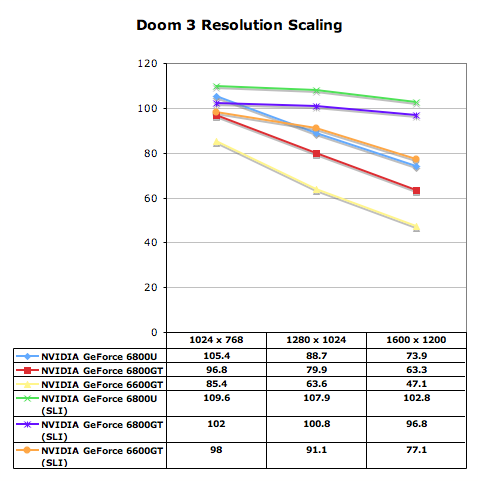
At 1600 x 1200 the 6800 Ultra sees a 39% performance increase in SLI mode, breaking the 100 fps barrier in Doom 3’s built in demo. The 6800GT gets even more of a performance boost at 53%, bringing it to within striking distance of a SLI 6800 Ultra setup. The 6600GT also becomes much more playable at 1600 x 1200 with SLI enabled.
Enabling Antialiasing simply increases the benefits of SLI. Now at 1024 x 768 there is a performance advantage to having two GPUs, and for the 6800 Ultra that’s a 34% increase in performance. Once again, the margins of improvement get better as you move to slower GPUs – 36% for the 6800GT and 66% for the 6600GT. At 1024 x 768 with 4X AA the two 6600GTs manage to offer performance that’s just slightly faster than a single 6800GT.
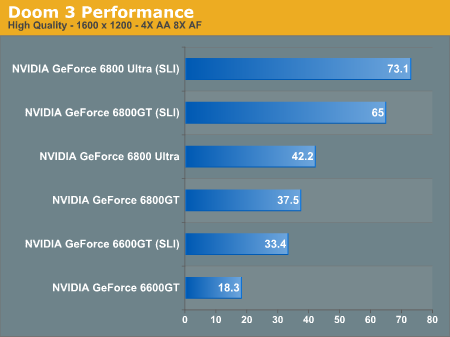
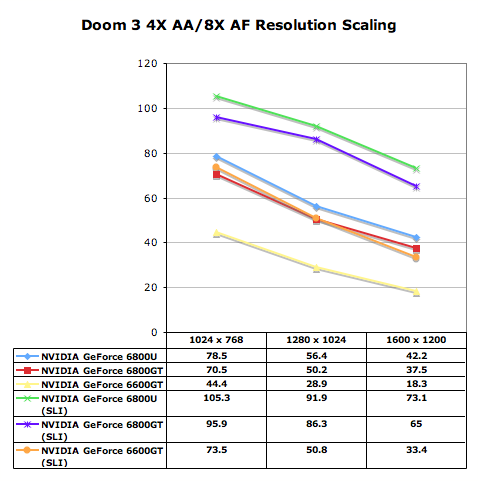
Going up in resolution we continue to see some impressive gains, but what matters here isn’t that SLI results in a 63% performance increase for the 6800 Ultra and 72% for a 6800GT, what matters is that SLI makes 1280 x 1024 with 4X AA and 8X AF very smooth, something that was not possible with only a single card. Despite the performance improvement, two 6600GTs are not able to pull ahead of even a single 6800 Ultra in this test, which shows you some of the limits of SLI. While the 6600GT in SLI mode does much better than a single 6800 Ultra at “lower” resolutions like 1280 x 1024 with AA disabled, turning on antialiasing still preys on the bandwidth and fillrate limitations of an 8-pipe 6600GT with only 16GB/s of memory bandwidth.
What’s important to note here is that the recommendation varies greatly based on resolution. While the 6800GT does incredibly well paired up with another card, the 6600GT only offers better performance than a single 6800 Ultra at non-AA resolutions. As soon as you enable AA, even a pair of 6600GTs isn’t faster than a single 6800 Ultra (or GT).
Originally published at https://www.anandtech.com/show/1552 (Wayback Machine).