
Half Life 2 GPU Roundup Part 1 - DirectX 9 Shootout
- Posted in
- GPUs
Turning on Anisotropic Filtering
For the most part Half Life 2 doesn’t absolutely beg for anisotropic filtering to be enabled, but there are definitely a few situations where image quality could be improved by turning it on.
Looking at the peach colored metal platform towards the right of the images before you can see some of the benefits of anisotropic filtering in Half Life 2:
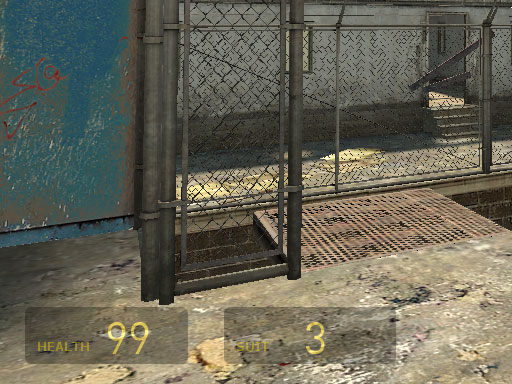
Aniso Disabled
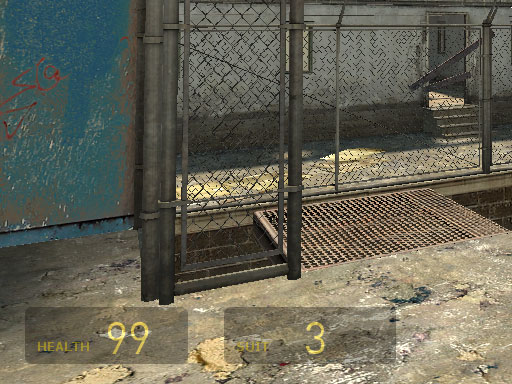
8X Aniso Enabled - ATI
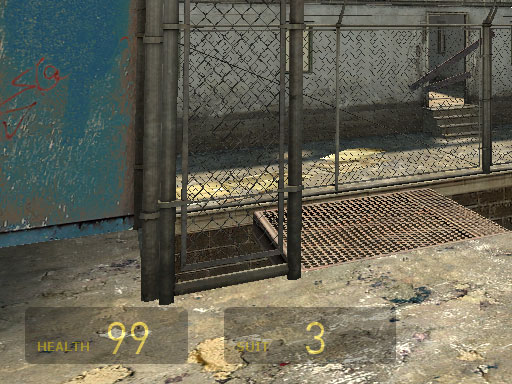
8X Aniso Enabled - NVIDIA
So there's definitely an improvement with 8X anisotropic filtering enabled but the difference in image quality between ATI and NVIDIA is tough to quantify. The two look quite similar in our opinion, with ATI getting the nod for slightly better image quality (the difference is quite subtle).
One issue we found in Half Life 2 with anisotropic filtering enabled is that the amount of resulting texture shimmering was borderline unbearable. The shimmering was worse on NVIDIA cards than on ATI cards, but it was definitely present on both. Part of the cause of the shimmering was the fact that all modern ATI and NVIDIA cards have resorted to a less ideal method of distance calculation for anisotropic filtering, which contributes to the shimmering issues we noticed under Half Life 2. With the release of the GeForce 6 series, NVIDIA moved to a method of anisotropic filtering using a weighted manhattan distance calculation, similar to what ATI had been doing for quite a while. The problem with the weighted manhattan distance calculation is that it is much more sensitive to the orientation of a surface in respect to the viewer, which can cause more of these shimmering issues.
NVIDIA’s NV3x line used a Euclidean distance calculation that was less sensitive to surface orientation and thus reduced some of the shimmering issues we encountered under Half Life 2.
There are some levels in Half Life 2 where enabling anisotropic filtering improves image quality, but then there are others where image quality is improved at the expense of increased texture shimmering. Rest assured that the shimmer occurs on both ATI and NVIDIA cards and it seems that the only way to get around it (unless both ATI and NVIDIA choose to employ different methods of anisotropic filtering) is to leave it disabled if it bothers you enough.
In terms of anisotropic filtering image quality, we just showed that we were hard pressed to find any image quality differences between ATI and NVIDIA’s solutions under Half Life 2. In motion however, NVIDIA’s drivers did seem to cause more texture shimmering than ATI’s with anisotropic filtering enabled.
Originally published at https://www.anandtech.com/show/1546 (Wayback Machine).