
ATI Radeon Xpress 200: Performance, PCI Express & DX9 for Athlon 64
- Posted in
- CPUs
SurroundView: Enabling More than Two Displays
Back when NVIDIA released the nForce chipset, we wondered if it would be possible to use the integrated graphics in conjunction with an add-in graphics card to enable multimonitor support. Unfortunately back then it was not possible, but now with the Radeon Xpress 200, ATI has granted our wish.When used with an add-in graphics card, the Radeon Xpress's integrated graphics can be used to drive a second, third or even fourth display. The integrated graphics core of the Radeon Xpress 200 features two display outputs, and ATI's reference board itself had both a VGA and a DVI output on the board to take advantage of these two display outputs. With a PCI Express graphics card, you can use the display outputs on the graphics card in conjunction with those on the motherboard to drive up to four monitors. Right now ATI has only validated the Radeon Xpress 200 for operation in triple display mode but nothing should stop them from enabling four display outputs.
To enable triple display output you first must select the option in the BIOS to enable SurroundView. Your PCI Express graphics card will, by default, function as your primary display driver, but of course this is reconfigurable once in Windows.
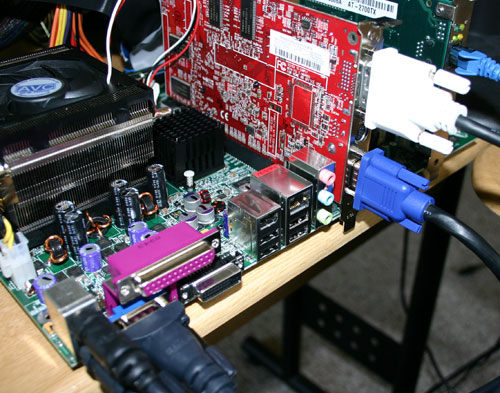
When in Windows, simply select to extend your desktop across the multiple monitors much like you would in a 2-monitor scenario and you're done. We applaud ATI for the inclusion of this feature in the Radeon Xpress 200 chipset as it is truly a reason for even a high end user to purchase their integrated chipset. The VGA output on the reference board had no problems with sharpness or image quality at high resolutions, but we'll reserve final judgment for the retail boards that end up shipping.

Click to enlarge.
Originally published at https://www.anandtech.com/show/1537 (Wayback Machine).