
Sun's W2100z Dual Opteron Workstation
- Posted in
- Systems
Thermals, Noise
Sonic
Having spent a considerable amount of time working on high end workstations in the past, the nagging thermal and audible "gotchas" are not issues to overlook. Many workstations perform outstanding when compared to an equivalent desktop setup, but they sound like a helicopter taking off. As we mentioned previously in the analysis, we were impressed by the simplicity and elegance of the w2100z internals. The true test of their worth seems to be when we start up the system and actually start using it. When we first set up our w2100z and the machine POST for the first time, we were greeted by the 120mm fan running at full speed, well above 50dBA! Fortunately, the initial fan speed setting seemed to only be part of the initial self-diagnostic test, and we never hear the fan peak over 30dBA for the rest of the analysis.
Click to enlarge.
Above, you can see the sole source of the w2100z's exhaust. If you look really closely at the EMI shield, you can see where the PS/2 ports are covered up still.
By contrast, our whitebox server setup is almost always running at or above 50dBA. The form factor is considerably different and the machine is more accustomed to sitting in a rack than on our desk. The comparison is apples to oranges, but our w2100z never makes the same amount of noise as our whitebox configuration.
Thermal
Equally important to any audible testing is a thermal analysis. We should approach any thermal testing in the same manner that one would approach any other enclosure review. In our previous enclosure analyses, we generally prefer bigger, slower moving fans over smaller, faster ones. It has been scientifically proven that when two sounds of equal dBA are compared side by side, humans tend to perceive the one with a higher pitch as "louder". Based on this premise, and the premise that larger fans move air over a larger area than smaller ones, Sun's layout for their exhaust makes a lot of sense. During our review, we did not see the fan peak over 2500 RPM, and generally, it averaged around 1100 RPM.  |
 |
 |
| Click to enlarge. | ||
Sun's heatsink/fan (HSF) combos are made almost entirely of aluminum, but unique because they employ a side fan and a system of heat pipes. Lately, every third-party manufacturer seems to have some heat pipes in their CPU coolers, so we weren't particularly surprised that they were adopted in the w2100z as well. The heatsinks play an integral role in Sun's very carefully designed thermal footprint - they are both placed in line with the 120mm exhaust and the second heatsink has fins to vortex hot air into the path of the 120mm fan. These small, professional attentions to detail compose part of our good impression confirming Sun's ability as a premiere workstation designer.
We added some other test points for this review to provide everyone with some thermal cross sections. The first graph shows the ambient air temperature taken from a sensor attached just off the inner wall of the side panel. You may download the CSV worksheet with each individual location tested here (under load). All positions on the graph below are measured using a digital thermometer with remote sensors at a constant ambient temperature of 22.3 degrees Celsius. After 30 minutes of looping SpecViewperf 8, we measured our workstation.

Click to enlarge.
You can see that the warmest ambient air resides near the bottom of the case. As we expected, there are pockets of warm air grouping around the video card and hard drive where we have no active cooling moving air around. Most importantly, the AGP, PCI-X and SCSI tunnels are operating at significantly high temperatures and contributing to this warm air pocket. You can see the graph below, which denotes various surface temperatures of some of the components in the system. Hovering over the image reveals the temperatures of the CPU mezzanine as well.
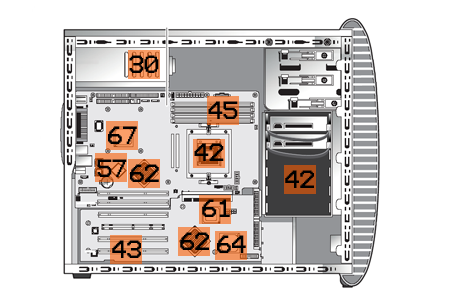
Hold your mouse over for the Overlay.
The CPUs themselves were both measured at 52 degrees Celsius under load, certainly not poor results. There is definitely a correlation between the surface temperatures of some of our components and the ambient air graph that we already saw. Temperatures on the SCSI controller and PCI tunnels are a little high and all of these components are passively cooled. Obviously, the components under the CPU mezzanine register as very warm, since they are not getting the benefits of the exhaust fan.
While testing the thermal components of the system, every time we removed the side panel, our rear exhaust fan shot up several hundred RPMs. Without the negative pressure pull across the inside of the case, the system almost immediately detects increased heat.
Originally published at https://www.anandtech.com/show/1523 (Wayback Machine).