
Doom3 Linux and Windows Battlegrounds
- Posted in
- Linux
Full Screen Anti Aliasing
An interesting and helpful quality about the AnandTech FrameGetter is that it always records the first frame of a timedemo, so long as the timedemo takes more than 2 seconds to load. This makes sense, since the screen before the timedemo is almost always a static screen that just says "loading"; nothing new is outputted from the frame buffer. In any case, this provides us with excellent opportunity to do some very neat IQ testing.Curiously, our NVIDIA drivers have a slider for 16X AA. This is generally unsupported outside of the Quadro cards for NVIDIA on Windows. Attempting to run Doom3 on 16X AA resulted in less than 10FPS during the demo1 timedemo. In fact, we can enable 2X Bilinear, 2X Quincunx, 4X Bilinear or 4X 9-tap Gaussian, 8X or 16X AA. We have a simple analysis, which follows, of the below image under various AA settings.
The screenshot image that we are using for analysis can be seen below in 16X AA. Feel free to download our AA raw data files here.

Click to enlarge.
Now, we look at a smaller piece of the puzzle for each image.
| AA Setting | Image (mouse-over for No AA) |
Difference Map (click to enlarge) |
| No AA | 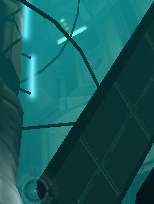 |
|
| 2X AA Bilinear | 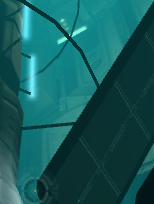 |
 |
| 2X AA Quincunx | |
 |
| 4X AA Bilinear | 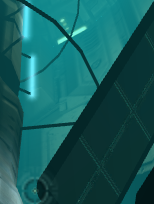 |
 |
| 4X AA 9-tap Gaussian | |
 |
| 8X AA | 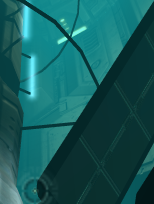 |
 |
| 16X AA | 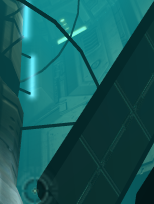 |
 |
16X is clearly working on our Linux machine, to the advantage of our Linux users over our Windows users. Performance is abysmal, but it's not something that we are totally concerned about right now, since abysmal performance and Doom3 tend to go hand in hand a lot. The graph below demonstrates how AA affected performance in our demo1 timedemo on the 6800 for 1280x1024.
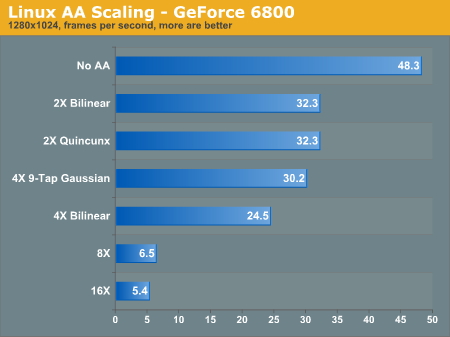
It should be noted that when setting AA higher than 4X on our GeForce 6800 cards, the screen would occasionally corrupt into a static/snowy image, and then freeze our entire machine.
It seems that our sweet spot for FSAA on Doom3 is right in the 4X 9-Tap Gaussian mode. 16X AA looks amazing;there is a clear, visual difference. However, the performance gap is extremely noticeable. Below, we have provided a difference map of 4X 9-Tap and 16X. The shadow seems considerably sampled, it looks less artificial now.

Although the difference is definitely visible between the two screenshots, it seems that 4X Gaussian does a fairly good job of cleaning up the jagged edges around the sides of the machine. The real difference seems to occur right in the center where the 16X image really blends the hard edges into a more fluid looking object.
Originally published at https://www.anandtech.com/show/1509 (Wayback Machine).