
Buyer's Guide - Entry Level, October 2004
- Posted in
- Guides
Memory
Choosing an ideal configuration for RAM in a budget computer can be a frustrating task. The fact of the matter is that 256 MB DIMMs are on their way out, and with XP SP2 now enabling additional features that use up more of your RAM, a system with only 256 MB of RAM is really meeting the bare minimum requirement.Choosing RAM is further complicated by the sheer variety of offerings in any one category. In an ideal world, all memory rated at the same speed and timings would perform equally well, but reliability can become a concern with some of the generic brands. We would prefer to spend a few extra dollars to get RAM from a well known company.
When building a budget system, it does not make sense to purchase more expensive RAM with better memory timings at the cost of RAM capacity. The typical increase when going from the "worst" 3-4-4 timings to the "best" 2-2-2 timings will be less than 10% (and often, less than 5%), and adding more RAM will often have further impact up to 512 MB. This is especially true for gaming.
In the end, we felt that it was best to give four suggestions in the RAM department, with a brief explanation of the pros and cons of each option. We have chosen Corsair RAM for all options, based on their reliability, price and performance. Mushkin, OCZ, Crucial, Kingston, GEIL and several others offer similar reliability and performance, so if you can find those for less money where you live, they are also acceptable.
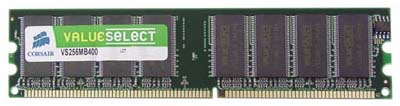
RAM Office Recommendation: 1x256 MB Corsair Value Select CL2.5
Price: $43 shipped
At the lowest end of the spectrum, if your computing demands are very light, you can simply get one 256 MB DIMM. This will be enough for running typical office applications and web surfing, and it comes with the lowest price. Having multiple applications open at the same time may be somewhat sluggish, but that will largely depend on how you use the system. You can always add a second 256 MB DIMM after building the system, if should you find performance to be insufficient. Finally, if you look around, you can often find sales on 256 MB DIMMs that end up costing little to nothing after the Mail-In Rebate.
RAM Office Alternative 1: 2x256 MB Corsair Value Select CL2.5
Price: $86 shipped
For the socket A system, memory can be run in dual-channel mode, which can improve performance slightly. The drawback is that you have now used up two of your DIMM sockets, which limits your options for future RAM upgrades. Buying two 256 MB DIMMs is also more expensive than buying a single larger 512 MB DIMM, but if you do not plan on upgrading your system and are willing to spend the extra $10, it might be worthwhile.
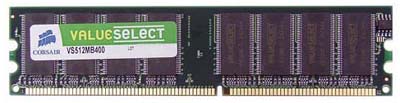
RAM Gaming Recommendation/Alternative Office 2: 1x512 MB Corsair Value Select CL2.5
Price: $70 shipped
For the socket 754 system, there is no performance benefit from having more than one DIMM, so there is no reason not to buy a single 512 MB DIMM. If you are looking to save on costs, but want a full 512 MB of RAM, it can also be used with the socket A system. If you are planning on doing much photo or video editing, starting with 512 MB with the intent to upgrade also makes sense.
RAM Gaming Alternative: 2x512 MB Corsair Value Select CL2.5
Price: $140 shipped
Finally, if gaming is a real concern, upgrading to a full gigabyte of RAM can be beneficial. It is not required (yet), and it might be wise simply to try out your system with 512 MB of RAM and only upgrade if you are unsatisfied. Still, several recent games feel smoother with 1 GB of RAM compared to 512 MB, since adding RAM can help avoid swapping data to your hard drive. If the games that you play are constantly stuttering and you see your hard drive activity light flickering, adding more RAM should help out.
Originally published at https://www.anandtech.com/show/1499 (Wayback Machine).