
The Hunt for the Best Ultra-Compact Camera
- Posted in
- Digital Camera
Playback Features: Casio Exilim Ex-Z40
To power on the camera directly into playback mode, you can press the Play button on the back of the camera. If the camera is already in record mode, you can also press the Play button to switch over to play mode. To move to different files, press the left/right arrow keys.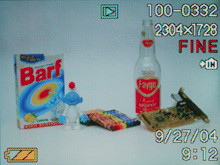 No magnification |
 4x magnification |
Magnification of an image is achieved by using the zoom controller. However, the Z40 only allows up to 4x magnification in 4 increments. To view 9 images at a time as thumbnails, you can press the wide end of the zoom controller. If you press the up arrow key, the screen will change to calendar. This allows you to view images from a specific day. Pressing the down arrow key will bring up a dialog with the options: All Files Delete, Delete, and Cancel.
| Playback Screens | ||
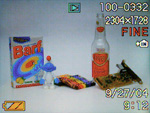 Basic |
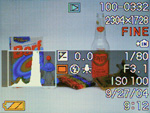 Detailed |
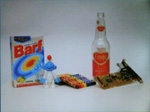 No info. |
Pressing the Display button will cause the LCD monitor to change between the following display types: Basic, Detailed, No info. The detailed screen contains the following information: shutter speed, aperture, ISO, histogram, EV, record mode, flash mode, white balance, date, time, location of file (card/internal memory), resolution, quality, and image number.
Pressing the Menu button brings up several options:
| Play Menu | |
| Slideshow | Start, Images (All images, One Image, Favorites), Time (1-5, 10, 15, 30, 60 min), Interval (1-30 sec, MAX), Cancel |
| Favorites | Show, Save, Cancel |
| DPOF | Select images, All images, Cancel |
| Protect | On/Off, All Files: On/Off, Cancel |
| Rotation | Rotate |
| Resize (based on 2304x1728) | 1280x960, 640x480, Cancel |
| Trimming | Select |
| Dubbing | Start |
| Create Album | Create, Delete, Layout, Setup, Cancel |
| Alarm | Alarm 1, 2, 3 |
| Copy | Built-in to Card, Card to Built-in, Cancel |
The Favorites feature allows you to tag favorite images for future reference. With DPOF (Digital Print Order Format), you can specify all or specific images for print. There is also an option to add a date stamp on the pictures. The Z40 offers the option to resize images to lower resolutions. When an image is resized, it is saved automatically as a new file. The Trimming option allows you to resize and move a cropping box around an image to create a new cropped version of that image. The Dubbing option allows an audio recording to be associated with an image. The camera allows for a maximum of 60 seconds for each recording. A really cool feature that the Z40 offers is the "Create Album" option. With this feature, the camera will create an HTML photo album with the pictures that you specify. There are 10 different layouts available from which to choose. The Alarm option allows you to set 3 separate alarms to display user-specified pictures. The alarms can be set to go off either once or daily. Lastly, the Copy function allows you to copy files either from the built-in memory to a flash card or vice versa.
Originally published at https://www.anandtech.com/show/1498 (Wayback Machine).