
The Hunt for the Best Ultra-Compact Camera
- Posted in
- Digital Camera
Playback Features: Pentax Optio S40
To power the camera on in "Playback Only" mode, you must hold down the Play button while pressing the main power button. You can also switch to playback mode from record mode by pressing the Play button. In playback mode, the left/right arrow keys cycle through existing pictures. To delete a picture, press the Delete button and choose "Delete" from the dialog. To delete all the images, videos, and sound clips, you simply press the Delete button again and choose "Delete All" from the dialog.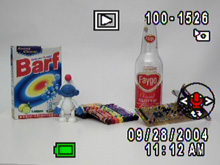 > No magnification |
 12x magnification |
You can use the zoom controller to magnify an image up to 12x. Magnifying an image is quite smooth when you hold down the zoom controller. However, moving across an image while zoomed in is somewhat slow. You can press the Ok button to view the image at full screen again. To view images 9 at a time as thumbnails, you can press the left side of the zoom controller while viewing an image at full screen.
| Playback Screens | ||
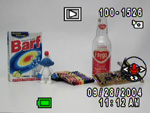 Basic |
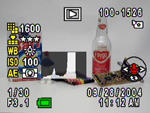 Detailed |
 No info. |
By pressing the Display button, you can toggle between the above screens. The detailed screen displays the following information: resolution, quality, white balance, ISO, metering, histogram, shutter speed, aperture, file number, date & time, and the option to record/play a voice memo. If you press the Function button during playback, you will get a help screen that explains the functionality of the arrow keys and the Ok button. The Mode dial must be set to Easy mode for this to work.
Pressing the Menu button during playback will offer the following options:
| Playback Menu | |
| Protect | Select |
| DPOF | Copies/Date |
| Slideshow | 1, 3, 5, 10, 20, 30 sec. |
| Resize (based on a 2304x1728 image) | Recorded Pixels (2048, 1600, 1024, 640, 320) Quality Level (***, **, *)/td> |
| Copy image/sound | Camera to Card, Card to Camera, Cancel |
| Digital Filter | B&W, Pencil 1, Pencil 2, Pencil 3, Soft, Blue1, Green1, Red1, Blue2, Green2, Red2, Brown |
| Quick Zoom | On, Off |
| Quick Delete | On, Off |
DPOF (Digital Print Order Format) allows you to specify how many copies you want of each picture. There is also an option to "stamp" the image with the date. You can specify the length of time that each picture is shown for the slideshow feature. By pressing set, the slideshow will begin. The Resize option allows you to downsize an image as well as choose a different/lower quality setting. The S40 gives you the option to overwrite the original file or to save the resized image as a new file. The "Copy image/sound" option allows you to transfer files between the camera's internal memory and a flash card. The Digital Filter option offers several post-processing filters from which to choose. After applying the filter, you are given the option to overwrite the file or to save a new file. Quick Zoom and Quick Delete are designed to save time. With Quick Zoom on, pressing the Magnify button (telephoto side of zoom controller), the image will zoom to the maximum 12x automatically. With Quick Delete on, when you press the Delete button, the "Delete" option will be highlighted. By default, the camera will select the "Cancel" option as a safeguard.
Originally published at https://www.anandtech.com/show/1498 (Wayback Machine).