
Linux 3D AGP GPU Roundup: More Cutting Edge Penguin Performance
- Posted in
- Linux
FSAA and AF
Enabling and disabling Full Screen Anti Aliasing and Anisotropic Filtering for both cards was met with varying succes. 4X AA for the ATI cards was enabled by hand in the XF86Config file. We needed to include the additional options for our fglrx device after installing the driver properly:Option "FSAAEnable" "yes" Option "FSAAScale" "4" Option "FSAADisableGamma" "no" Option "FSAACustomizeMSPos" "no" Option "FSAAMSPosX0" "0.000000" Option "FSAAMSPosY0" "0.000000" Option "FSAAMSPosX1" "0.000000" Option "FSAAMSPosY1" "0.000000" Option "FSAAMSPosX2" "0.000000" Option "FSAAMSPosY2" "0.000000" Option "FSAAMSPosX3" "0.000000" Option "FSAAMSPosY3" "0.000000" Option "FSAAMSPosX4" "0.000000" Option "FSAAMSPosY4" "0.000000" Option "FSAAMSPosX5" "0.000000" Option "FSAAMSPosY5" "0.000000" Option "UseFastTLS" "0" Option "BlockSignalsOnLock" "on" Option "UseInternalAGPGART" "no" Option "ForceGenericCPU" "no" Option "EnablePrivateBackZ" "yes"
Pay considerable attention to the EnablePrivateBackZ option. Although documentation for that particular variable seems light, AntiAliasing refused to draw correctly without it. Without enabling that element on our tests beds, nothing would draw to the screen.
You may notice that we purposely have not discussed much about Anisotropic Filtering up until this point. There are currently no driver-level AF features in fglrx. This is a large problem with the Radeon cards in our lineup - but fortunately, we still have trilinear and bilinear filtering.
To enable FSAA for NVIDIA cards, we needed only to set the environmental variable $__GL_FSAA_MODE to 4 (AF is enabled similarly by setting $__GL_DEFAULT_LOG_ANISO). We do not need to restart X to enable FSAA or AF, which is a huge relief for us. However, attempting to find Anisotropic Filtering working correctly in a game setting proved difficult. Perhaps it was the way in which we configured our drivers, or perhaps some fluke in our testing methodology escaped us, but AF for NVIDIA cards did not work.
Since the AnandTech FrameGetter utility by default measures FPS once every second, we modified the source to take screenshots every tenth of a second for this portion of the test. After running the various benchmarks a few times, we had several hundred overlapping frames to choose some comparative screenshots for IQ testing. Below, you can see our capture of a soldier that shows two levels of anti-aliasing. Try as we could, there were no instances of one card rendering AA differently than the other. No driver cheating conspiracies today.
| None | 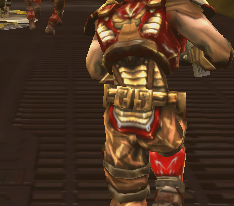 |
| 4X | 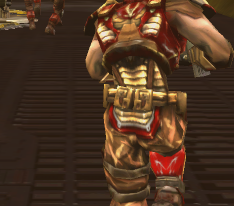 |
| Mouseover AA to No AA |
|
There is nothing really shocking in these benchmarks. AA is behaving the same as it would in Windows. It was worth checking to make sure, though. Using the same method as above, we can demonstrate some rudimentary advantages of trilinear filtering over bilinear filtering.
| Bilinear | 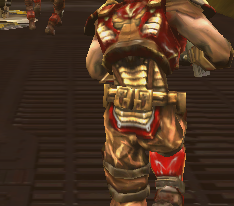 |
| Trilinear | 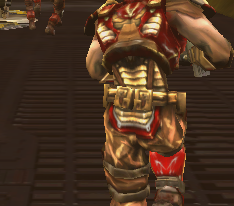 |
| Mouseover bilinear to trilinear |
|
Again, everything here is on par with Windows demonstrations of trilinear/bilinear filtering. There were no differences between the ATI and NVIDIA implementations of trilinear and bilinear filtering; we get the same images on both cards.
Originally published at https://www.anandtech.com/show/1497 (Wayback Machine).