
The MSI GE75 Raider Laptop Review: Core i9 and RTX 2080 Performance
Wireless
MSI has been utilizing Killer networking for quite a while now, and that continues with the GE75 Raider, but luckily for MSI, the quality of the Killer wireless took a major step forward when Killer partnered with Intel to use the latest Intel 9260 wireless adapter as their new base wireless chip. Whether or not you feel the Killer software stack is worth it, the Qualcomm Atheros base wireless in the Killer 1535 card was unreliable, which is a common feature on practically all wireless solutions other than Intel in 2019.
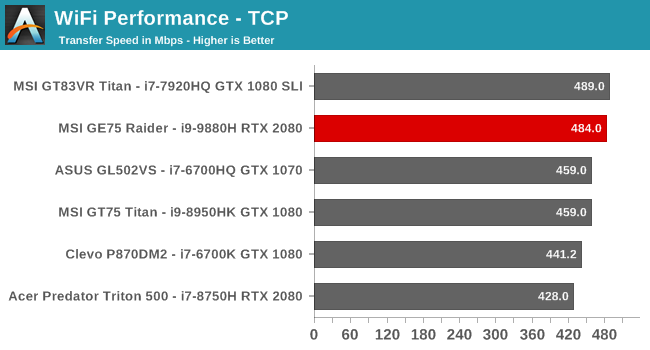
Performance wise, the latest Killer performs just as well as the base Intel would, and if you have a new router which supports 160 MHz channels, performance would be even higher, since this was tested against a standard 802.11ac router. The stability is excellent as well, and at no time did the laptop ever wake up without network connection, nor did the networking ever drop off in use. The combination of an excellent wireless card along with a dedicated Gigabit Ethernet connection provides great performance no matter which method you choose to connect. Considering the Ethernet is located on the opposite side as the power, from a desk cleanliness perspective, a good wireless solution helps tremendously.
Audio
MSI offers what they brand as “Giant Speakers” on the GE75 Raider, and that consists of two 3-Watt speakers combined with two 3-Watt subwoofers. They also continue their partnership with Nahimic for the software side of their audio solution, offering quite a few options for sound settings, microphone settings, and even sound tracking for use in games to get a visual indication of where sound is coming from.

The speakers themselves offer excellent volume, with the GE75 Raider hitting up to 85 dB(A) measured one inch over the trackpad. The sound quality out of the box was a bit mixed, with the mid-range too pronounced, but once adjusted in the Nahimic software the sound quality from the GE75 Raider was surprisingly good. The small subwoofers do help on the bottom end of the range, and the GE75 ended up being one of the best sounding laptops I’ve heard.
Thermals
All gaming laptops have one thing they have to deal with – heat. Intel has settled in on the 45-Watt range for their top laptop processors, but the massive GPUs in gaming laptops can easily draw three times that themselves. Moving heat out of the laptop is the key component to any gaming laptop, since a laptop that throttles isn’t going to be great for long gaming sessions.

As with most gaming laptops, MSI offers a variety of fan speed settings in their Dragon Center software, and also accessible with a dedicated hardware button on the right side of the keyboard deck. They offer a Cooler Booster setting which ramps the fans up to their maximum, or you can choose automatic, or set the fans lower as well if you’d prefer a quieter machine, although of course the quieter it is the more likely it will thermally throttle.
To see how the GE75 Raider performs under load, it was run against Shadow of the Tomb Raider at our Enthusiast settings for over an hour. The fan speeds were alternated between the Cooler Booster mode and Automatic to test the impact as well.

Overall the laptop shows no signs of thermally limiting itself and gradually losing GPU frequency. The GPU and CPU both do run very warm, with the GPU at about 85°C and the CPU getting as warm as 99°C, but even after a long session the system is able to keep up with the demands. Interestingly the Cooler Booster mode produced the same fan speeds and cooling capabilities as Automatic, it just gets there a lot quicker, and both offer the same levels of cooling and noise.

As far as noise, the laptop is loud, as expected, coming in at over 55 dB(A) sound pressure level measured one inch over the trackpad, but that’s in-line with many gaming laptops, and for the performance available, very reasonable. Larger true DTR type machines may be able to offer a bit less noise from the fans, thanks to more room for larger, slower fans that can move more air, but as with any gaming laptop you’d really need a good set of closed back headphones regardless.
Software
MSI doesn’t install much in the way of software outside of their own utilities, which is great to see. There was no trialware installed that you’d have to deal with out of the box, and the utilities they do install are very useful.

MSI’s Dragon Center is likely their showcase, and while the looks of the software leave something to be desired, the functionality of Dragon Center is up there with the best suites around. You can easily monitor performance and temperatures of the internal components, as well as adjust their behavior with several pre-defined modes. MSI also offers some in-built overclocking as well. If you’d prefer the Windows key on the left, as I do, you can swap it with the Fn key in the software, and perform basic maintenance tasks as well.
Dragon Center is looking a bit dated, and it would be nice to see it overhauled into a more modern looking, cleaner package, but there’s no doubt as to the functionality available.
In addition, MSI includes the SteelSeries software which allows you to customize the keyboard backlighting and create key bindings for macros.

Then of course there’s the MSI True Color software which we already covered in the display section which is the best display software in the gaming laptop segment.
So, overall, MSI offers some excellent functionality with their included software, without bogging down the system with any trialware, which is important considering the premium pricing they are asking.
Originally published at https://www.anandtech.com/show/14612/the-msi-ge75-raider-laptop-review (Wayback Machine).