
Shuttle XPC slim DH370 mini-PC Review: A Compact Digital Signage Powerhouse
Miscellaneous Performance Metrics - II
Continuing our presentation of benchmarks of real-world workloads, this section discusses Agisoft's Photoscan and the Dolphin Emulator, followed by an evaluation of the storage aspect of the XPC slim DH370 configuration.
Agisoft Photoscan
Agisoft PhotoScan is a commercial program that converts 2D images into 3D point maps, meshes and textures. The program designers sent us a command line version in order to evaluate the efficiency of various systems that go under our review scanner. The command line version has two benchmark modes, one using the CPU and the other using both the CPU and GPU (via OpenCL). We present the results from our evaluation using the CPU mode only. The benchmark (v1.3) takes 84 photographs and does four stages of computation:
- Stage 1: Align Photographs (capable of OpenCL acceleration)
- Stage 2: Build Point Cloud (capable of OpenCL acceleration)
- Stage 3: Build Mesh
- Stage 4: Build Textures
We record the time taken for each stage. Since various elements of the software are single threaded, and others multithreaded, it is interesting to record the effects of CPU generations, speeds, number of cores, and DRAM parameters using this software.
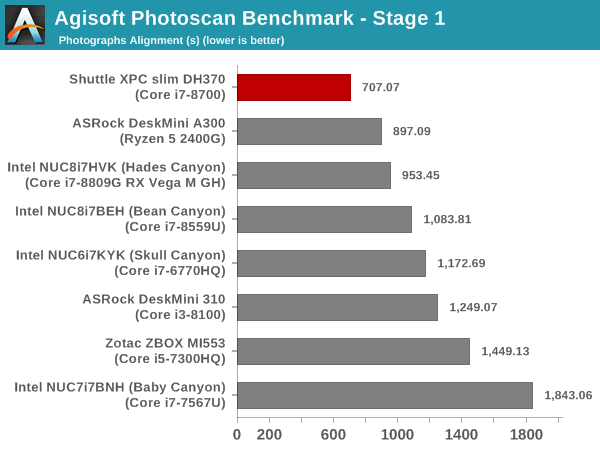
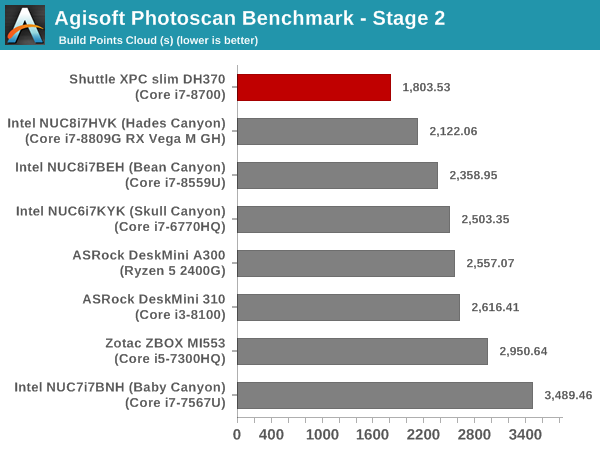
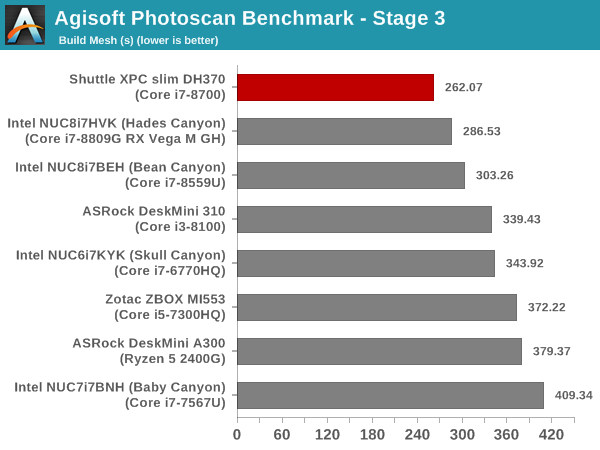
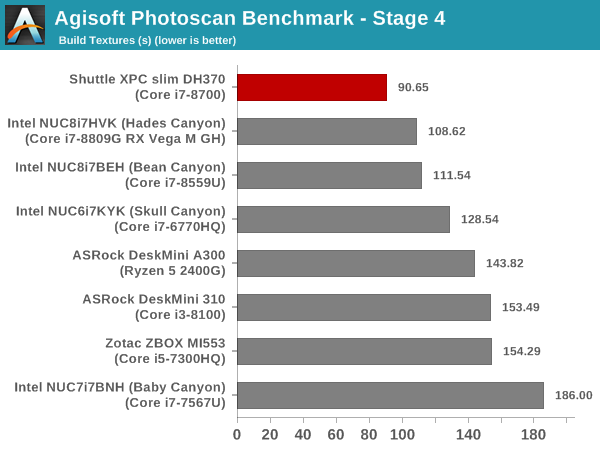
The power of the Core i7-8700 again comes to the fore, as the XPC slim DH370 sweeps the workload across all stages comfortably despite the slower RAM.
Dolphin Emulator
Wrapping up our application benchmark numbers is the new Dolphin Emulator (v5) benchmark mode results. This is again a test of the CPU capabilities.
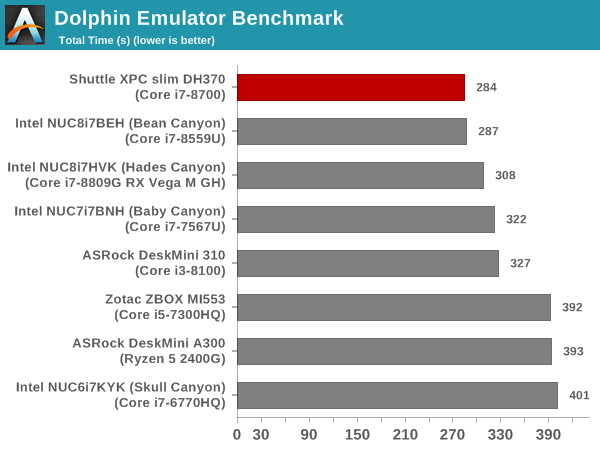
The XPC slim DH370 completes the benchmark in the least amount of time, followed closely by the Bean Canyon NUC. Overall, in CPU-intensive workloads, the compact form-factor of the XPC slim DH370 doesn't seem to affect the capabilities of the Core i7-8700.
Storage Performance
Storage performance is a major aspect which influences our experience with any computing system. On the storage side, one evaluation option would be the repetition of our strenuous SSD review tests on the drive(s) in the PC. Fortunately, to avoid that overkill, PCMark 8 has a storage bench where certain common workloads such as loading games and document processing are replayed on the target drive. Results are presented in two forms, one being a benchmark number and the other, a bandwidth figure. We ran the PCMark 8 storage bench on selected PCs and the results are presented below.
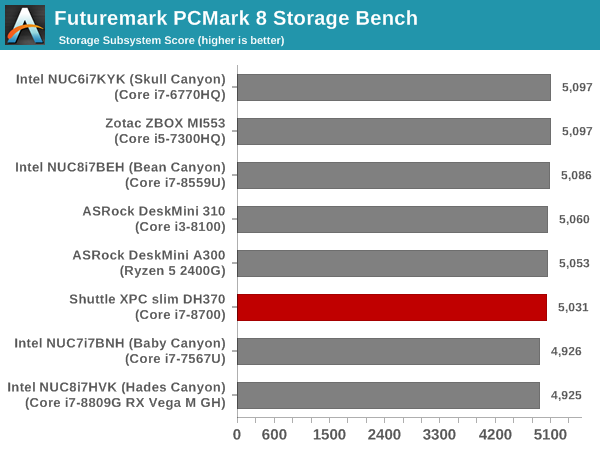
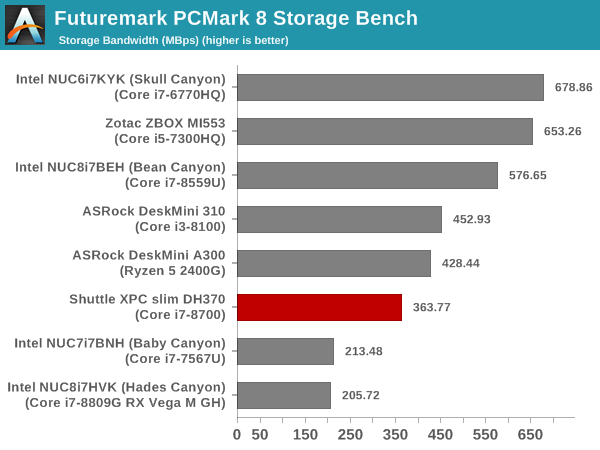
The XPC slim DH370 is handicapped by the use of a PCIe 3.0 x2 NVMe SSD (compared to the x4 SSDs in most of the other systems). Yet, the numbers are well behind the DeskMini A300, which also used a PCIe 3.0 x2 NVMe SSD (WD Blue NVMe). If the storage sub-system is important for the use-case, the end user can do much better than the Kingston A1000 that our review system was configured with. In fact, using the WD Blue NVMe SSD could provide better performance numbers at a lower cost. PCIe 3.0 x4 NVMe SSDs are also supported, if needed.
Originally published at https://www.anandtech.com/show/14292/shuttle-xpc-slim-dh370-minipc-review-a-compact-digital-signage-powerhouse (Wayback Machine).