
The ASRock DeskMini A300 Review: An Affordable DIY AMD Ryzen mini-PC
BAPCo SYSmark 2018
The ASRock DeskMini A300 was evaluated using our Fall 2018 test suite for small-form factor PCs. In the first section, we will be looking at SYSmark 2018.
Prior to describing the benchmark itself, we should quickly address concerns about using the benchmark to test AMD-based systems, given that AMD is not a part of the BAPCo consortium. In fact, AMD has been pretty vocal against the benchmark, with their last salvo appearing in 2016. AMD had quit BAPCo in 2011 over concerns of the GPU not being represented enough in the benchmarks.
Having analyzed the SYSmark 2018 white paper, and actually followed the execution of the benchmark workloads, we can say that SYSmark 2018 does represent possible usage patterns for a PC used in a business / office setting. Even if one were to side with AMD on the scoring aspect, the benchmark's rather unique energy consumption metric accurately represents the efficiency of the system for the realistic workloads. Overall, we believe that SYSmark 2018 is a good benchmark for systems used in certain scenarios; though it goes without saying that we never put too much stock in any one benchmark, which is why we only use it as one of out several benchmarks in our mini-PC reviews.
Anyhow, BAPCo's SYSmark 2018 is an application-based benchmark that uses real-world applications to replay usage patterns of business users in the areas of productivity, creativity, and responsiveness. The 'Productivity Scenario' covers office-centric activities including word processing, spreadsheet usage, financial analysis, software development, application installation, file compression, and e-mail management. The 'Creativity Scenario' represents media-centric activities such as digital photo processing, AI and ML for face recognition in photos and videos for the purpose of content creation, etc. The 'Responsiveness Scenario' evaluates the ability of the system to react in a quick manner to user inputs in areas such as application and file launches, web browsing, and multi-tasking.
Scores are meant to be compared against a reference desktop (the SYSmark 2018 calibration system, a Dell Optiplex 5050 tower with a Core i3-7100 and 4GB of DDR4-2133 memory to go with a 128GB M.2 SATA III SSD). The calibration system scores 1000 in each of the scenarios. A score of, say, 2000, would imply that the system under test is twice as fast as the reference system.
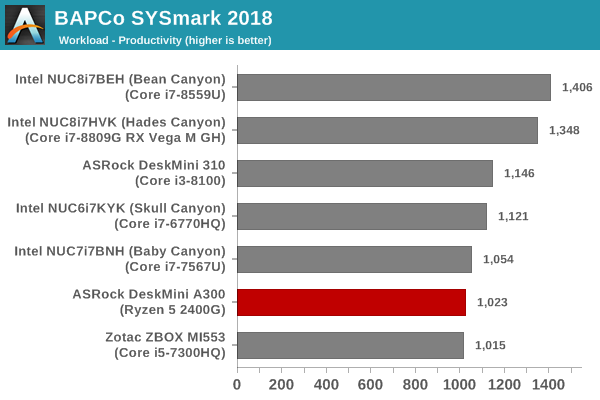
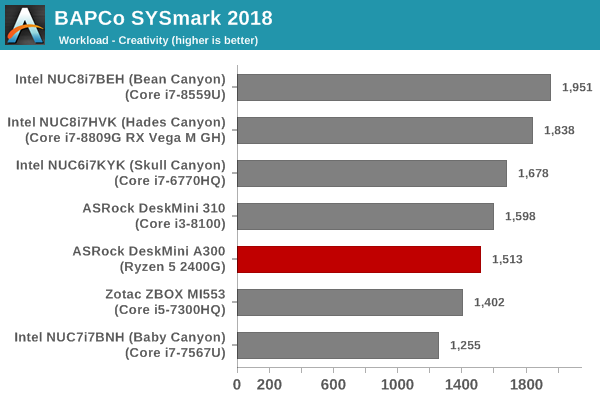
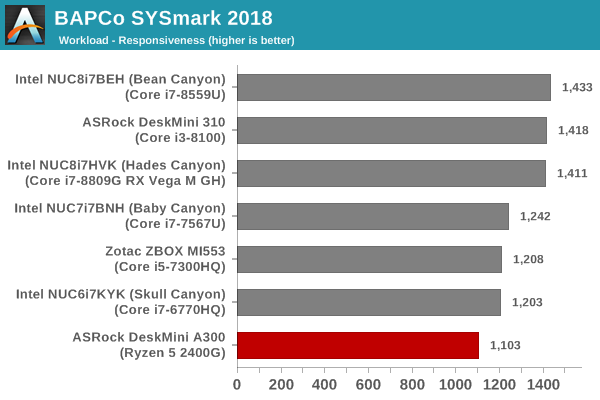
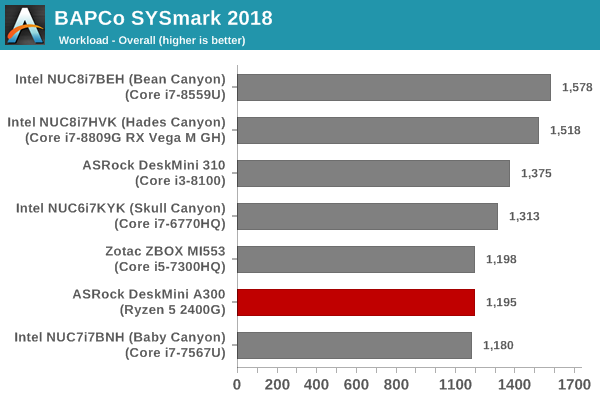
SYSmark 2018 also adds energy measurement to the mix. A high score in the SYSmark benchmarks might be nice to have, but, potential customers also need to determine the balance between power consumption and the efficiency of the system. For example, in the average office scenario, it might not be worth purchasing a noisy and power-hungry PC just because it ends up with a 2000 score in the SYSmark 2014 SE benchmarks. In order to provide a balanced perspective, SYSmark 2018 also allows vendors and decision makers to track the energy consumption during each workload. In the graphs below, we find the total energy consumed by the PC under test for a single iteration of each SYSmark 2018 workload. For reference, the calibration system consumes 5.36 Wh for productivity, 7.71 Wh for creativity, 5.61 Wh for responsiveness, and 18.68 Wh overall.
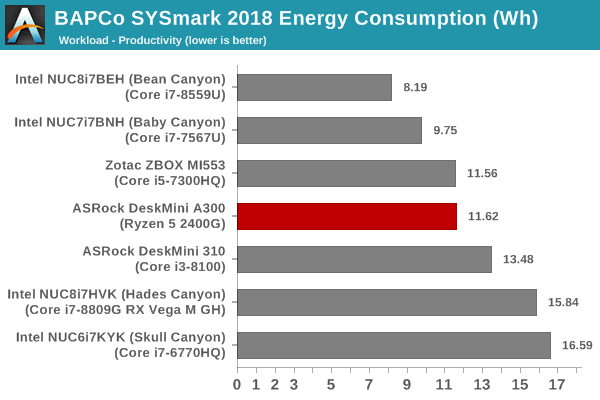
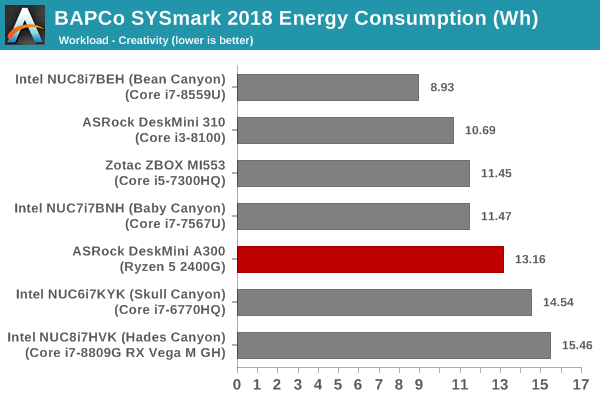
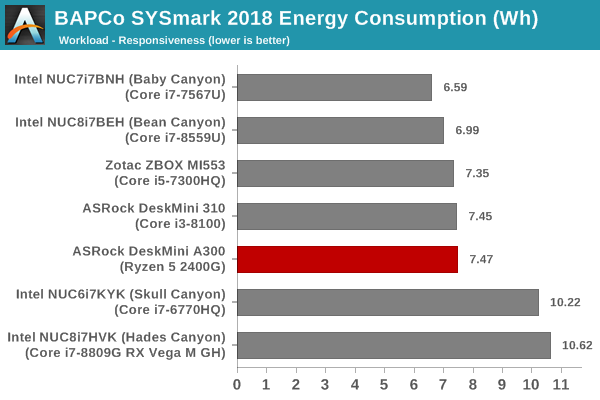
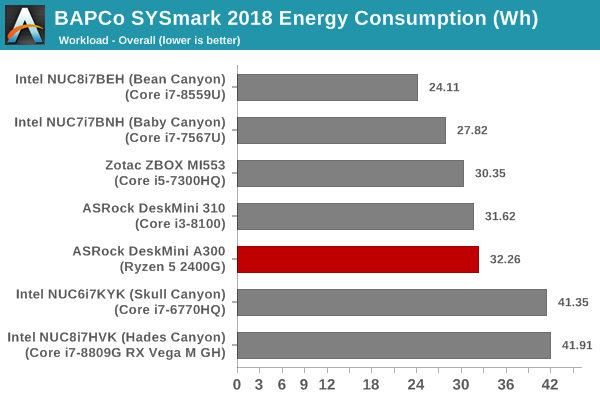
In the rest of the review, our focus will be on comparing the performance of the DeskMini A300 with the Ryzen 5 2400G and the DeskMini 310 with the Core i3-8100. Our builds for the system have approximately the same price point, and they are both contemporary systems. The overall energy consumption for the A300 is only slightly higher than the DeskMini 310, but the benchmark scores are lower. The DeskMini A300 configuration performs as well as the Zotac ZBOX MI553 (with the 45W Core i5-7300HQ) and the Baby Canyon NUC (with the 15W Core i7-7567U). However, those machines consume around 2 to 5 Wh less to achieve those scores.
Originally published at https://www.anandtech.com/show/14251/asrock-deskmini-a300-review-an-affordable-diy-amd-ryzen-minipc (Wayback Machine).