
Doom 3: CPU Battlegrounds
- Posted in
- CPUs
How does CPU Speed Impact Graphics Performance?
For the most part, we ultimately make our purchasing decisions based on price. If we have $200 to spend on a processor, it doesn't matter how fast an Extreme Edition runs our apps and games unless it sells for $200. It's the price point that determines what our options are, and then we look at the best performer at that price point to make our final decision. But when upgrading, it's sometimes difficult to know when to upgrade various components - especially a CPU.
If you have a 2.4GHz Pentium 4, is it worth it to upgrade to a 3.4GHz P4 in order to get greater performance in Doom 3? Or is your 2.4GHz P4 paired up just fine with a NVIDIA 6800GT? These next set of graphs are designed to help you see the type of CPU scaling you can expect out of a high end card like the GeForce 6800 Ultra, or a slower card like the Radeon 9800 Pro.
The graphs below are frame rate vs. clock speed graphs, taken using a Pentium 4 C and varying the clock speed on a single platform. Once again it's the curve of the graph that you want to look at; the steeper the slope of the curve is, the more benefit you'll get from having a faster CPU. The flatter the curve is, the less benefit you'll get from having a faster CPU.
Although we're only showing two cards here, you can extrapolate performance of faster and/or slower cards pretty easily. Using our Doom 3 Graphics Guide you should know what cards are faster or slower than the two we're representing here; then just remember that a faster card will have a steeper (more CPU dependent) curve, while a slower card will have a flatter (less CPU dependent curve).
Also keep in mind that the scaling will be relatively similar for both AMD and Intel platforms; we chose to stick with only a single platform here in the interest of time as well as keeping these pages simple.
First up, we have the 6800 Ultra at 800x600:
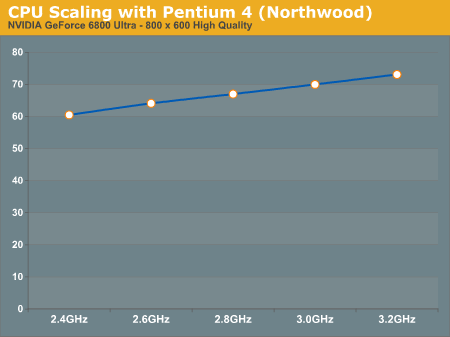
Here we have a decently steep curve, probably the steepest it will get since we're dealing with one of the fastest GPUs at a relatively low resolution. The move from a 2.4GHz to a 3.2GHz processor resulted in a 21% increase in performance, considering that this was because of a 33% increase in clock speed it is safe to say that at lower resolutions the more money you put into a faster CPU, the higher your Doom 3 performance will be on a 6800 Ultra.
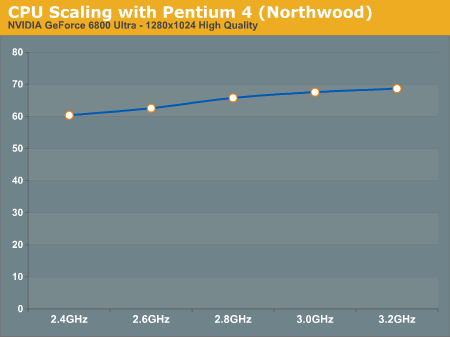
At higher resolutions the burden shifts to the GPU as is evident by the change in the slope of the curve. Now we have a distinctly more flat curve, with only a 13% difference between the fastest and the slowest CPUs - it's not insignificant, but definitely not huge.
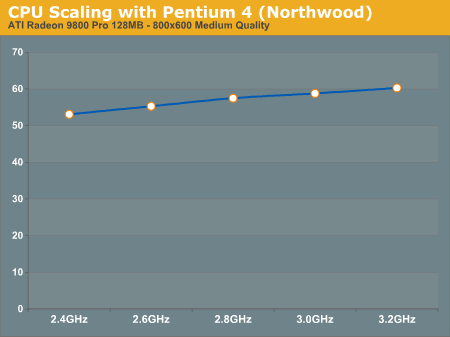
Looking at the 9800 Pro at 800x600 we see a curve that closely resembles the 6800 Ultra's curve at 1280x1024, once again with a 13% gain seen from the 2.4GHz processor to the 3.2GHz part.
Although the rest of our CPU tests use the 6800 Ultra, the standings and degrees of performance improvement will apply to other graphics cards as well. As we've just seen, at 1280x1024 the GeForce 6800 Ultra scales much like a Radeon 9800 Pro at 800x600 - keep that in mind as we compare CPUs under id's latest and most impressive 3D game to date.
Originally published at https://www.anandtech.com/show/1419 (Wayback Machine).