
The Microsoft Surface Laptop 2 Review: Surface Essentials
Battery Life
By Ultrabook standards, the 47.5 Wh battery capacity in the Surface Laptop 2 is on the light side, as some of the competition can offer 60 Wh or so. But Microsoft tends to focus quite a bit on power usage instead of raw capacity, and as a result can eke out extra battery life through other means. The battery is only slightly larger than the 45 Wh in the Surface Pro 6, and it performed well in our battery rundown tests.
To test the battery life, we calibrate displays to 200 nits to make the test as even as possible, and then run through several workloads.
2013 Light
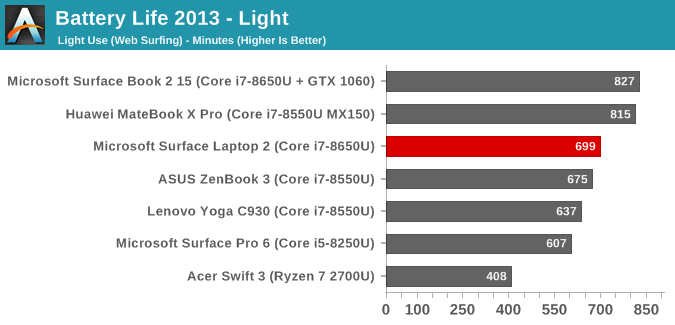
Our lightest test is our oldest, which cycles four webpages per minute. The scripting isn’t a very big task for modern processors. Despite the smaller battery, the Surface Laptop 2 lasted for over 11.5 hours, which is fantastic.
2016 Web
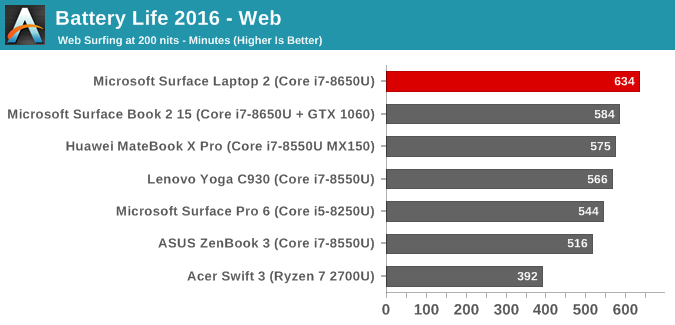
Our web test involves a lot more work for the CPU, and as such the results are generally quite a bit lower than our older light test, and that is the case here again with the Surface Laptop losing over an hour of runtime compared to the light test, but it still came in well above any other laptop we’ve tested, offering over 10.5 hours of runtime.
Movie Playback
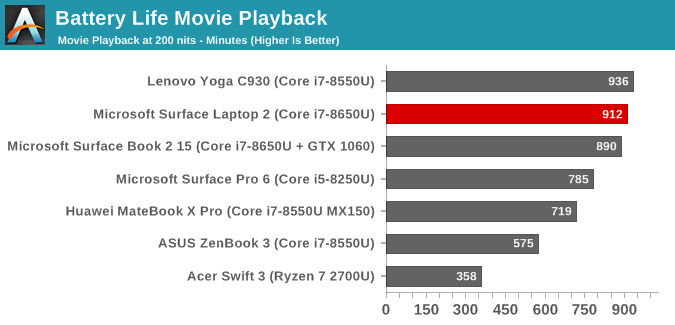
Media playback allows the CPU to offload work to fixed function hardware in the media block, which allows most of the processor to go to sleep. The Surface Laptop was able to play back a local movie file for over 15 hours, which is amazing considering the battery capacity here.
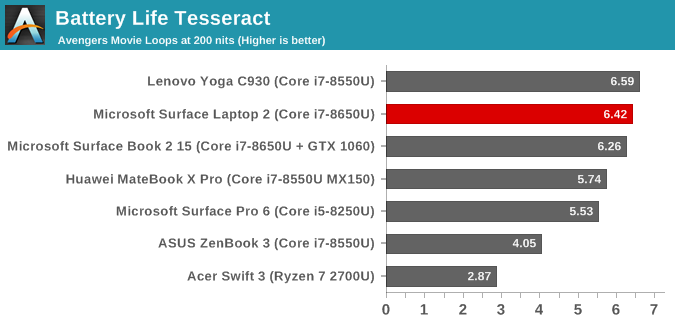
Our Tesseract score puts the movie playback into a more usable number. The runtime is divided by the length of a long movie (The Avengers) to get a result in terms of how many movies you can watch in a row. The Surface Laptop 2 is ready for any movie marathon you’re after.
Normalized Results
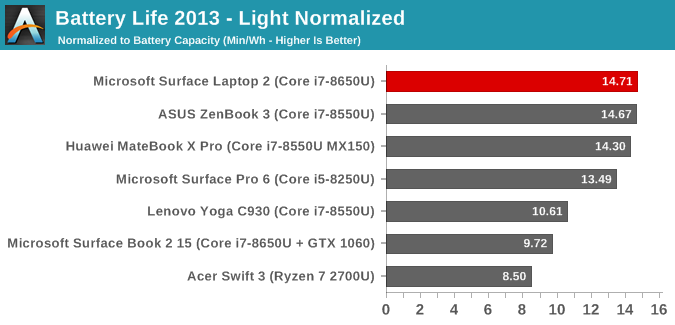
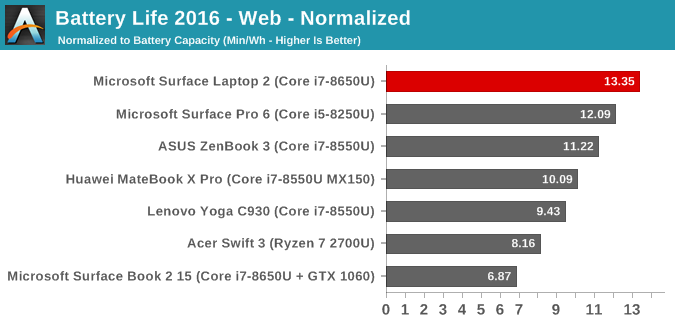
By removing the battery capacity from the equation, we can take a look at the efficiency of each device. The Surface Laptop 2 outperforms all other laptops we’ve tested here. Microsoft has put a tremendous amount of effort in the getting power consumption in check across their lineup, and the lower display density of the Surface Laptop 2 puts it at the top of their devices, as well as the top of any laptop we’ve tested. It is a truly impressive result.
Charge Time
Microsoft ships the Surface Laptop 2 with a 44 Watt power supply, and in typical Surface fashion it offers an incredibly useful USB charging port built into the brick. The charger connects via the Surface Connect port, which is the same proprietary magnetic connector Microsoft has been using since the introduction of the Surface Pro 3. It’s a great connector, it’s easy to connect, and it offers a light on the side so you know whether or not it’s charging or not. The only thing missing is it would be nice to have the USB-C port for charging as well, which would make travel even easier.
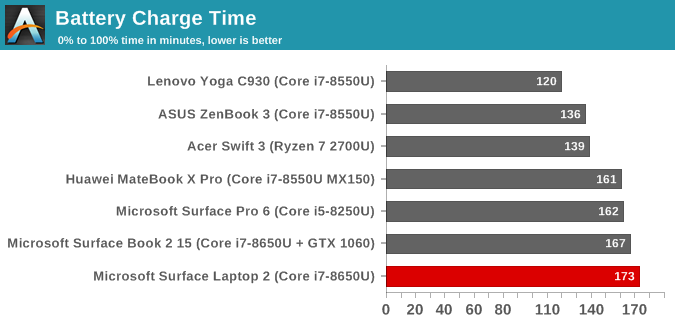
The Surface Laptop 2 isn’t particularity quick at charging, but it’s within a few minutes of the other Surface devices. Microsoft doesn’t seem to want to charge the battery too quickly, which may help with longevity, but thanks to the efforts they’ve put into the battery consumption, they likely don’t need to put as much weight on charging.
Originally published at https://www.anandtech.com/show/14109/the-microsoft-surface-laptop-2-review (Wayback Machine).