
Nikon Coolpix 5200: Does It Deliver?
- Posted in
- Digital Camera
Color Reproduction
* For all of our color tests, we reset the CP5200 to its factory default settings. It was then set to record using the highest image quality option.We took a picture of our color chart using each of the following WB settings: Auto, Incandescent, and Manual. Click on a thumbnail below to view the full-size image.
| Auto WB | Incandescent WB | Manual WB |
 Click to enlarge. |
 Click to enlarge. |
 Click to enlarge. |
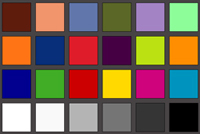 Reference Chart ("actual colors") |
||
Crops
| Auto WB | Incandescent WB | Manual WB |
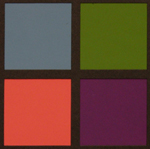 |
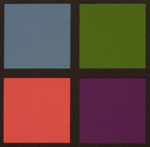 |
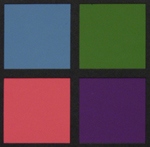 |
We are still waiting to be impressed by the performance of Auto WB in today's digital cameras. Unfortunately, the CP5200 is no exception. Although it's not horrible, you can see a yellowish-red cast in the Auto WB crop above (especially visible in the full chart). The incandescent setting does much better than Auto, producing very accurate colors. Surprisingly, the manual setting was too bluish, causing the purple color square to look more blue than purple. If you plan on shooting with available tungsten light, we recommend using the Incandescent setting to get accurate results.
Studio Shot
In this shot, we tested the camera's ability to reproduce colors in our studio shot using different WB settings. The camera was set to Auto mode without the flash.  Click to enlarge. |
 Click to enlarge. |
 Click to enlarge. |
The yellowish-red cast of the Auto WB mode is clearly visible on our studio shot. Again, the manual WB setting proved to be too bluish. The incandescent setting performed the best in our studio shot, producing the most accurate colors without a noticeable color cast.
Built-in Flash
For the flash test, we set the camera to Auto mode (with Auto WB). The picture was taken from 5 feet away.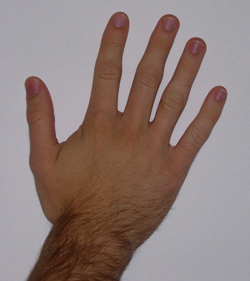
The CP5200 showed average performance on our flash test. The image is a bit darker than we would like it to be and there is a slight bluish cast on the background (white paper).
Since the CP5200 has a "Party/Indoor" option in Scene mode, we decided to include a sample. The picture was taken 4 feet away from the subject. Click on the thumbnail to view the full-size image.

Click to enlarge.
The "Party/Indoor" feature uses a slow sync in addition to the flash to produce more natural-looking indoor pictures. We were pretty impressed with the results. The initial flash froze our subject and the slow sync that followed captured the ambient light in the room to provide an evenly-lit final image.
Originally published at https://www.anandtech.com/show/1402 (Wayback Machine).