
5 Megapixels for < $300: Kodak DX4530, Olympus C-50 Zoom, Casio QV-R51
- Posted in
- Digital Camera
The Design: Olympus C-50 Zoom
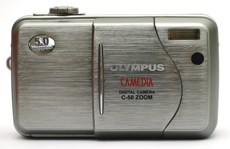
99 x 58.5 x 41.5 mm
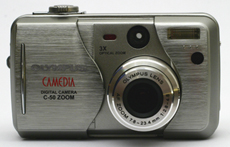
The front of the camera has a sliding door that acts as the main power switch for the camera as well as a shield to protect the lens. When you slide the door to the side, the lens extends automatically and the camera is ready to shoot. Conversely, sliding the door back towards the lens triggers the camera to power off, causing the lens to retract and the shutter to close. It is worth noting that, on occasion, we found that we moved the sliding door accidentally during shooting and caused the camera to power off. The lens has an aperture range of f2.8 - 8.0 in wide angle mode and f4.8 - 8.0 in telephoto mode. The camera is capable of shutter speeds from 1/1000th - 8 seconds. On the top left is the Self-timer/Remote control lamp. This light flashes to tell the user when the picture will be taken in remote control or self-timer mode. Just to the right of this lamp is the viewfinder window. In the right corner is the built-in flash. The flash range is 0.6 - 11.2 ft in wide angle and 1.0 - 6.6 ft in telephoto mode. Below the built-in flash is the receiver for the remote control. The C-50 Zoom has a 3x optical zoom that is equivalent to 38-114mm on a 35mm camera. There is also a 4x digital zoom.
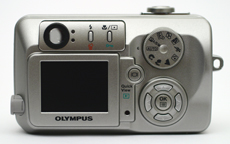
The Olympus C-50 Zoom is much smaller than the Kodak DX4530 and has a magnesium alloy body. Given the layout of the controls on the back, there was very little room for a comfortable place to rest our thumb. We had to rest our thumb on the Mode dial. Luckily, however, the Mode dial is sturdy enough that it does not rotate when our thumb rubs against it. On the left side of the camera is the review monitor which is 1.5" with 134,000 pixels. Above the monitor are the viewfinder, orange and green indicator lamps, a flash/erase button, and a Macro/Spot/Protect button. Pressing the flash button cycles through the following 6 modes: Auto, Red-eye, Fill, Slow (to capture ambient light in addition to the flash), Slow w/Red-eye, and Off. Pressing the Macro/Spot button in shooting mode cycles through the following 4 options: Spot metering mode, Macro mode, Macro with Spot metering mode, and Off. In playback mode, pressing the Macro/Spot/Protect button will mark an image as "protected" so that you cannot delete it by accident. While in macro mode, you can focus from 7.9 inches - 19.7 in wide angle and 11.8 - 19.7 inches in telephoto. We have some trouble understanding how Olympus considers this range a macro range.
In the middle of the camera, just to the right of the LCD monitor is the Monitor/Quick View button and a red lamp that blinks while a picture is being written to the camera or a flash card. The Quick View button serves to turn on/off the live LCD display while in record mode. A double-press of this button will switch the camera to review mode where you can look at previously stored pictures and video clips. On the right side are the Mode dial and an arrow pad. The arrow pad has a separate OK/Menu button in the middle. Rotating the mode dial selects one of the following options: Fully automatic, Portrait, Landscape and Portrait, Landscape and Scene, Night Scene, Sports, Self-portrait, Movie, My (custom settings), and P/A/S/M (Program, Aperture priority, Shutter priority, and Manual) mode. If P/A/S/M mode is chosen, a series of menus must be used to select which sub-mode you want.
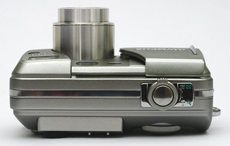
Olympus kept the top of the camera pretty clear with just the shutter button and a zoom control. The zoom control on this camera is much more sensitive than the Kodak DX4530. We were able to zoom optically at ~20 different levels with the C-50 Zoom. This gave the zoom a more fluid feeling than the DX4530.
 |
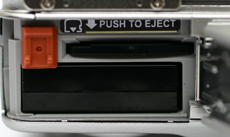 |
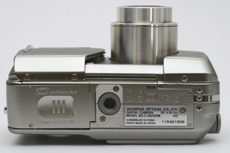
On the bottom is the compartment for the LI-10B rechargeable lithium-ion battery pack (supplied with a charger in the box). The charge time for the battery back is about 2 hours. Behind the same hinged door is the slot for an xD-Picture Card (a 32MB card is supplied in the box). Also on the bottom of the camera is a plastic tripod mount. Something that we feel is worth mentioning is the 256MB flash card capacity limitation on the C-50 Zoom. Because of this limitation, we had to buy a 256MB card, as our 512MB version simply did not work in the camera. We found this limitation to be especially contradictive, since the camera has the option to record in the large file-sized TIFF mode and offers no way to upgrade past a 256MB card.
UPDATE: A firmware update is available that would allow 512MB xD cards to be used in the C-50 Zoom. To receive the update, you must send your camera to one of two Olympus service centers with the proof of purchase from your 512MB Olympus, SanDisk, or Lexar xD card. Without the proof of purchase, the upgrade is $39.95.
 |
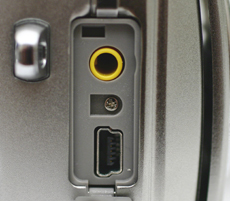 |
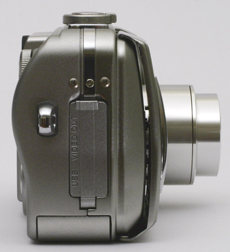
The right side of the camera has a tab that snaps in place to cover the USB port and the Video out jack. You can select NTSC or PAL output through the Setup menu. There is also a wrist strap post on this side.
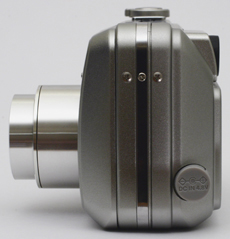
The only thing on the left side is the port for the optional 4.8V AC adaptor.
The C-50 Zoom offers a wide range of image size settings: TIFF (uncompressed), SHQ, HQ, SQ1, and SQ2. Option SQ2 has 4 additional choices. The details of each of these settings are outlined in the table below.
| Setting | Compression | Resolution (pixels) |
| TIFF | Uncompressed | 2560x1920 |
| SHQ | JPG | 2560x1920 |
| HQ | JPG | 2560x1920 |
| SQ1 | JPG | 2048x1536 |
| SQ2 | JPG | 1600x1200 |
| JPG | 1280x960 | |
| JPG | 1024x768 | |
| JPG | 640x480 |
All of the quality options have an aspect ratio of 4:3. In addition to the resolution settings, sharpness can be set to Hard, Normal, or Soft and contrast can be set to High, Normal, and Low. The C-50 Zoom supports xD-Picture Cards and comes with a 32MB starter card in the box. Since our tests with the SHQ setting averaged around 2MB per picture, you will most likely find yourself needing a higher-capacity card.
Auto focus on the C-50 Zoom is very straightforward. You simply point the two auto focus brackets over the subject that you are trying to capture and press the shutter down halfway. If the camera is able to lock focus, the green indicator lamp will light up on the back of the camera to the right of the viewfinder. If it is not able to lock focus, the green light will flash. Olympus did not include manual focus on this camera.
It is nice to see that Olympus included Program, Aperture priority, Shutter priority, and Manual exposure modes on this camera. This adds a great deal of flexibility in terms of creative control. Two other handy features that are available on this camera are exposure compensation and flash compensation. Both can be adjusted to +/- 2 stops in 1/3 stop increments. To adjust the exposure compensation, all you need to do is press the left arrow key to decrease and the right arrow key to increase exposure. To adjust the flash compensation, you can set up a shortcut in order to adjust the setting with the press of two buttons (otherwise, you must navigate through a few menu options). It should be noted that there is a mode called "My Mode" that allows you to customize default settings for essentially every option in the menu. This is very convenient for people who want to switch to their favorite settings quickly.
The C-50 Zoom gives you two options for metering: Digital ESP and spot. Digital ESP is the default metering mode and it measures both the light in the center and the rest of the frame separately. It's good to have the option to switch to spot metering mode if there is a strong light behind the subject. This would help ensure against underexposing the subject. It's disappointing to see that the C-50 Zoom does not have an option for manual white balance. Instead, you are given 5 options: Auto, Daylight, Overcast, Tungsten, and Fluorescent. The camera offers the following ISO settings: Auto, 80, 160, and 320.
This camera also offers a continuous drive option to record 1fps for 3 frames (continuous drive is not available in TIFF mode). You can select between continuous drive with or without auto-focusing before each picture. In addition, the camera has a bracketing feature with options +/-0.3, 0.7, and 1.0 for 3 or 5 frames (bracketing for 5 frames is only available in SQ2-1024x768 and 640x480 modes).
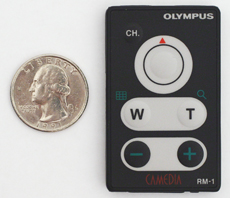
Like the Kodak DX4530, the C-50 Zoom has a Movie mode that records video clips at 15fps. There are two options (both are QuickTime): 320x240 (for up to 15 seconds) or 160x120 (for up to 70 seconds). We should point out, however, that this Olympus camera does not record sound with its video clips. The C-50 Zoom comes with a small remote control that offers zoom controls and a shutter button. To use the remote, you must turn on the Remote Control option in the menu. Pressing the shutter button on the remote will trigger the camera's self-timer/remote control lamp to start flashing. After about 3 seconds, a picture will be taken. The remote can also be used in video mode to start and stop recording. Another useful function of the remote control is its ability to cycle through pictures while outputting to a TV screen. You can also use the "-" and "+" keys on the remote to zoom in during playback.
A couple of extra functions on the C-50 Zoom include Panorama and 2-in-1 mode. In Panorama mode, the camera locks the exposure, focus, and white balance settings for the first frame taken and allows up to 10 frames to be recorded. Software included in the box helps to stitch these frames together to create the final panorama. The 2-in-1 mode is a way to take 2 separate pictures and have them saved as one file. You are prompted to take the first vertical half of the picture and then the second. The two pictures are joined and saved automatically. TIFF is not available as a quality setting for the 2-in-1 mode.
To get to playback mode while the lens is extended, you can press the Quick View button twice. During playback, you are given six levels of magnification from 1.5x-4x to zoom in on a particular part of a photo. In addition, there are a few options for image manipulation in-camera. While in playback mode, you can rotate an image, convert it to Sepia or B&W;, or resize it to either 640x480 or 320x240. If any of these options are selected, the camera saves a separate file with the changes and leaves the original file intact.
There were a couple things that we found frustrating about the C-50 Zoom. First, the camera does not offer the option to delete a picture immediately after it is taken during auto-review. It would have been easy to implement this option as Kodak did on their DX4530. Instead, you must hit the Quick View button twice to switch to playback mode and delete it from there. Secondly, navigating the menu system is not immediately intuitive because the button for "OK" and the menu are the same. This dual-function button takes some getting used to during menu navigation. For example, while navigating through the menus, you must press the right arrow key to confirm a highlighted menu option instead of the OK/Menu button. However, if you are actually selecting a specific setting, then you must use the OK/Menu button to confirm your choice. The menu would be much easier to use if there were dedicated OK and Menu buttons. Although it takes some time to get the feel of the menu operation, it is easy enough to navigate.
It's a shame that they didn't include manual focus and white balance modes on this camera, given that it has a Manual exposure mode. We tend to think that advanced settings such as Manual, Aperture priority, and Shutter speed priority go right along with the ability to perform manual white balance.
Originally published at https://www.anandtech.com/show/1391 (Wayback Machine).