
Maxtor's MaXLine III 250GB: Bringing 16MB Buffers and NCQ to Hard Drives
- Posted in
- Storage
Taking Advantage of NCQ
Remember that to take advantage of NCQ on the MaXLine III, a controller and drivers with NCQ support must be used. Currently, only Intel's ICH6 features support for NCQ when used with the Intel Application Accelerator 4.0 drivers.The IAA 4.0 drivers will only work if ICH6's SATA controller is configured for use as an Advanced Host Controller Interface (AHCI) device. So, the first step to enabling NCQ is to enable AHCI within the BIOS. If the ICH6R RAID functionality is enabled, then the device is already set to be an AHCI device.
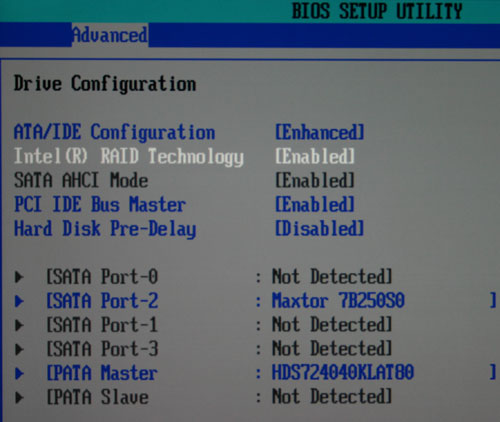
Be warned; in order to use the ICH6 controller as an AHCI device, you must have the IAA 4.0 drivers installed. Unfortunately, IAA 4.0 will not install if the controller is not configured as an AHCI first. What does this mean? If you don't have AHCI enabled initially and install Windows to a SATA drive, you will have to reinstall Windows to enable AHCI and provide a disk with the IAA 4.0 drivers during the Windows setup process when the F6 prompt appears. If you have AHCI already enabled and Windows installed, or if Windows is installed on a PATA drive, or if you have yet to install Windows, then there's nothing more to worry about.
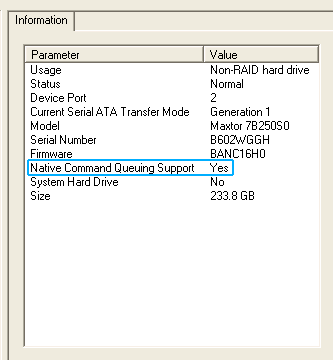
Once in Windows, you'll want to install the IAA 4.0 application itself. Doing so will let you make sure that NCQ is enabled if the drive supports it. Also, the IAA 4.0 application will let you create RAID 0 and RAID 1 arrays if you have multiple drives.
Originally published at https://www.anandtech.com/show/1364 (Wayback Machine).