
The Biostar X470GTN Motherboard Review: AM4 ITX Revisited
Ryzen Overclocking
Experience With the Biostar X470GTN
One of the major benefits with Ryzen’s AM4 socket is that the majority of the chipsets support overclocking out of the box thanks to AMD's arsenal of fully unlocked Ryzen processors; the exception to this is the more basic and barebone A320 chipset which hasn’t currently had the refresh that the B350 and X370 chipset have. Our Ryzen 7 1700 eight-core processor has been capable of achieving a stable overclock of up to 4.0 GHz on virtually every AM4 board thus far and the main variation between the different models is the amount of voltage required to get it stable at the maximum clock speeds. Boards such as the ASRock B450 Gaming ITX/ac has managed 4.0 GHz at 1.40 V, while the MSI B350M Gaming Pro failed to prove fruitful at the same voltage, even with more voltage applied via Vdroop.
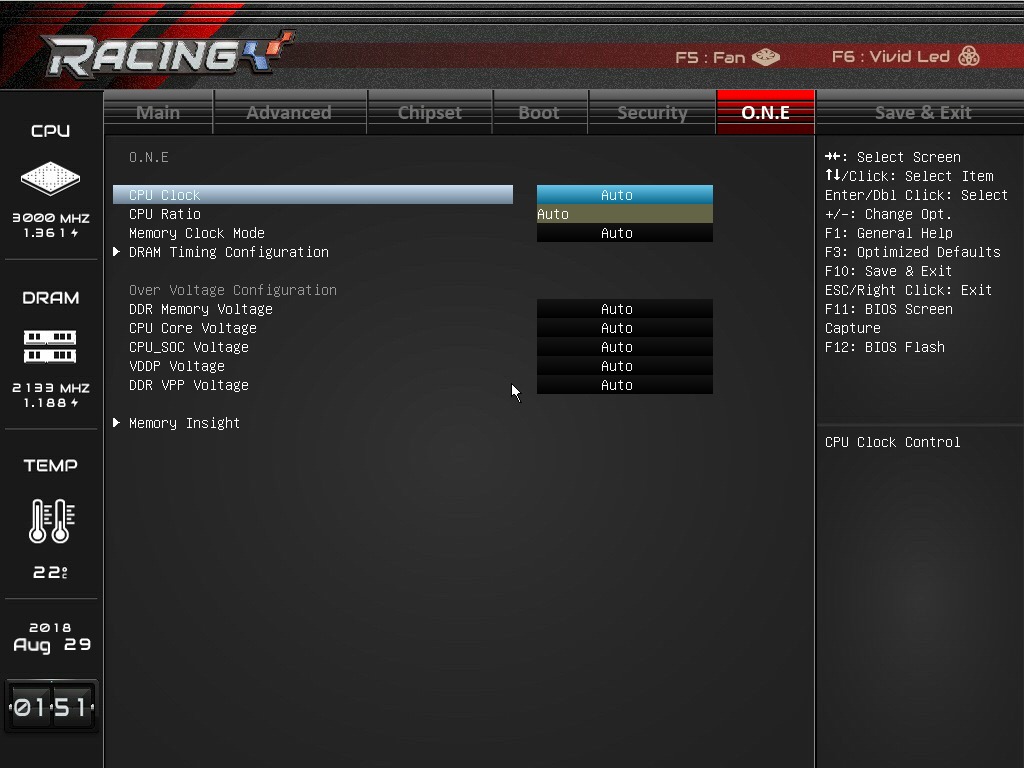
Focusing on the X470GTN, the BIOS has been improved upon visually since we last took a look at the Biostar X370GTN. In terms of overclocking, the improvements stop at the GUI as the X470GTN experiences the same issues of old in that adjusting the voltages have to be done using offsets instead of applying set values. This poses problems for a couple of reasons, especially for novice users that aren’t proficient in the art of achieving efficient overclocks. The biggest downside to using offset voltages is that there isn’t a list of base values to work from meaning it’s increasingly difficult to work out what offset value is suitable for each overclock. It’s a very primitive way of doing things and really lets Biostar down here in their mission to drive away market share from other brands, especially for enthusiasts who like to overclock their processors and memory to unlock ‘free’ performance so to speak.
Even though the Biostar X470GTN has no physical external clock generator, it is still possible to adjust the base clock on this board which offers adjustments from 100.0 MHz up to 107.3 MHz; this is done incrementally through a drop-down menu as opposed to custom set values. Overclocking via the base clock not only ups the ante so to speak on the processor, but it also overclocks other key subsystems such as the memory clock speed, the PCIe bus and even the SATA interface meaning there is more to go wrong. While the CPU and memory may be able to handle the extra speed from overclocking the base clock, the other interfaces can cause instability in the other subsystems and I really only recommend it in certain circumstances such as overclocking a processor with a locked multiplier; upping the ratio is king and allays a lot of other potential issues when compared to base clock tweaking.
Due to Biostars O.N.E layout and implementation, the following overclocking was done via the Ryzen Master Overclocking utility which is an intuitive overclocking tool provided and developed by AMD which allows users to tweak and adjust settings in an easy to navigate GUI and within the operating system. While the AMD Ryzen Master doesn't contain as many options as most BIOSes, it's more than adequate to push a Ryzen based processor to its limits in systems using ambient cooling without issue or fuss.
Methodology
Our standard overclocking methodology is as follows. We select the automatic overclock options and test for stability with POV-Ray and OCCT to simulate high-end workloads. These stability tests aim to catch any immediate causes for memory or CPU errors.
For manual overclocks, based on the information gathered from previous testing, starts off at a nominal voltage and CPU multiplier, and the multiplier is increased until the stability tests are failed. The CPU voltage is increased gradually until the stability tests are passed, and the process repeated until the motherboard reduces the multiplier automatically (due to safety protocol) or the CPU temperature reaches a stupidly high level (100ºC+). Our test bed is not in a case, which should push overclocks higher with fresher (cooler) air.
Overclocking Results

For a mini-ITX motherboard that costs $130, the Biostar X470GTN showed promise with a maximum stable overclock of 4.0 GHz at 1.40 V. This has been the limit so far with our Ryzen 7 1700 sample and even though 4.1 GHz proved close in stability with a slightly above safe value of 1.475 V, the extra voltage proved futile. One of the notable aspects while overclocking the X470GTN was its tight default Vdroop control under load and it demonstrated some of the most consistent load voltages in comparison to the set voltages within Ryzen Master we have seen so far. For example when 1.200 V was applied within Ryzen Master at 3.70 GHz, it equated to maximum load voltage of 1.199 V, which is as close to 1.200 V as it could be without actually mirroring the set voltage.
The PovRay performance did seem a little inconsistent between 3200 MHz and 3500 MHz but after a multiplier of x36 was applied, the X470GTN hit a sense of cohesion all the way up to 4.0 GHz. With a more modern UEFI BIOS and less archaic voltage adjustment options, the Biostar X470GTN could have been the hidden gem, but it’s really hard to ignore the obvious pitfalls in the BIOS. The quality of the MOSFET heatsink is hardly substantial enough for large overclocks in an inadequately unventilated system, but there are no issues with proper airflow and with overclocks up to 3.9/4.0 GHz with voltages below 1.4 V.
Originally published at https://www.anandtech.com/show/13264/the-biostar-x470gtn-motherboard-review-am4-itx-revisited (Wayback Machine).