
The ASUS X399 ROG Zenith Extreme Motherboard Review: Top Tier Threadripper
ASUS X399 ROG Zenith Extreme Software
The USB flash drive that ASUS supplies along with the ASUS X399 ROG Zenith Extreme is no different than a typical optical disk in terms of content and presentation, so much that the header of the basic launcher application reads "support CD". The application is straightforward and, unlike what is nowadays common with such media, it does not try to install unnecessary software packages along with motherboard's device drivers, except from Google's Chrome Browser, which appears at a prominent spot and can be easily unselected.
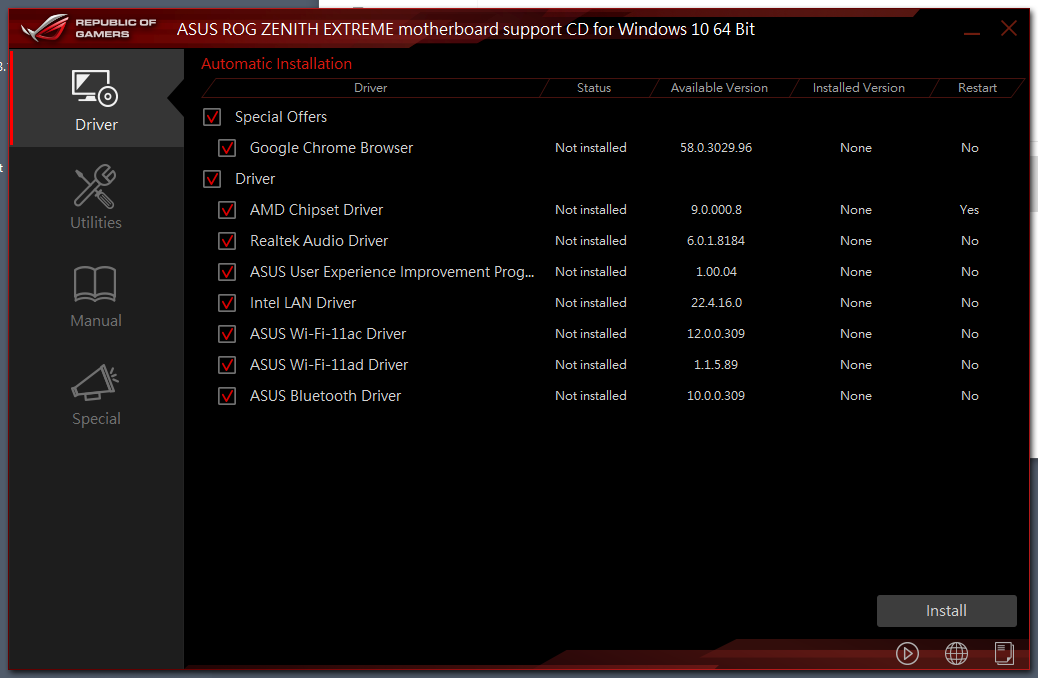
The second tab of the launcher software includes a lot of utilities, both from ASUS and third-party companies. It is easy to select which utilities to install and which not to but the software does not offer any kind of information regarding what each utility does, an approach that can easily confuse inexperienced users. The "special" tab only includes Google's Chrome browser, nothing more.


The main software of the ASUS X399 ROG Zenith Extreme is the AI Suite, a software that includes most of the motherboard's BIOS options. It has a complex UI that is divided across multiple screens, which can be accessed from a hidden left side menu. Each screen includes a variety of settings, from frequency settings to current and phase control options. There is also an app included that cleans up "junk files" that may accumulate over time in a HDD/SSD.

The main display at the top has a side menu that offers access to many different screens, each with a large number of advanced settings. Most of the BIOS options are accessible via these screens, allowing the user to perform automated or advanced overclocking without having to enter the BIOS. There is also a BIOS update software.


The Livedash application allows for the programming of the OLED screen on the I/O cover. From here the user can select one or more informative options (they will appear in rotation) or a monochromatic image/animation to be displayed by the OLED. The software is well presented and the range of settings is excellent but the position and size of the OLED are not convenient.


The Asus AURA software is flexible and allows for the programming of basic and advanced lighting effects independently for the motherboard itself and for the installed RGB LED strips (if available). There are several pre-programmed lighting effects and each can be individually tweaked, but the users cannot program effects of their own.


ASUS also includes a Macro programming software, the "Keybot II". It can be used to replace the function keys (F1-F10) with macros that the user can manually program. These may be small texts (up to 50 words each), key sequences with manually programmable delay times, simple multimedia functions, or application shortcuts. The software does not support mouse-related options.


Another interesting software is the “Gamefirst IV”, Asus’ network optimization/acceleration software. It can be used to adjust the priority of specific applications/services, either manually or automatically. Its “intelligent mode” automatically detects games and prioritizes them over other processes. It also has network monitoring and debugging options. The “Gamefirst IV” appears to be compatible only with the Intel I211-AT at the time of this review.


Finally, ASUS provides the "Mem TweakIt" software, a graphically simple software with an overwhelming interface that includes a host of memory-related settings. It allows for the tweaking of the RAM-related options from within the OS but pushing any setting beyond its stable limit will result to a frozen system, so it is a software mostly reserved for advanced/competitive overclockers or experienced users who know what they are doing.


Originally published at https://www.anandtech.com/show/13081/the-asus-x399-rog-zenith-extreme-motherboard-review (Wayback Machine).