
AMD Ryzen 5 2400G and Ryzen 3 2200G Integrated Graphics Frequency Scaling
Overclocking Ryzen APU Integrated Graphics
As we detailed in our dedicated AMD Ryzen 2000 series APU overclocking guide and analysis, both the Ryzen 5 2400G and the Ryzen 3 2200G chips benefit from overclocking the CPU core frequency. The results on heavy computational workloads gave noticeable improvements across the board, while the gaming results didn't seem to have the expected 'oomph' so to speak. When it comes to overclocking the integrated graphics, the key directive and conclusion is that when a user is overclocking the CPU core frequency, it lessens the headroom available to overclock the integrated graphics and visa versa. It is a real push and pull situation.
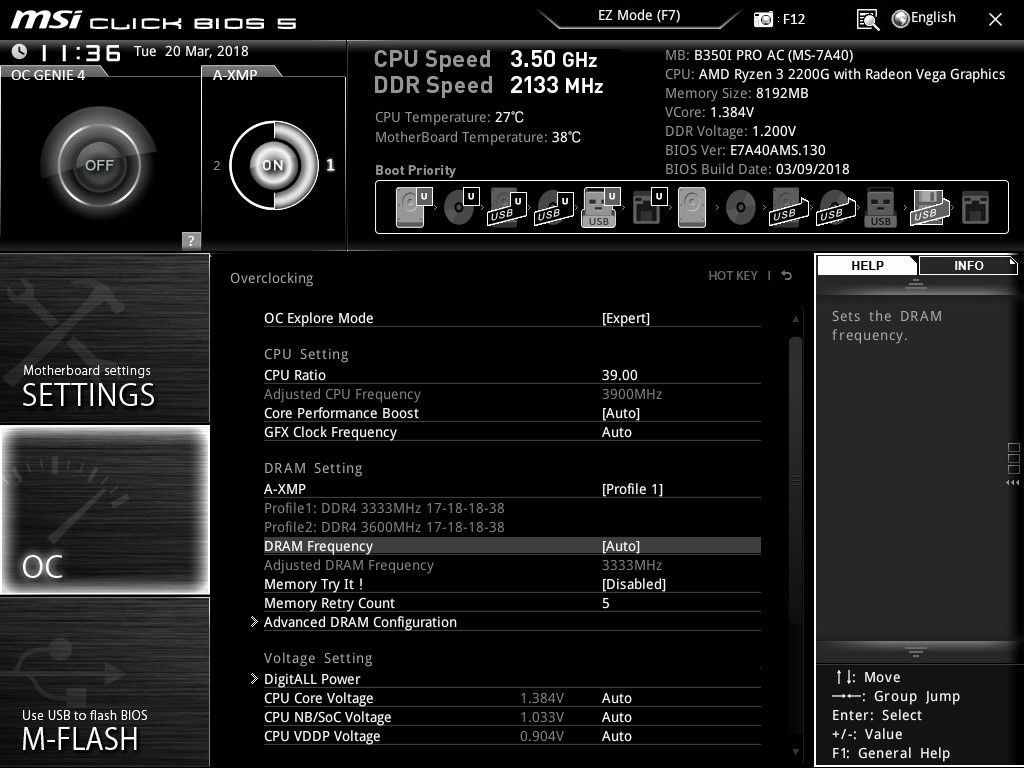
Overclocking the integrated graphics on the MSI B350I Pro AC motherboard was quite easy as there are three main variables to consider.
- The graphics clock frequency is the primary frequency setting, measured in MHz
- The SoC voltage (or CPU NB Voltage) is directly linked to the integrated graphics voltage.
- The CPU core frequency and CPU core voltage can also help/hinder.

Beware the Black Hole!
When overclocking the integrated graphics core on both APUs, rising through the frequencies, we experienced an anomaly or 'black hole' between 1350 and 1500 MHz. Regardless of the settings, there was a clear issue in the system.
While the system would boot at these frequencies, the combination of overclock and drivers caused random reboots of the test system, constant and consistent crashes during gaming, and Windows Crash Reporter stating a 'Video_TDR_Failure' of the atikmpag.sys process. This error is usually an indication of a faulty or corrupt graphics driver, but in this instance, it happened across multiple systems with three different motherboards and operating systems using the AMD's Adrenalin Edition 18.5.1 WHQL drivers (the latest at the time of testing). The issue bestowed itself regardless of the GPU driver used, or BIOS revision on any of the motherboards tested.
At 1500 MHz however, the issue went away. Our experience is not unique - other professionals in the industry have experienced similar issues. We have reached out to AMD about this issue and will update when an official response is received.
Overclocking Results
The Ryzen 5 2400G has a base graphics frequency of 1250 MHz and the Ryzen 3 2200G has a base frequency of 1100 MHz. We were able to push both of them up to 1600 MHz, giving a 28% and 45% overclock respectively. For the completeness of data, we ran both APUs from 1100 MHz up to 1600 MHz, missing out the black hole. Here were our settings:
| Integrated Graphics Frequency | SoC/iGPU GFX Voltage |
| 1100 MHz | 1.15 V |
| 1150 MHz | 1.15 V |
| 1200 MHz | 1.15 V |
| 1250 MHz | 1.15 V |
| 1300 MHz | 1.15 V |
| 1350 MHz | 1.15 V |
| 1400 MHz | ERROR |
| 1450 MHz | ERROR |
| 1500 MHz | 1.20 V |
| 1550 MHz | 1.25 V |
| 1600 MHz | 1.25 V |
Originally published at https://www.anandtech.com/show/13041/amd-ryzen-5-2400g-and-ryzen-3-2200g-integrated-graphics-frequency-scaling (Wayback Machine).