
iBuyPower Element Gaming PC Review: i7-8086K and GTX 1080 Ti Inside
System Performance
Starting things off, let's take a look at low-level system performance. This gives us a look at some of the baser aspects of the system, including power consumption, audio quality, POST time and latency.
***For this specific review, the iBuyPower system hardware is different than the other datasets used. We wanted to test performance out of the box with the factory overclocked Core i7-8086K CPU (in this case iBuyPower set it to 5 GHz all cores) along with the included video card, a reference GTX 1080 Ti running at stock speeds.
Power Consumption
Power consumption was tested on the system while in a single GPU configuration with a wall meter connected to the relevant system/testbed's power supply. The Thermaltake power supply in the Element is Bronze rated, which means on US on a 120 V supply it hits ~82% efficiency > 60W, and 85%+ efficiency at 300W. This method of power reading allows us to compare the power management of the underlying motherboard and its ability to supply components with power under load, and includes typical PSU losses due to efficiency. These are the real world values that consumers may expect from a typical system (minus the monitor) using this motherboard.
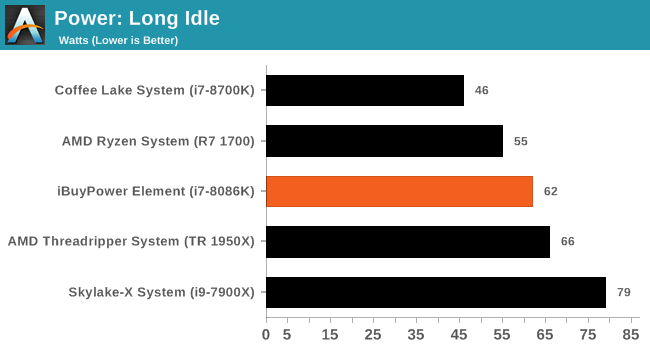
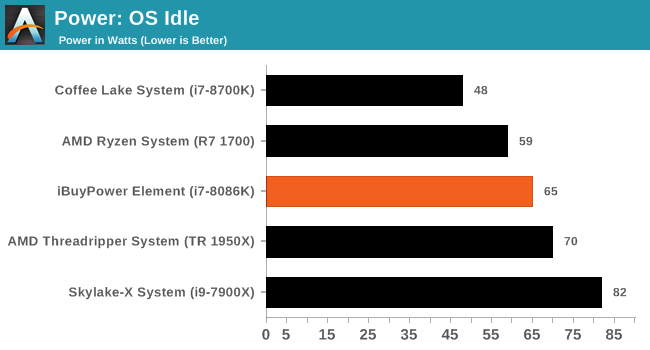
Looking at the power use on the iBuyPower system, we are able to discern the PC (as configured) uses 62W and 65W in Long Idle and OS Idle states respectively. This value places it around 15W above a stock configured i7-8700K system with our 750W Platinum-rated PSU. That said, idle loads will vary as the systems involved are not exactly alike. But clearly, a processor sitting at 5 GHz with raised voltage on idle will use more power.
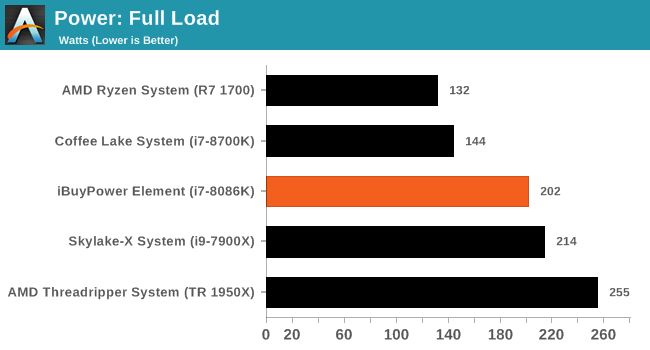
The load tests show the iBuyPower system coming in at 202W, just slightly behind a stock Skylake-X system at 214W. Compare this to the stock i7-8700K which uses 144W in this testing (OCCT Blend) and we can see what is to be expected in the overclocked iBuyPower system which is using more due to the overclock and other system differences.
Non-UEFI POST Time
Different systems have different POST sequences before an operating system is initialized. A lot of this is dependent on the motherboard used, and POST boot time is determined by the controllers on board (and the sequence of how those extras are organized). As part of our testing, we look at the POST Boot Time using a stopwatch. This is the time from pressing the ON button on the computer to when Windows 10 starts loading. (We discount Windows loading as it is highly variable given Windows specific features.
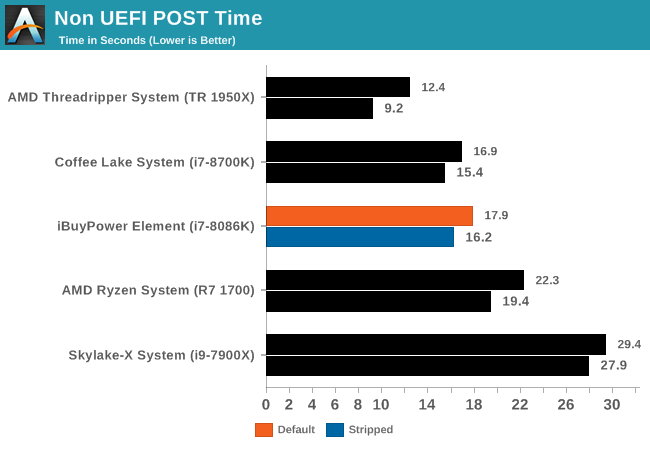
In the non-UEFI POST times, the iBuyPower Element system with the ASUS TUF Z370-Plus Gaming posted a fast boot time of 17.9 seconds out of the box, and 16.2 seconds when shutting down extras. This time puts it in the middle of results and close to its Z370 counterpart so there isn't anything out of the ordinary here.
Rightmark Audio Analyzer 6.2.5
Rightmark:AA indicates how well the sound system is built and isolated from electrical interference (either internally or externally). For this test we connect the Line Out to the Line In using a short six inch 3.5mm to 3.5mm high-quality jack, turn the OS speaker volume to 100%, and run the Rightmark default test suite at 192 kHz, 24-bit. The OS is tuned to 192 kHz/24-bit input and output, and the Line-In volume is adjusted until we have the best RMAA value in the mini-pretest. We look specifically at the Dynamic Range of the audio codec used on board, as well as the Total Harmonic Distortion + Noise.
Due to circumstances currently out of our control, we were unable to get RMAA results for this board, or any X299 board for that matter. The issue continues with Z370 as well. The problem does not lie with the board itself. Once (if) we are able to get it working properly, the space will be updated with data.
DPC Latency
Deferred Procedure Call latency is a way in which Windows handles interrupt servicing. In order to wait for a processor to acknowledge the request, the system will queue all interrupt requests by priority. Critical interrupts will be handled as soon as possible, whereas lesser priority requests such as audio will be further down the line. If the audio device requires data, it will have to wait until the request is processed before the buffer is filled.
If the device drivers of higher priority components in a system are poorly implemented, this can cause delays in request scheduling and process time. This can lead to an empty audio buffer and characteristic audible pauses, pops and clicks. The DPC latency checker measures how much time is taken processing DPCs from driver invocation. The lower the value will result in better audio transfer at smaller buffer sizes. Results are measured in microseconds.
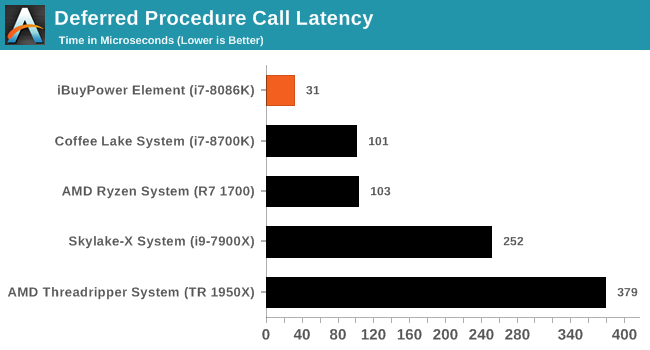
DPC Latency results for this system was the best we have seen so far by quite a longshot at 31µ. This result is repeatable (varies a bit in subsequent tests, but generally in the low 30s). This also means that we did not encounter any latency-induced sound issues here.
Originally published at https://www.anandtech.com/show/13008/ibuypower-element-gaming-pc-review-8086k-and-gtx-1080ti-inside (Wayback Machine).