
The GIGABYTE X399 DESIGNARE EX Motherboard Review
Overclocking
Experience with GIGABYTE X399 Designare EX
While GIGABYTE makes no effort to market the X399 Designare EX as a special "overclocking-friendly" motherboard, to the extent that while they extensively advertise the advanced power circuitry and reliability , even the support for liquid cooling solutions, there is not even a single mention regarding overclocking into the manufacturer's website and yet the X399 Designare EX is a very capable motherboard, with good overclocking potential for most users. Hardcore overclockers may be limited by the lack of additional power connectors, as the two 8+4 pin connectors are unlikely to provide enough current for a highly stressed Threadripper processor. Such overclocking will also require very advanced and complex cooling solutions, well beyond typical liquid cooling setups.
The BIOS of the X399 Designare EX is versatile, with a broad range of options. The frequency and voltage control settings are well beyond reasonable bounds, as the processor is unlikely to function with the maximum voltage settings regardless of the cooling system.
Methodology
Our standard overclocking methodology is as follows. We select the automatic overclock options and test for stability with PovRay and OCCT to simulate high-end workloads. These stability tests aim to catch any immediate causes for memory or CPU errors.
For manual overclocks, based on the information gathered from previous testing, starts off at a nominal voltage and CPU multiplier, and the multiplier is increased until the stability tests are failed. The CPU voltage is increased gradually until the stability tests are passed, and the process repeated until the motherboard reduces the multiplier automatically (due to safety protocol) or the CPU temperature reaches a stupidly high level (100ºC+). Our test bed is not in a case, which should push overclocks higher with fresher (cooler) air.
Overclock Results
Knowing that the X399 Designare EX is already pushing the Ryzen Threadripper 1950X quite hard by default, we decided to test the first of GIGABYTE's automatic overclocking settings (3.6G). That setting increased the processor's base frequency by 200MHz but the maximum temporary frequency boost by the Core Performance Boost option did not increase. Still, the CPU would throttle significantly, even though the energy consumption did not increase too much. It would appear that this option may be bugged.
We disabled the Core Performance Boost option during our manual overclocking tests, locking the processor at a given frequency each time. We managed to raise the processor's frequency up to 3.9 GHz without issues. At 4.0 GHz our Noctua cooler was inadequate for the extreme thermal needs of the Ryzen Threadripper processor. An advanced liquid cooling solution would probably allow the CPU to reach a couple hundred MHz higher but the energy consumption under these circumstances is extraordinary and we are not confident that the motherboard's connectors and circuitry will survive such stress for too long.
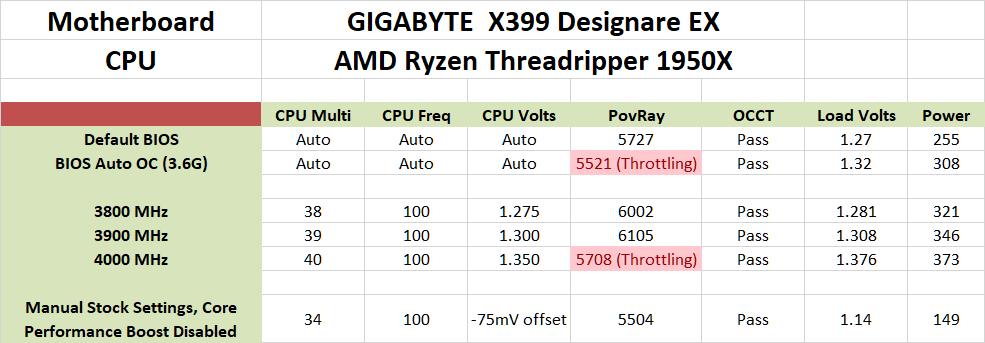
When looking at the above table, it is clear that overclocking the Ryzen Threadripper processor greatly increases its energy consumption. However, we hypothesized that the management of energy consumption would probably work both ways. We decided to give a try with the processor locked at its base frequency (Core Performance Boost disabled) and with a mildly lowered CPU Vcore/VSOC (-75mV offset). These settings alone halved the processor's energy consumption with only a small decrease in performance. Of course, the 16C/32T Ryzen Threadripper 1950X is not a processor designed for low-energy green computing, but this proves that it is also technically possible to greatly reduce the system's energy consumption and still receive the benefits of all these cores/threads if one wants to do so.
Originally published at https://www.anandtech.com/show/13001/the-gigabyte-x399-designare-ex-motherboard-review (Wayback Machine).