
The Plextor M9Pe NVMe SSD Review: Teaching An Old Chip New Tricks
Power Management Features
Real-world client storage workloads leave SSDs idle most of the time, so the active power measurements presented earlier in this review only account for a small part of what determines a drive's suitability for battery-powered use. Especially under light use, the power efficiency of a SSD is determined mostly be how well it can save power when idle.
For many NVMe SSDs, the closely related matter of thermal management can also be important. M.2 SSDs can concentrate a lot of power in a very small space. They may also be used in locations with high ambient temperatures and poor cooling, such as tucked under a GPU on a desktop motherboard, or in a poorly-ventilated notebook.
| Plextor M9Pe NVMe Power and Thermal Management Features |
|||
| Controller | Marvell 88SS1093 "Eldora" | ||
| Firmware | 1.04 | ||
| NVMe Version |
Feature | Status | |
| 1.0 | Number of operational (active) power states | 3 | |
| 1.1 | Number of non-operational (idle) power states | 2 | |
| Autonomous Power State Transition (APST) | Supported | ||
| 1.2 | Warning Temperature | 83 °C | |
| Critical Temperature | 85 °C | ||
| 1.3 | Host Controlled Thermal Management | Supported | |
| Non-Operational Power State Permissive Mode | Supported | ||
The Plextor M9Pe supports the full range of power and thermal management features from the latest NVMe standard, with Plextor's firmware implementing features that didn't exist when the Marvell 88SS1093 controller first hit the market. The power state table looks quite reasonable with two idle states that shouldn't take too long to enter or leave. The maximum active power rating of 8W is a bit high for an M.2 drive, but the M8Pe was also rather power-hungry at its worst.
| Plextor M9Pe NVMe Power States |
|||||
| Controller | Marvell 88SS1093 "Eldora" | ||||
| Firmware | 1.04 | ||||
| Power State |
Maximum Power |
Active/Idle | Entry Latency |
Exit Latency |
|
| PS 0 | 8 W | Active | - | - | |
| PS 1 | 4.5 W | Active | - | - | |
| PS 2 | 3 W | Active | - | - | |
| PS 3 | 70 mW | Idle | 1 ms | 5 ms | |
| PS 4 | 10 mW | Idle | 5 ms | 50 ms | |
Note that the above tables reflect only the information provided by the drive to the OS. The power and latency numbers are often very conservative estimates, but they are what the OS uses to determine which idle states to use and how long to wait before dropping to a deeper idle state.
Idle Power Measurement
SATA SSDs are tested with SATA link power management disabled to measure their active idle power draw, and with it enabled for the deeper idle power consumption score and the idle wake-up latency test. Our testbed, like any ordinary desktop system, cannot trigger the deepest DevSleep idle state.
Idle power management for NVMe SSDs is far more complicated than for SATA SSDs. NVMe SSDs can support several different idle power states, and through the Autonomous Power State Transition (APST) feature the operating system can set a drive's policy for when to drop down to a lower power state. There is typically a tradeoff in that lower-power states take longer to enter and wake up from, so the choice about what power states to use may differ for desktop and notebooks.
We report two idle power measurements. Active idle is representative of a typical desktop, where none of the advanced PCIe link or NVMe power saving features are enabled and the drive is immediately ready to process new commands. The idle power consumption metric is measured with PCIe Active State Power Management L1.2 state enabled and NVMe APST enabled if supported.
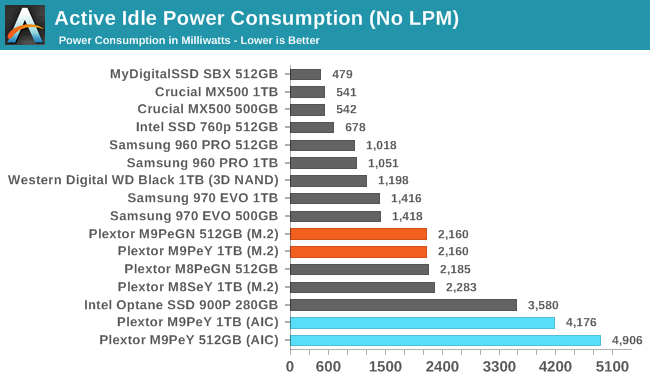
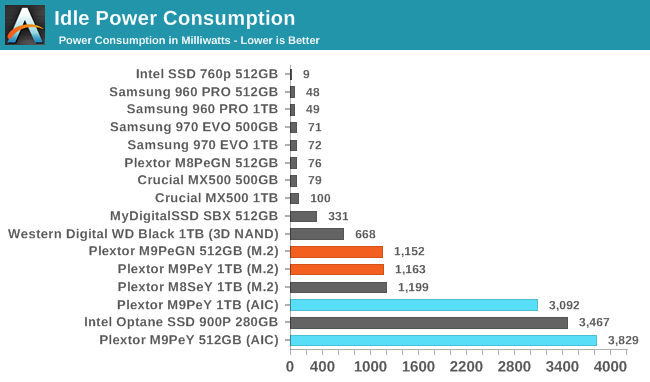
The LEDs on the M9PeY's add-in card adapter ruin its idle power scores, but the M.2 drive itself behaves about the same as the older M8Se. The M9Pe doesn't manage to drop down to the deepest sleep states on our testbed, but enabling idle power management does cut its draw in half.
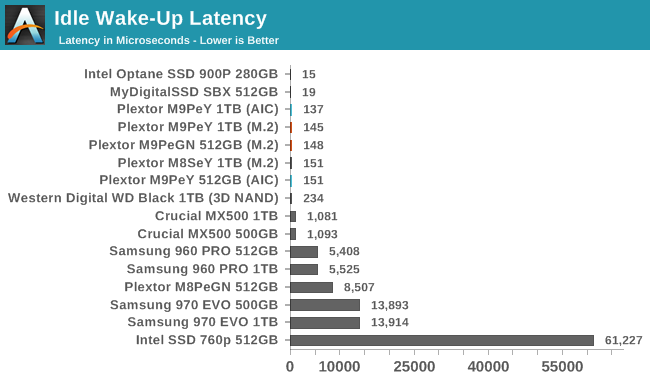
The M9Pe wakes up from its ~1W intermediate idle in well under a millisecond, which guarantees that this level of power management won't harm performance.
Originally published at https://www.anandtech.com/show/12747/the-plextor-m9pe-nvme-ssd-review (Wayback Machine).