
The Acer Swift 3 SF315-41 Review: Ryzen Meets Laptop
Display Analysis
Acer has outfitted the Swift 3 with a 1920x1080 IPS display, which is a big improvement over the TN displays that used to plague AMD based systems. This is a display with a Corning Gorilla Glass cover, but there’s no touch.
To test the display capabilities, we leverage SpectraCal’s CalMAN software suite, along with an X-Rite i1DisplayPro colorimeter for brightness and contrast, and an X-Rite i1Pro2 spectrophotometer for color accuracy testing.
Brightness and Contrast
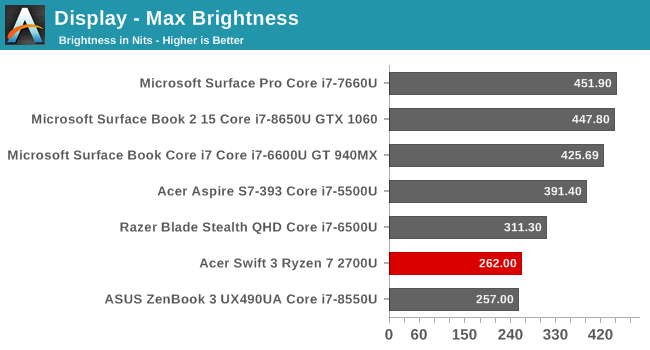
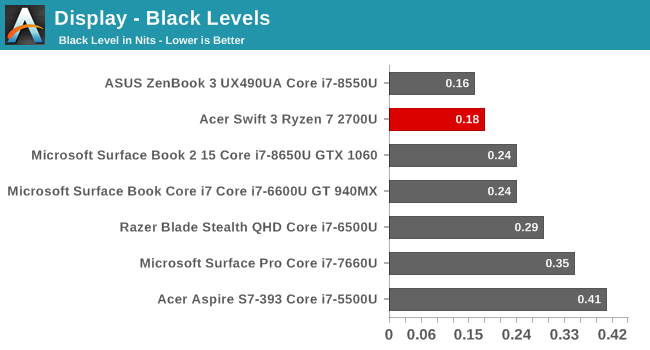
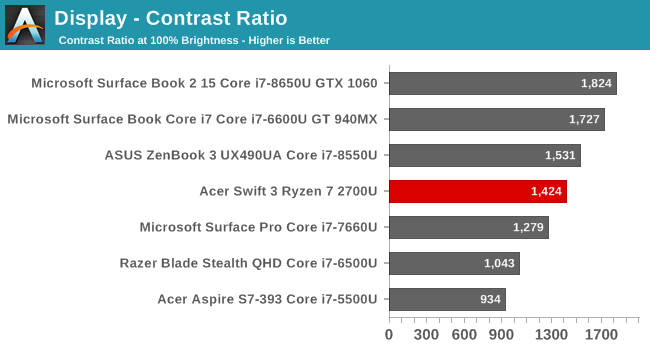
The Acer doesn’t come close to other laptops in terms of overall brightness, at just 260 nits, so outdoor usage, especially with the glass over the display, is going to be a challenge, but the black levels are very good, so the contrast ratio is very solid. The display goes down to 20 nits, which is still fairly bright, but would be fine in a dim room. This isn’t a tablet you’d use in bed, so there’s likely no need to go down to the low single-digits we see on some devices.
Grayscale

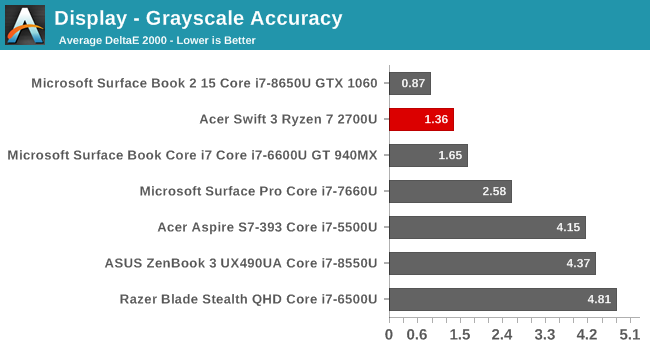
Here was a surprise. Acer absolutely delivers in terms of grayscale out of the box, with fantastic RGB balance, and a great average result without the big spikes we sometimes see closer to 100% white on some systems. Gamma is a bit low, but still close to the 2.2 level we’d like to see.
Gamut

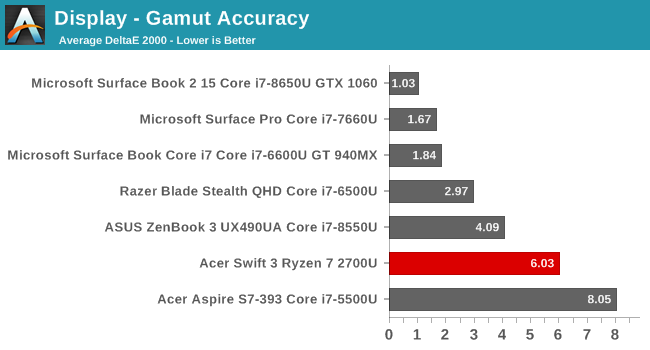
Here’s a good sign that Acer considers the Swift 3 a lower-tier model. This display doesn’t even come close to covering the entire sRGB gamut, with all three primary colors short of the target at 100%. The blue results are especially terrible, with an error level of 17.6 at 100% when you’re looking for a result under 3.0.
Saturation

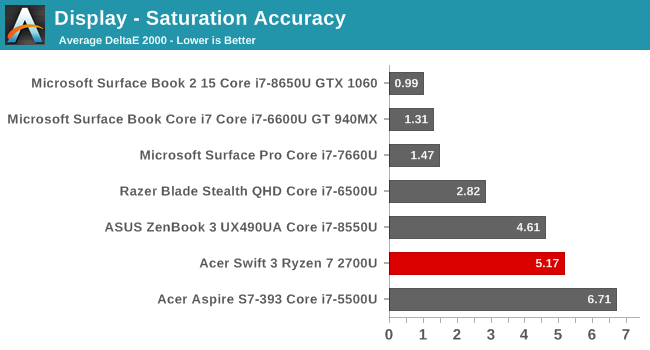
This is just a more comprehensive view of the gamut results, so it’s not surprising to see a less than amazing average error level here too. All of the sweeps are well short of the targets, and the error levels start to creep up very early.
Gretag Macbeth

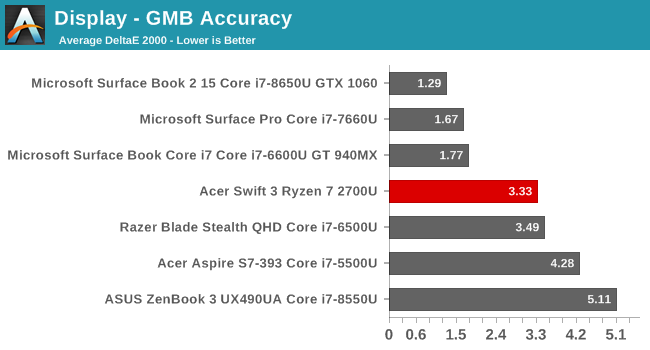
The GMB test is the most comprehensive, covering not just the primaries and secondaries, but also various colors in between, and the important skin tones. With the lack of gamut coverage, there’s plenty of errors here, but for the most part, they are a lot less severe than the pure primaries.
The following image shows the target color on the bottom and the actual displayed color on the top. This image will be relative though because any errors in your own display will prevent an absolute look at the differences, but you can still clearly see the excellent grayscale results, marred by the lack of gamut coverage on the deeper colors.

Display Conclusion
This is definitely a mixed bag conclusion. Acer is targeting a lower price bracket on the Swift 3, and that shows when you see a display that is this far short of covering all of sRGB, but at the same time, they offer some of the best out of the box grayscale results we’ve seen outside of perhaps a Surface device. Still, at a $949 MSRP for the laptop tested, it would be nice to see a display that can cover all of sRGB.
The 1920x1080 resolution is the perfect fit for this laptop as well, allowing Acer to keep the price down, but still offering enough resolution for a 15.6-inch device. You can easily run this at 100% scaling, which avoids any issues you’d see with higher resolution laptops, although most of those issues are a huge problem anymore.
Originally published at https://www.anandtech.com/show/12709/the-acer-swift-3-sf31541-review-ryzen-meets-laptop (Wayback Machine).