
The ASUS ZenBook 3 Review: A Convincing Case for Quad Core Thin & Light Laptops
GPU Performance
Although the move to 8th Generation Core has brought a nice jump in CPU performance, the same can’t be said for the integrated GPU. Here Intel is using the UHD 620, which other than a minor clockspeed bump, is largely the same as the HD 620 iGPU found on Kaby Lake. At the moment, there are no Iris equipped GPUs either, although that’s not unusual, since they tend to get launched later on. It’ll be curious to see if Intel launches any Iris based Core i7 models based on Kaby Lake Refresh, since they’ve already used up extra die space for more CPU cores.
We’ve already seen Intel announce that they will be building CPUs with AMD's Radeon graphics, but those are going to be targeted at the H series chips, which are the 45-Watt lineup, so on the Ultrabook end of things, the HD 620 is all we’re going to get for now.
The integrated GPUs on Core products have always been a sore spot, since they can generally run desktop workloads just fine, but any additional workloads tend to make them really struggle. Only the lightest games are generally playable at low resolutions, and the only compute available is QuickSync.
Since this is an Ultrabook, we’ve not stressed it like a gaming system, but instead kept to a couple of synthetics, and then one game which can be playable on lower-end hardware.
3DMark
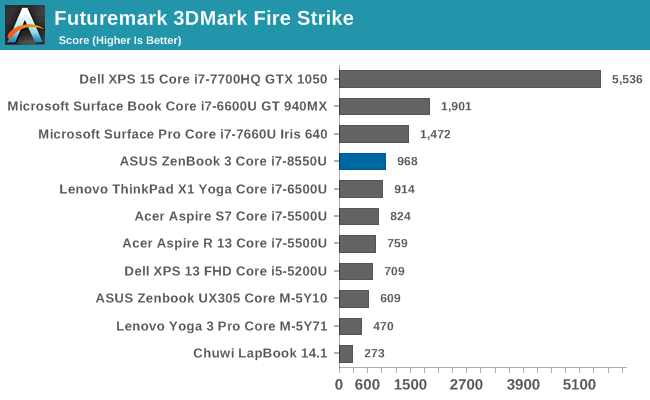
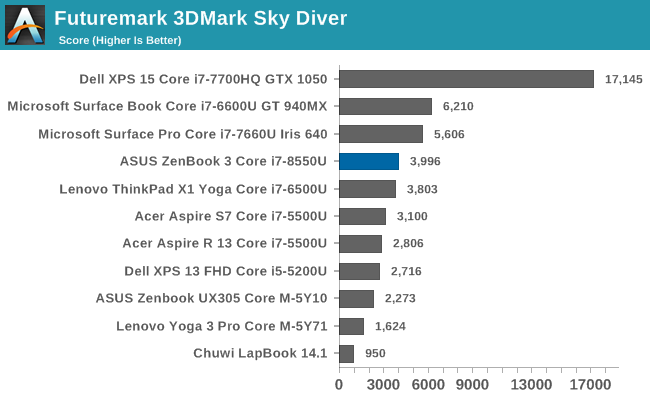
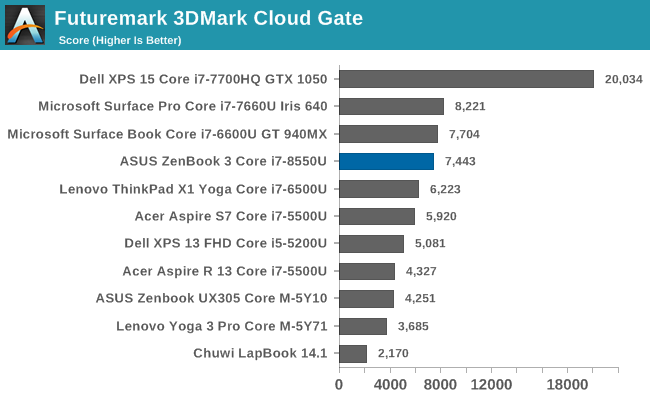
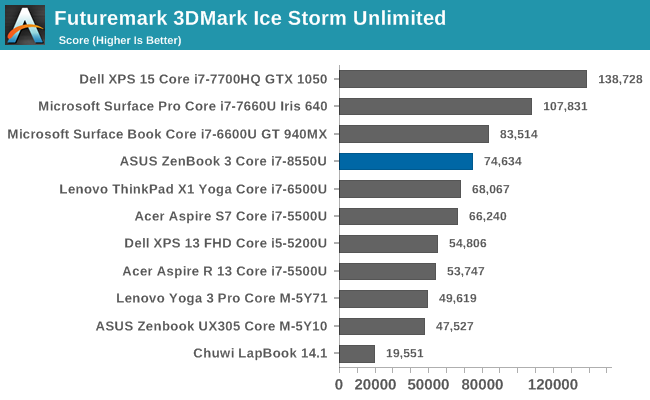
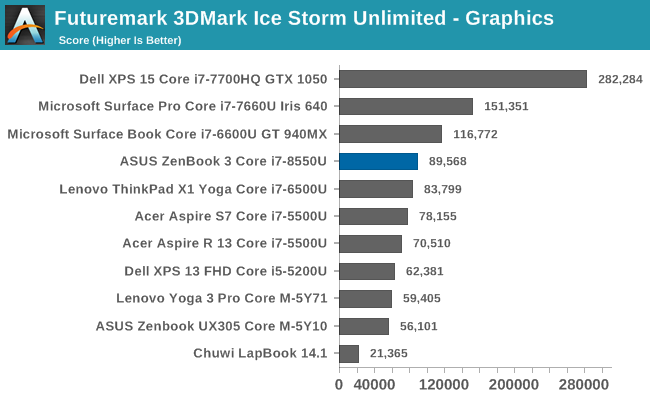
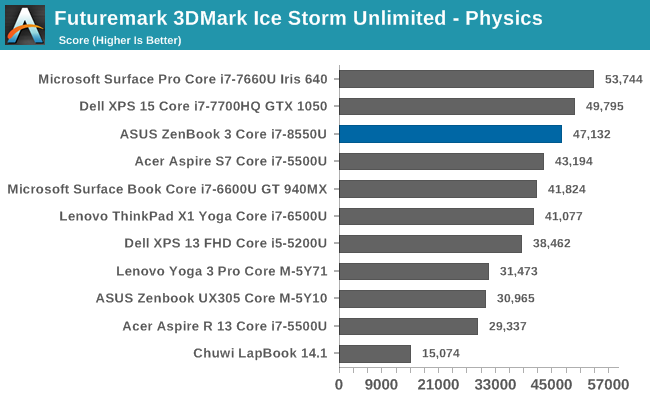
FutureMark has continuously updated it’s 3DMark suite, offering newer tests for even more powerful hardware, but there’s no need to worry about that with integrated graphics. The HD 620 of the ZenBook 3 slots in about where it’s expected, behind the Iris graphics in the Surface Pro, and below the discrete graphics in the Surface Book, which is the GT 940MX on the original, and well below the GTX 1050 on the Dell XPS 15.
GFXBench
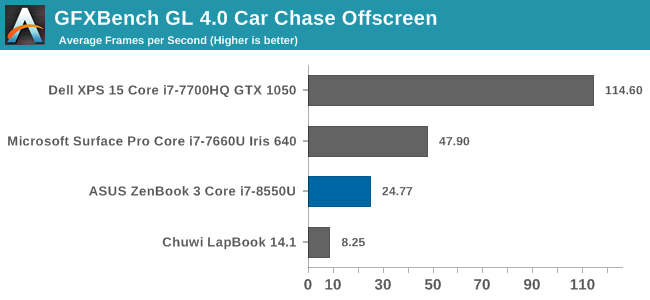
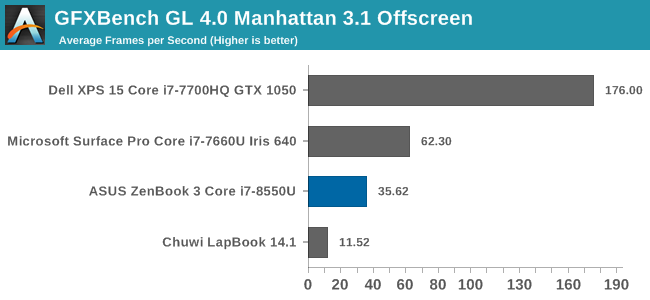
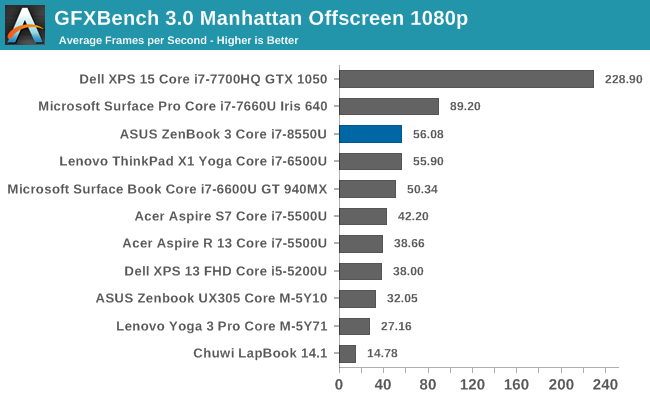
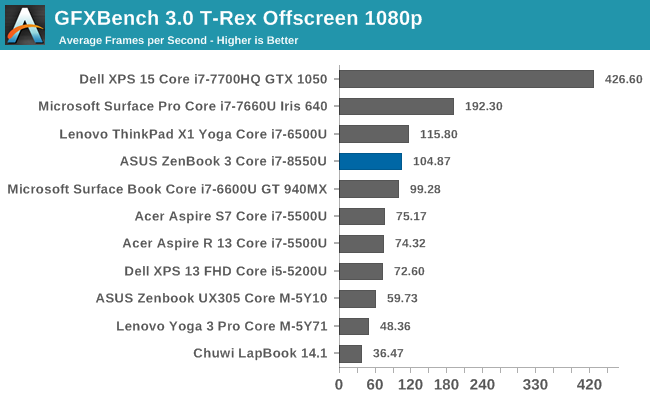
GFXBench is a set of tests that are cross-platform, although the desktop version is OpenGL based and runs at 32-bit precision, rather than the 16-bit precision of mobile devices. Once again, the HD 620 is not very fast, and sits well behind the Iris Plus Graphics 640 in the Surface Pro.
Dota 2 Reborn
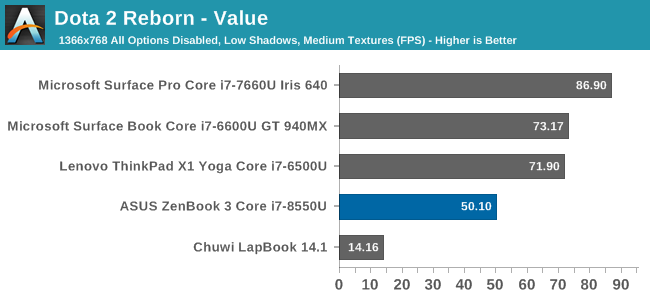
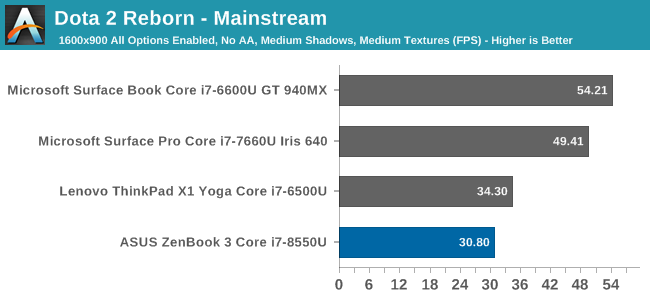
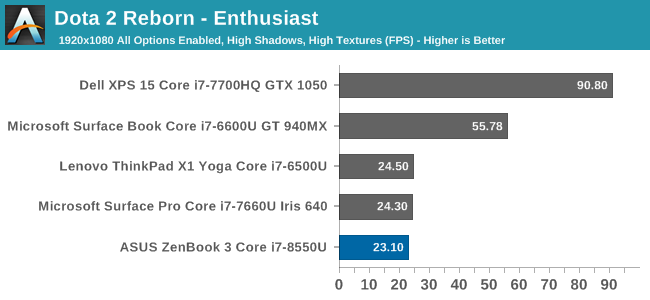
The one game tested is Vavle’s Dota 2, which can run fairly well even on low-end GPUs. The value settings, especially, offer reasonable performance from even integrated graphics. When playing a game, the performance of the ZenBook 3 falls even further behind. Even on the most basic settings, the game can’t quite hit 60 FPS, although all of the integrated GPU systems fall short at our Enthusiast settings.
Storage Performance
ASUS offers two SSD options in the ZenBook 3 UX490UA. The 256 GB is a SATA based SSD, but the larger 512 GB model is a NVMe PCIe 3.0 x4 model. In our review unit is the larger drive, which as it turns out is a Samsung PM961. This is a TLC drive, but thanks to the combination of Samsung’s Polaris controller and their 48-layer V-NAND, performance is very good.

The drive maxes out the PCIe link on reads, and still offers about 1.5 GB/s write speeds under sequential loads. The random read and write speeds are also very solid, assuming you stay in the SLC cache, which for most operations, that shouldn’t be a problem. The PM961 generally outperforms the SM951 MLC drive which was the top option not very long ago.
Originally published at https://www.anandtech.com/show/12062/the-asus-zenbook-3-review (Wayback Machine).