
The Windows 10 Fall Creators Update Feature Focus
Edge Updates
It wouldn’t be an update to Windows 10 without some new features and fixes in the Edge browser, and with the Fall Creators Update, Edge now gets bumped to EdgeHTML 16. It’s a bit disappointing that Edge is still tied to the operating system update schedule, but with the biannual release schedule now locked in, it’s a better situation. As a new browser, Edge launched with Windows 10 in a state that was somewhat sparse, to say the least, but has gotten successively better with every update.
Some of the reasons Edge gets tied to Windows itself is that Edge tends to take advantage of new features coming to the OS, which they would not be able to test and implement outside of the current Windows Insider Program. For example, Edge has already gained some support of Fluent Design, with some acrylic on the tab bar. It’s subtle, but looks nice.

There’s still a lot of features that existed in Internet Explorer that have yet to make their way over to Edge, but they are slowly checking all the boxes. With the FCU, you can finally pin a website to the taskbar, and it gets the webpage icon, as it should. The only missing feature here is a way to customize it opening in a new window, or in a tab in the currently open window, since it’s locked into the latter only. That might not always be what a user would want, especially when heavily using web apps like mail.
One very nice feature that has arrived is the ability to annotate PDFs and e-books right in Edge. Edge is the default PDF viewer in Windows 10, and the ability to now sign and mark up PDFs right in the browser will be welcome to many. There’s always third-party utilities for this, but it’s nice to have the feature built-in. You can of course mark up with Windows Ink as well.

As part of the push to accessibility, Edge will now tap into the Windows Narrator to read websites aloud, just by right clicking the page and choosing “Read aloud”. This works for e-books and PDFs as well, and because it uses the built-in tools, you can easily adjust the voices or add new ones if necessary. You can quickly adjust the speed, or pause the reading, right in the browser window.
For those that miss the ability to browse in full screen, Edge 16 adds that feature back, which can be accessed with F11.
Another small change is the ability to edit the URLs for favorites. Yay.
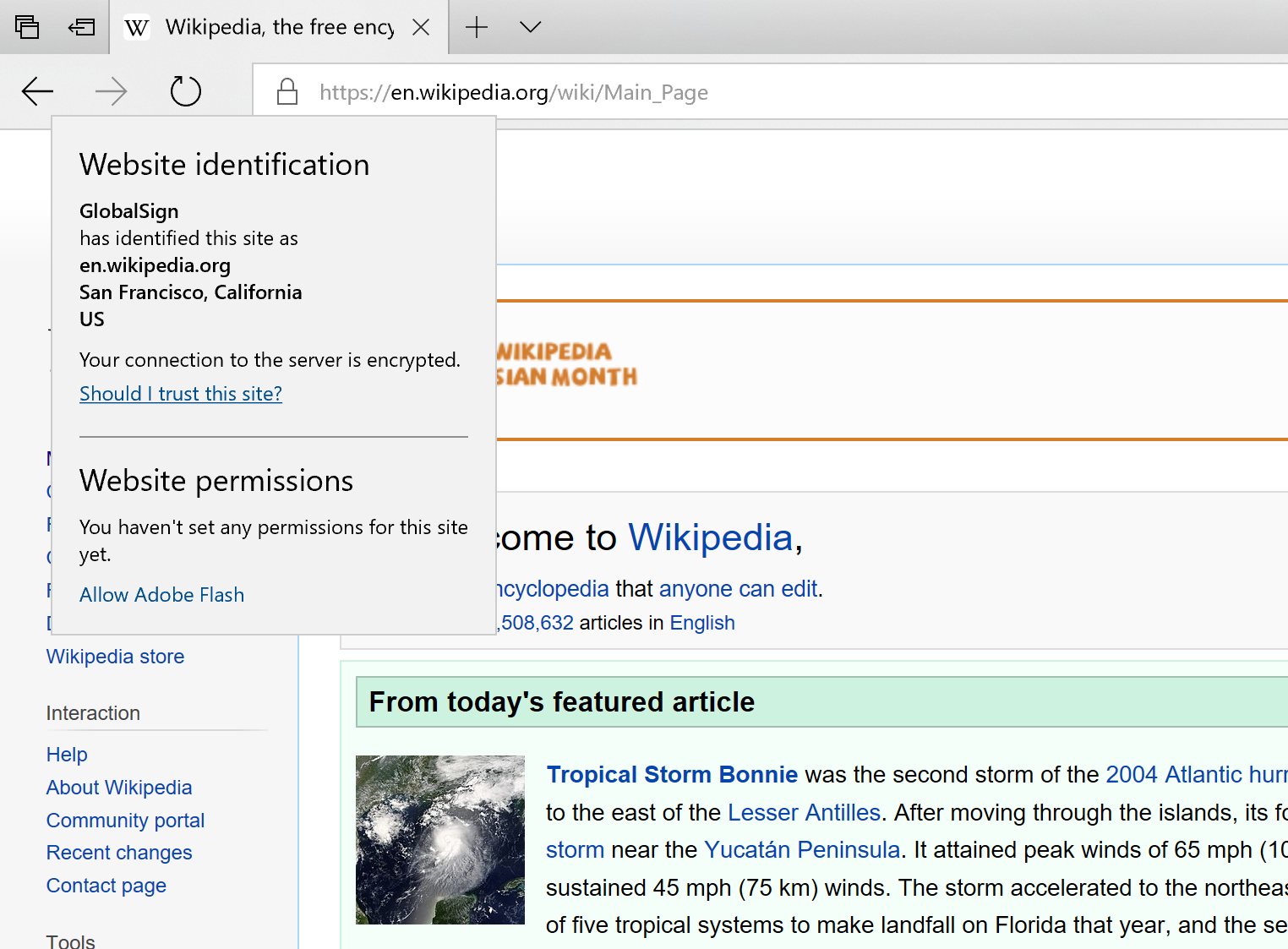
One nice new feature is the ability to manage website permissions, right from the address bar. Clicking on the TLS lock, or the i icon if the site doesn’t have TLS, and you can see and adjust what permissions, such as webcam, location, or notifications, that the site has access to based on your previous responses. You can also view all website permissions under advanced settings.
One thing you still can’t do is actually view the site certificate. The information provided by Edge is very basic, with no option to open the certificate in the more advanced Windows certificate tools to check the trust chain, and more. This seems like an obvious requirement, but is still lacking.
Edge 16 has also added preview support for Service Workers, which are the prelude to Progressive Web Apps on Windows. Going to about:flags allows you to enable this to test PWAs on Edge, in preparation for full support coming in the next update.
For me, Edge is still my go-to browser mostly because of the fantastic job it does rendering text, especially on high DPI displays, but several years on, it’s still missing some very basic functionality, such as the ability to copy the link of an image, but the dev tools have continued to improve with every release. For some tasks, I still have to fall back to Chrome, but you can pretty comfortably use Edge as your daily browser now, which certainly wasn’t the case when it first launched. I look forward to seeing more feature updates coming, with the knowledge that they are chasing a moving target.
Originally published at https://www.anandtech.com/show/12021/the-windows-10-fall-creators-update-feature-focus (Wayback Machine).