
The Asus ROG Strix Z270G Gaming Motherboard Review
Asus ROG Strix Z270G Gaming Board Features
If a look at its name is not conclusive enough, a simple glance either on the motherboard’s box or at the manufacturer’s website instantly reveals that the Asus ROG Strix Z270G Gaming is a product directly marketed towards gamers. Everything about the motherboard, from its color and down to its last feature, was a design choice with gamers in mind. The highlight of the ROG Strix Z270G Gaming probably is its two full-length PCIe slots that allow for SLI/Crossfire configurations. Asus also tried to make this motherboard as easy to work with as possible by installing a lot of tools that automate overclocking/tweaking procedures, allowing less experienced users to easily boost the performance of their systems.
| Asus ROG Strix Z270G Gaming | |
| Warranty Period | 3 Years |
| Product Page | Link |
| Price | Link |
| Size | ATX |
| CPU Interface | LGA1151 |
| Chipset | Intel Z270 |
| Memory Slots (DDR4) | Four DDR4 Supporting 64GB Dual Channel Up to 3733+ MHz |
| Memory Slots (DDR3L) | None |
| Video Outputs | HDMI 1.4a DisplayPort 1.2 |
| Network Connectivity | 1 x Intel I219-V 1 x Qualcomm QCNFA364A |
| Onboard Audio | Realtek ALC1220A |
| PCIe Slots for Graphics (from CPU) |
2 × PCIe 3.0 - ×16, - ×8/×8 |
| PCIe Slots for Other (from PCH) | 2 × PCIe ×1 |
| Onboard SATA | Six, RAID 0/1/5/10 |
| Onboard SATA Express | None |
| Onboard M.2 | 2 × PCIe 3.0 (x4) |
| Onboard U.2 | None |
| USB 3.1 | 1 × Type-C 1 × Type-A 2 × via headers |
| USB 3.0 | 4 x Type-A Rear Panel 2 × via headers |
| USB 2.0 | 2 × Rear Panel 4 × via headers |
| Power Connectors | 1 x 24-pin ATX 1 x 8-pin CPU |
| Fan Headers | 1 x CPU (4-pin) 1 x Pump/Aux (4-pin) 3 x System (4-pin) |
| IO Panel | 4 x USB 3.0 (USB 3.1 Gen 1) 2 x USB 2.0 1 x USB 3.1 Type-A 1 x USB 3.1 Type-C 1 x Network RJ-45 1 x DisplayPort 1.2 1 x HDMI 1.4a 1 x Combo PS/2 5 x 3.5 mm Audio Jacks 1 x Optical SPDIF Out Port |
In The Box
We get the following:
- Driver Disk
- Quick Installation Guide
- Rear I/O Shield
- Four black SATA cables (two straight, two with a 90° connector)
- 2-way SLI HB bridge
- RGB strip cable
- CPU installation tool
- Wireless antenna
- 3D printing mount
- Cable labels
- Drink coaster

Asus supplies a rich bundle alongside with the ROG Strix Z270G Gaming. The typical items that we usually find accompanying any motherboard are a standard manual, a drivers/software DVD, a metallic I/O shield, a case badge, and four SATA cables. Beyond these, Asus also supplies a CPU installation tool that can be used to help installing the CPU without touching it, an HB SLI bridge especially designed for NVIDIA’s GTX 1080 GPUs, a dual WiFi/Bluetooth antenna, a few colored cable labels, and a cardboard drink coaster.
Overclocking with the Asus Strix Z270G Gaming
Gamers are the main target group that the ROG Strix Z270G Gaming is being targeted at, well-known for their enthusiasm and inquisitive nature. A significant percentage of those building a high-performance gaming system will attempt to tweak and/or overclock it. This can lead to woeful experiences for inexperienced users and Asus tried to make this process as foolproof as possible with the implementation of a “crash-free” BIOS and automated overclocking options. For experienced users, the selection and range of tweakable frequency, timing, and voltage options is vast. Combined with the excellent power circuitry, the ROG Strix Z270G Gaming would please even a seasoned overclocker.
Methodology
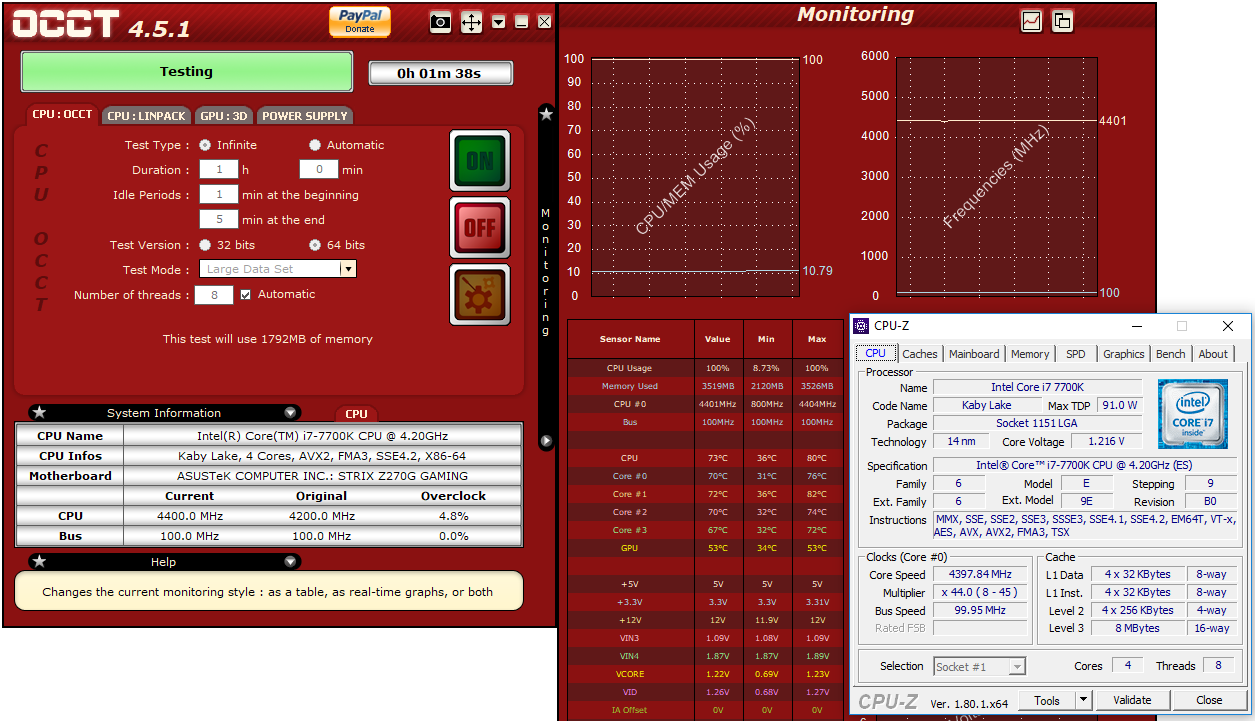
Our standard overclocking methodology is as follows. We select the automatic overclock options and test for stability with PovRay and OCCT to simulate high-end workloads. These stability tests aim to catch any immediate causes for memory or CPU errors.
For manual overclocks, based on the information gathered from previous testing, starts off at a nominal voltage and CPU multiplier, and the multiplier is increased until the stability tests are failed. The CPU voltage is increased gradually until the stability tests are passed, and the process repeated until the motherboard reduces the multiplier automatically (due to safety protocol) or the CPU temperature reaches a stupidly high level (100ºC+). Our test bed is not in a case, which should push overclocks higher with fresher (cooler) air.
Overclock Results
The default configuration of the Asus ROG Strix Z270G Gaming has multi-core turbo enabled and thus our 7700K CPU was reaching a maximum frequency of 4.4 GHz under load, which is typical on advanced gaming/enthusiast motherboards.
Initially, we tested the three automated overclocking options. Both the TPU 1 and TPU 2 presets worked fine for us, with the system overestimating the CPU core voltage only slightly in comparison to what our processor really needed. The 5G preset worked but, unfortunately, its slight overestimation of the CPU core voltage forced our CPU to throttle. Manual control allowed us to reach a maximum frequency of up to 5 GHz, with our processor just shy of the thermal throttling temperature point. A boost to 5.1 GHz caused our processor to throttle once again. This has little to do with the capabilities of the motherboard but with the thermal performance of our specific processor. A better cooling solution or a processor that thermally performs better (delided or with a better-attached lid from the factory) could achieve even better results.

The maximum BCLK frequency that we managed to reach with minimal tweaking was 197 MHz, which is an excellent result. Adjusting voltage and/or FCLK settings could probably bring the BCLK clock even higher, although that would hardly matter for regular users. All of the newer motherboard designs decouple the CPU bus from the rest of the frequency domains in order to allow for these high BCLK overclocks, meaning that the performance of other components and the system’s overall bandwidth remains unaffected. On the contrary, frequency misalignments can cause an overall performance drop. Thus, this technique is useless to users who have unlocked CPUs and should be used only to overclock locked CPUs.

Originally published at https://www.anandtech.com/show/11893/the-asus-rog-strix-z270g-gaming-motherboard-review (Wayback Machine).