
The ASRock Z270 Supercarrier Motherboard Review: 4-way SLI and 5 Gigabit Ethernet on Kaby Lake
- Posted in
- Motherboards
- ASRock
- SLI
- Aquantia
- Z270
ASRock Z270 Supercarrier Software
Despite the motherboard’s class and price, ASRock made no effort to develop a software package any more advanced than what comes with their mainstream motherboards. The driver DVD has a very basic automated installer software with five tabs. The first tab lists all of the drivers and software that are compatible with this motherboard, plus Google’s Chrome Browser and Toolbar, even though these have their own tab. There is an “Install all” option that automatically installs everything, without leaving any room for the user to select what should be installed and what not. The “Utilities” tab is practically empty, with only the “Restart to UEFI” software to be found here, a simple shortcut that restarts the PC and automatically enters the BIOS. Manuals and guides can be found under the Information tab and, finally, the company’s contact information is all that can be seen under the Contact tab.

The core software package that accompanies the ASRock Z270 Supercarrier, and practically all of ASRock’s motherboards today, is the ASRock App Shop. This application doubles as a software “shop” and as an updates installer. Extra software packages that can enhance the system’s devices, offer more options, and even some basic games can be downloaded and installed.


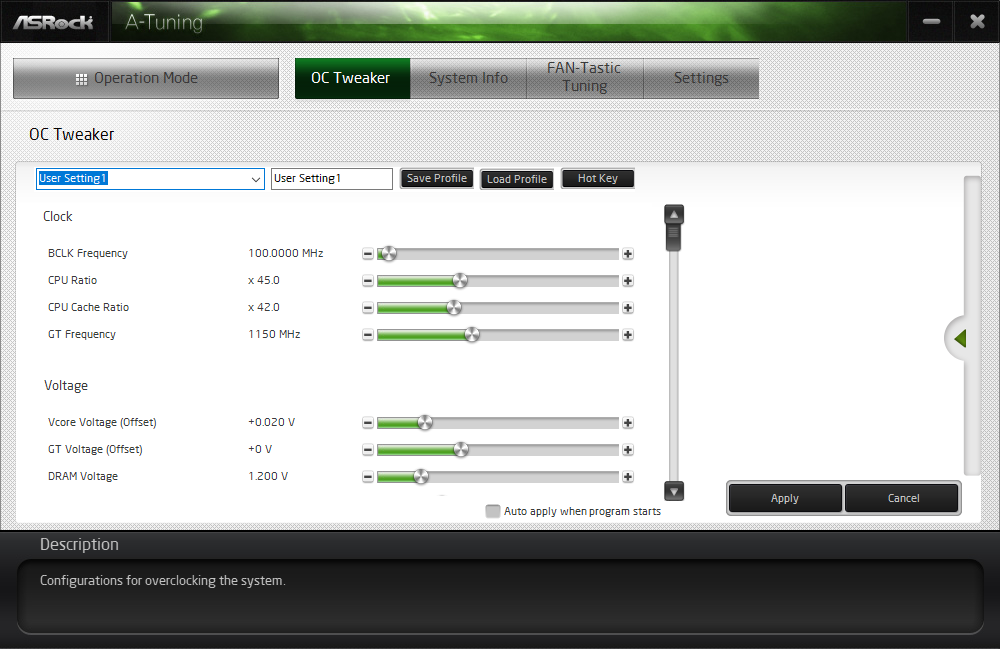
ASRock’s A-Tuning utility is the software package that allows for overclocking, fan tuning and monitoring via the OS. In its “OC Tweaker” tab we found many of the settings that are accessible via the BIOS screen, allowing for casual overclockers to experiment with minimal risk, as the settings reset when the system restarts. It is also handy for people who do not want a permanent overclock forced via the BIOS but prefer to boot with stock settings and force an overclock whenever they want or after the OS has booted.
The ASRock XFast LAN technically is the well-known cFos software with ASRock’s skin. This software allows the user to prioritize network traffic according to his/her needs. For example, it can be set to prioritize the traffic of a specific game/application over a downloading/file sharing app or server. This is particularly useful for applications where seamless network traffic can be vital, such as, for example, when there are IP security cameras connected to the computer and they should not be disturbed by the downloading of a large OS update or other files.

Originally published at https://www.anandtech.com/show/11885/the-asrock-z270-supercarrier-motherboard-review (Wayback Machine).