
Dell Latitude X300: A Traveler's Companion
- Posted in
- Laptops
Features — Hardware
Dell also sent along the X300's MediaBase docking station. A docking station in the case of an ultraportable system provides more than just port replication for the system. The MediaBase brings additional ports including a serial port and a PS/2 mouse port that the X300 doesn't provide, clearly due to space issues. The use of MediaBase also adds Gigabit ethernet support.
Our system also came with a second battery, which provides more battery life than the primary X300 battery. As shown below, X300's 14.8V 4.4AH extended life battery is much wider than the primary battery. Its use limits the 180 degree range of the screen. It also makes it harder to see and use the ports on the back. Additionally, it does make the system look a bit odd, and our own preference is the primary battery. The extended life battery works better as a solution away from the docking station.
The right side reveals the MediaBase modular bay. Our system came with a DVD-ROM, which can be switched easily enough to a CD-ROM, DVD-ROM, CD-RW/DVD-ROM combo drive, or a DVD+RW drive. This would depend on the additional modular bay purchase made. The VGA-port is blocked because it is replicated on the back of the docking station.

The front of MediaBase reveals a few buttons (left to right): undock, power on, mute, and volume up and down. All are green LEDs.

The left side of the system is the release clip to the docking station and the docking station's subwoofer. Because the MediaBase has an ethernet port replicator, the ethernet jack on the laptop is blocked off.

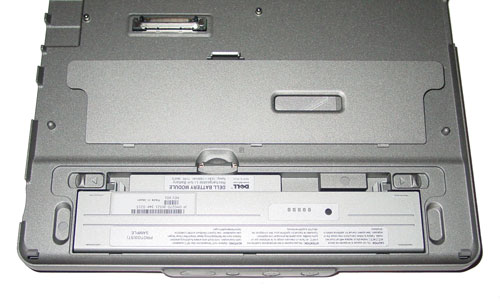
The primary battery is housed on the top side of the MediaBase, and obviously, the extended life battery will not be able to fit in the docking station. The battery cover has a small window, so that the battery status can still be viewed. We will reserve judgment on the usefulness of the extra battery till we look at the test results.
The bottom of the MediaBase shows the subwoofer. Other than that, there is nothing else revealed on the bottom of the docking station.

The docking process is easy enough: just slide the front of the X300 into the MediaBase and press down. Undocking is the same. Hit the undocking button on the front of the docking station, and pull the release level on the left side.
While the MediaBase offers more functionality than the X300 alone, it does come with a price: an increase size and weight. The MediaBase itself is 10.8" x 9.3" x 0.79" and weighs 1.9 pounds. Therefore when docked, the MediaBase increases the total system height to just shy of 2 inches (1.88 inches to be exact), while the weight of the system increases to 5.3 pounds.
We found the addition of the MediaBase to be quite chunky and the use of the extended life battery with the MediaBase makes the system extra chunky. When we were on the go, we found that we just took the system with us, and this basically defeated the purpose of a second battery that the MediaBase offers. The beauty of the X300, like all ultraportable notebooks, is the fact that it is small and easily portable. As we mentioned before, we only liked the extended life battery as a solution away from the MediaBase. This is suppose to increase the overall battery life compared to the use of the primary battery, but we weren't given any specific information to what degree the increase was. This will be determined in our own testing.

Originally published at https://www.anandtech.com/show/1188 (Wayback Machine).