
IBM Think Center S50: The Ideal Corporate Small Form Factor
- Posted in
- Systems
IBM Think Center S50: S50 Chassis
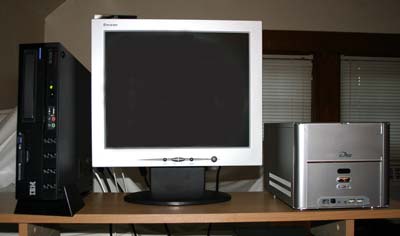
IBM's Think Center S50 is the smallest Desktop PC made by IBM — some 62% smaller than traditional IBM Desktops. As you can see in comparison to the more traditional SFF, the Think Center is laid out as a wide, thin, and shallow computer. At 12.2" x 14" x 3.3", it is really quite small. Despite the size, the S50 is very heavy, weighing a bit over 16 lbs. (7.3 kg). IBM claims that the S50 can support heavy CRT monitors on top of the unit, and we agree — you will not find any thin metal in this computer. In addition, the thick metal is said to function as a heatsink, keeping the Think Center cooler. The S50 is all black and comes with a matching black keyboard and mouse.
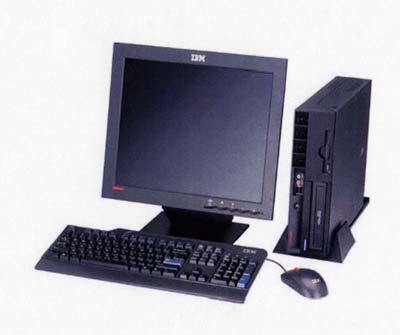
A tilt-stand is also provided, which reduces the “footprint” even further. In the system above, the S50 is standing next to a 17" flat panel. Even in the smallest cubicles and on the smallest desk, the IBM is kind in its space requirements.
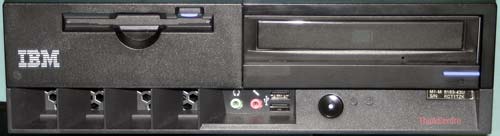
The Think Center front has slanted air intakes where 2 small, but quiet, fans pull in outside air to cool the fanless CPU. Standard components are a 1.4mb 3.5" floppy and a CD-ROM, CD-RW or DVD-ROM. Either a 40GB or 80GB 7200RPM hard drive is available. In addition to drive access, the front has 2 USB 2.0 ports and mic and headphone inputs. A flush on/off push-button is also on the front of the tiny chassis.
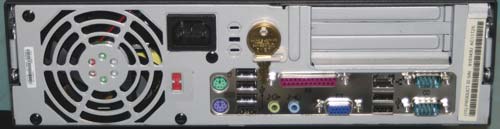
The rear of the chassis is a pleasant surprise in terms of port selection. Not only are there six USB 2.0 ports on the rear, you will also find 2 serial ports and a Parallel port — very unusual on SFF computers. Anyone who has worked in the Corporate Computer arena will quickly discover that there are lots of legacy peripherals to which corporations have become attached, and these sometimes are proprietary. IBM was smart to cater to those needs with a full array of legacy ports plus a full 8 USB 2.0.
If you are looking for the Firewire ports, you won't find any. This machine is targeted at the Corporate desktop, and it is very rare to find a consistent need for IEEE 1394 ports in that target audience. Since there are 2 PCI expansion slots in the PC, a Firewire card can always be added if needed.
You can also see the outlet grill on the rear for the 200 Watt power supply. IBM has paid careful attention to the PS, selecting a model that is very quiet.
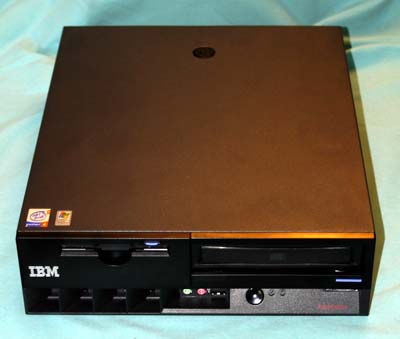
The small black IBM box is a model of simplicity from an end-user's perspective. The computer is completely screwless. A top key lock can prevent unauthorized access to the unit. There is also a Kensington lock slot for Corporations using that security solution.
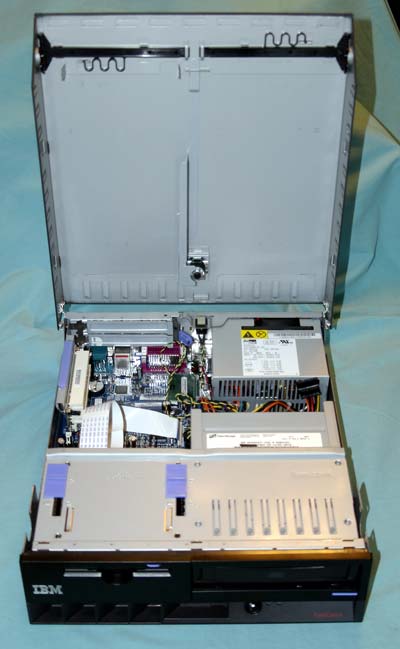
Opening the computer is as easy as pushing the lock buttons on each side and raising the top. Inside, you will find an open, uncluttered interior whose excellent engineering makes it appear to be the model of simplicity.
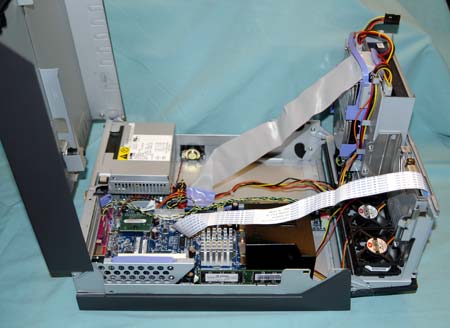
By flipping out the hinged drive panel, you have full access to everything inside the computer. IBM markets the Think Center S50 as extremely easy to service. More than that, many corporations will consider the S50 as User Serviceable to much deeper levels than generally seen on the Corporate desktop. Of course, this significantly reduces “cost-of-ownership” over the 2- to 3-year lease life of the S50.
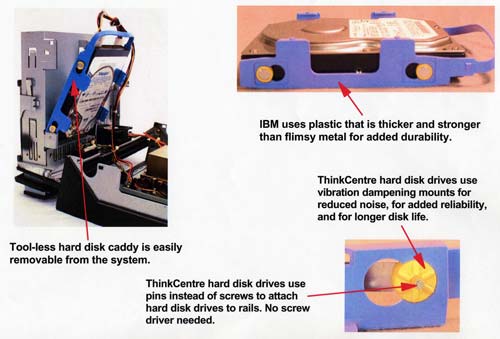
Even the drives in the S50 are “User-Serviceable”. The drives can be removed or replaced without so much as a screwdriver. Whether replacement is by the actual PC user or a technician, service time is significantly reduced for drive replacement.
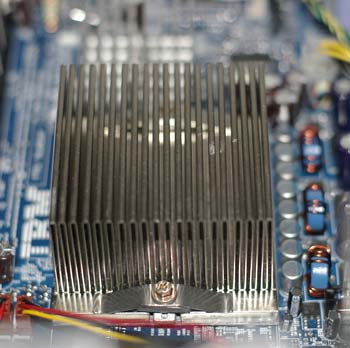
The CPU is protected by a metal cover. Beneath the cover is a very large passive heatsink generally preferred by IT departments. Cooling air blows across the heatsink fins from the 2 front mounted fans to allow high-end CPUs to be used. Our test system came equipped with a 3.2GHz Pentium 4.
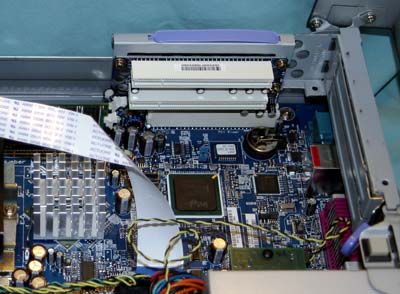
The Think Center S50 provides 2 full-length PCI slots for expansion. The lack of an AGP slot reminds us again that the target audience is the Corporate Desktop. Corporate PC departments would not be adding expensive 8X AGP cards to computers aimed at general business usage, and the on-board Intel Extreme Graphics 2 is plenty of graphics power for business applications.
Originally published at https://www.anandtech.com/show/1184 (Wayback Machine).