
The Corsair Neutron NX500 (400GB) PCIe SSD Review: Big Card, Big Pricetag
Power Management
Real-world client storage workloads leave SSDs idle most of the time, so the active power measurements presented earlier in this review only account for a small part of what determines a drive's suitability for battery-powered use. Especially under light use, the power efficiency of a SSD is determined mostly be how well it can save power when idle.
Idle power management for NVMe SSDs is far more complicated than for SATA SSDs. NVMe SSDs can support several different idle power states, and through the Autonomous Power State Transition (APST) feature the operating system can set a drive's policy for when to drop down to a lower power state. There is typically a tradeoff in that lower-power states take longer to enter and wake up from, so the choice about what power states to use may differ for desktop and notebooks.
We report two idle power measurements. Active idle is representative of a typical desktop, where none of the advanced PCIe link or NVMe power saving features are enabled and the drive is immediately ready to process new commands. The idle power consumption metric is measured with PCIe Active State Power Management L1.2 state enabled and NVMe APST enabled.
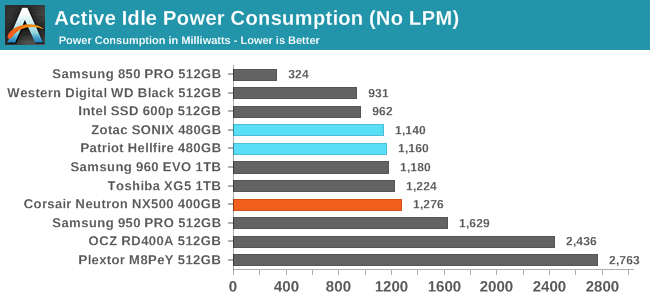
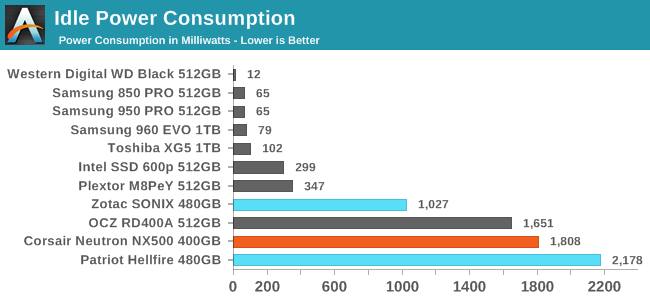
The active idle power consumption of the NX500 is clearly higher than the other two Phison E7 drives, most likely due to the extra DRAM on the NX500. Idle power saving modes are still broken with the combination of this testbed and the Phison E7, but at least the NX500 isn't drawing as much power as the Patriot Hellfire did. Given the intended audience, it is unlikely that NX500 users would even attempt to use the low power modes.
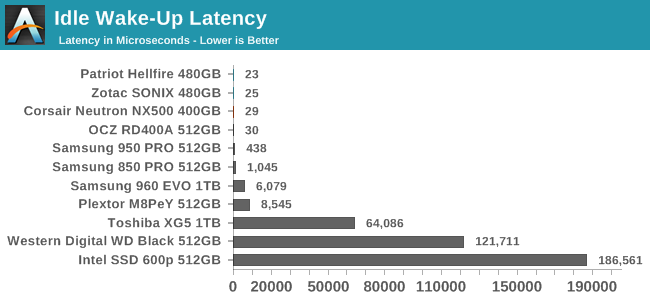
With no drive-level sleep state to wake up from, the idle wake-up latency of the NX500 is the minimal time it takes to switch the PCIe link back to full power.
Originally published at https://www.anandtech.com/show/11602/the-corsair-neutron-nx500-400gb-ssd-review (Wayback Machine).