
Launching the #CPUOverload Project: Testing Every x86 Desktop Processor since 2010
- Posted in
- CPUs
- AMD
- Intel
- Haswell
- Thuban
- Enterprise CPUs
- Vishera
- Kaveri
- Broadwell
- Skylake
- Carrizo
- Zen
- Kaby Lake
- Bristol Ridge
- Ryzen
- Core
- Skylake-SP
Gaming Tests: Gears Tactics
Remembering the original Gears of War brings back a number of memories – some good, some involving online gameplay. The latest iteration of the franchise was launched as I was putting this benchmark suite together, and Gears Tactics is a high-fidelity turn-based strategy game with an extensive single player mode. As with a lot of turn-based games, there is ample opportunity to crank up the visual effects, and here the developers have put a lot of effort into creating effects, a number of which seem to be CPU limited.
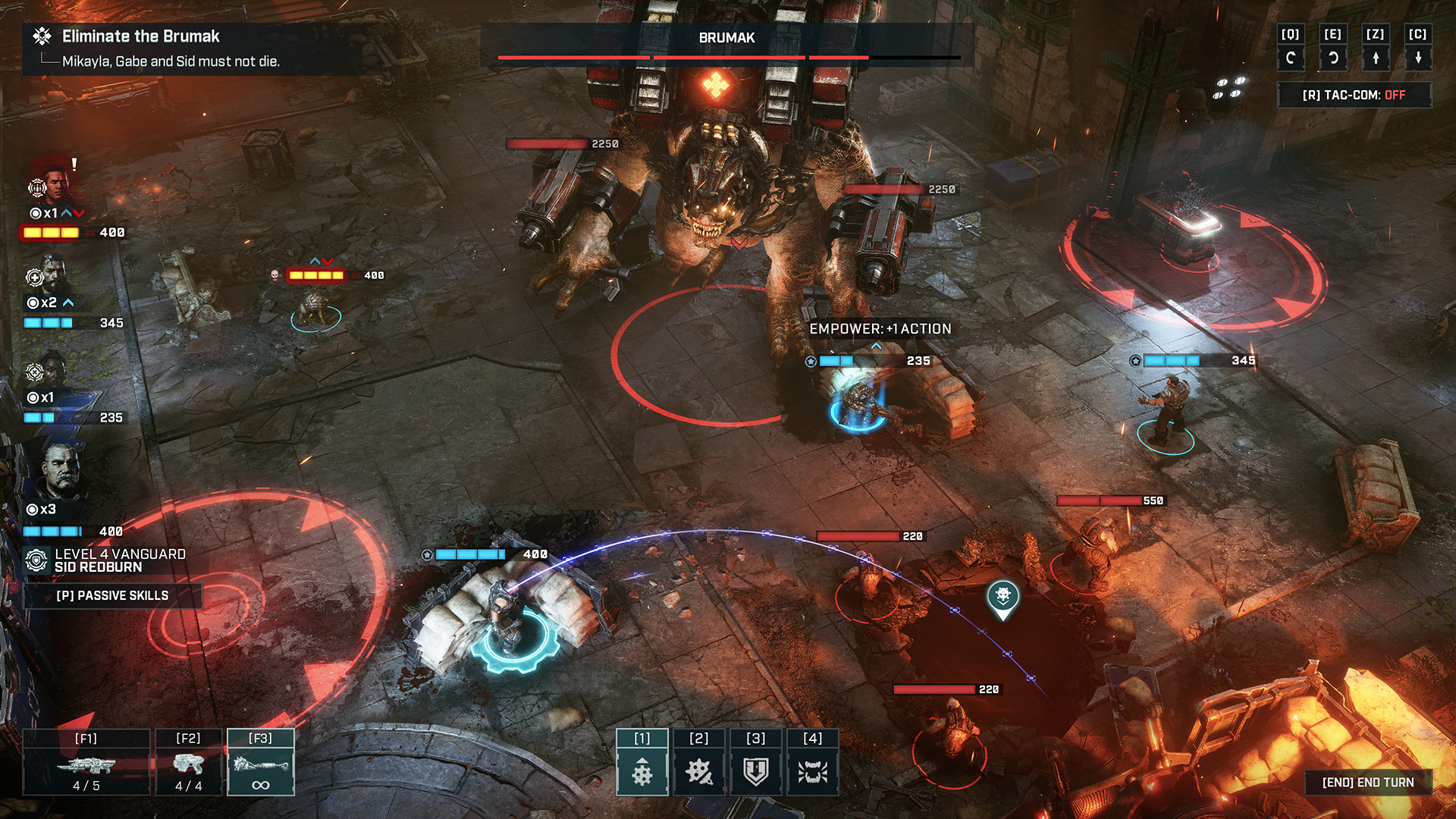
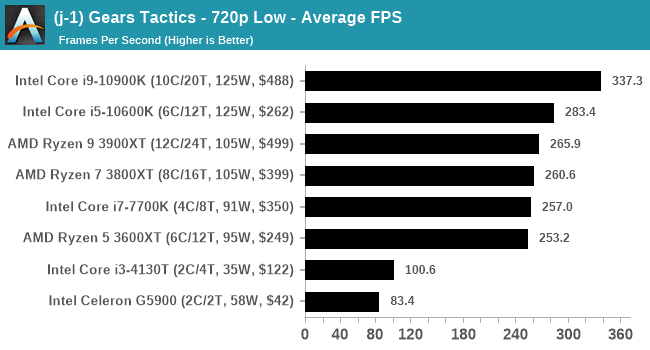
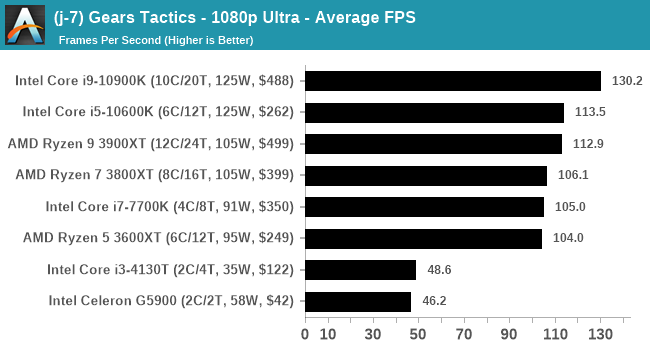
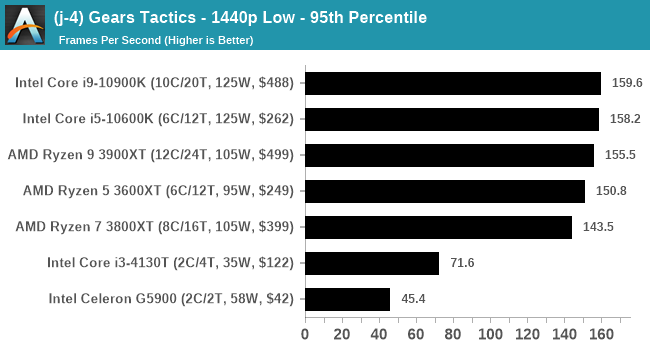
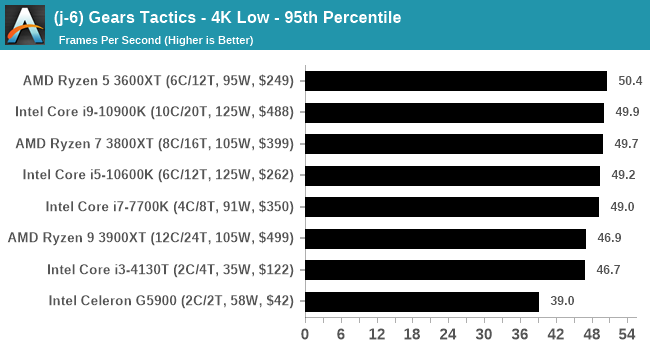
Gears Tactics has an in-game benchmark, roughly 2.5 minutes of AI gameplay starting from the same position but doing slightly different things each time. Much like the racing games, this usually leads to some variation in the run-to-run data, so for this benchmark we are taking the geometric mean of the results. One of the biggest things that Gears Tactics can do is on the resolution scaling, supporting 8K, and so we are testing the following settings:
- 720p Low
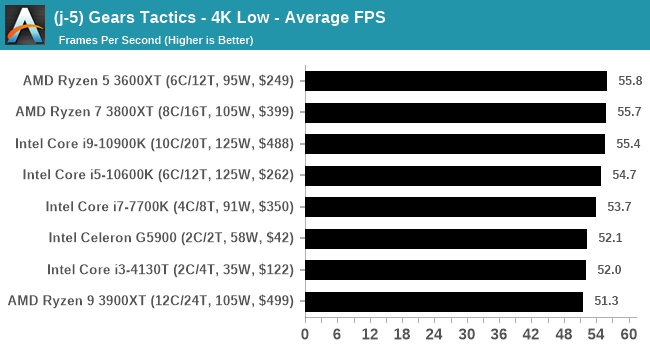
- 4K Low
- 8K Low
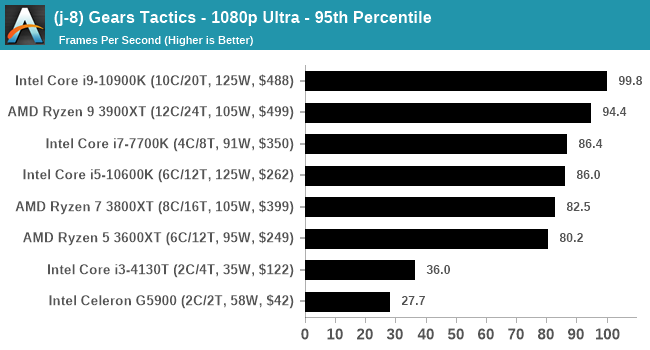
- 1080p Ultra
For automation, Gears Tactics falls under one of our more frustrating titles. The resolution and quality are taken from a settings file, and this is easily transferable between machines. However one part of the settings file cannot be transferred – a specific hardwareID created by the CPU+GPU combination. To get this, we load up the game first without a settings file so it generates the value, then we extract that value to use in our pre-prepared settings files.
There is no command line option to get to the benchmark, and so we load up the game and have to navigate to the benchmark mode. While I was testing for this article, the game introduced an intro splash screen notifying users of an update, which meant I had to script a way to cancel that screen without exiting the game – luckily there was a small segment of the ‘accept’ box that doesn’t cover the ‘exit game’ box when the intro splash screen disappears (so it should be valid when that splash screen is removed, or replaced).
By far the biggest issue with the benchmark is the results output. The game showcases a mountain of data when the benchmark is finished, such as how much the benchmark was CPU limited and where, however none of that is ever exported into a file we can use. It’s just a screenshot which we have to read manually. If the developers could output all this data that they’ve clearly recorded and shown to the user, it would make my job a lot easier. I did consider putting the benchmark in a FRAPs wrapper, however the loading time for the test is too variable, along with the lack of a fixed seed for the AI actions that makes the benchmark itself a bit variable in length.
As with the other benchmarks, we do as many runs until 10 minutes per resolution/setting combination has passed. For this benchmark, we manually read each of the screenshots for each quality/setting/run combination. The benchmark does also give 95th percentiles and frame averages, so we can use both of these data points.
| AnandTech | IGP | Low | Medium | High |
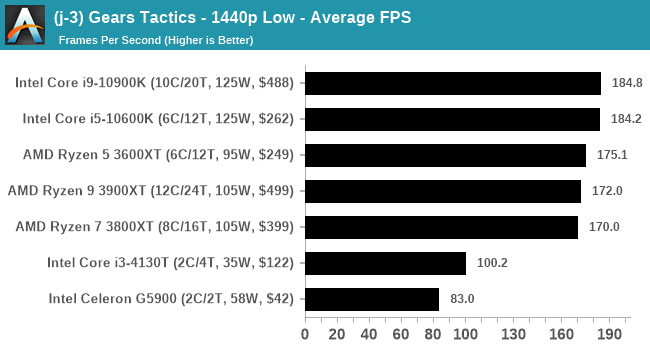
| Average FPS | |
 |
 |
 |
| 95th Percentile | 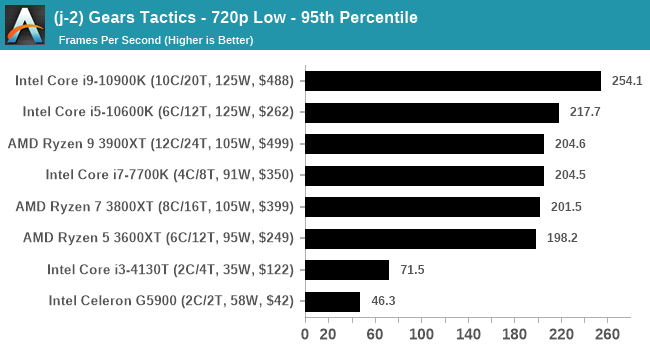 |
 |
 |
 |
All of our benchmark results can also be found in our benchmark engine, Bench.
Originally published at https://www.anandtech.com/show/11425/launching-the-cpu-overload-project-testing-every-x86-desktop-processor-since-2010 (Wayback Machine).