
Launching the #CPUOverload Project: Testing Every x86 Desktop Processor since 2010
- Posted in
- CPUs
- AMD
- Intel
- Haswell
- Thuban
- Enterprise CPUs
- Vishera
- Kaveri
- Broadwell
- Skylake
- Carrizo
- Zen
- Kaby Lake
- Bristol Ridge
- Ryzen
- Core
- Skylake-SP
Gaming Tests: F1 2019
The F1 racing games from Codemasters have been popular benchmarks in the tech community, mostly for ease-of-use and that they seem to take advantage of any area of a machine that might be better than another. The 2019 edition of the game features all 21 circuits on the calendar, and includes a range of retro models and DLC focusing on the careers of Alain Prost and Ayrton Senna. Built on the EGO Engine 3.0, the game has been criticized similarly to most annual sports games, by not offering enough season-to-season graphical fidelity updates to make investing in the latest title worth it, however the 2019 edition revamps up the Career mode, with features such as in-season driver swaps coming into the mix. The quality of the graphics this time around is also superb, even at 4K low or 1080p Ultra.

To be honest, F1 benchmarking has been up and down in any given year. Since at least 2014, the benchmark has revolved around a ‘test file’, which allows you to set what track you want, which driver to control, what weather you want, and which cars are in the field. In previous years I’ve always enjoyed putting the benchmark in the wet at Spa-Francorchamps, starting the fastest car at the back with a field of 19 Vitantonio Liuzzis on a 2-lap race and watching sparks fly. In some years, the test file hasn’t worked properly, with the track not being able to be changed.
In the 2019 benchmark, the test file allows you to select a driver, a track, a position, how many laps, and the weather. It doesn’t allow you to set the grid how you see fit (perhaps due to sponsorship reasons?), but also one bug bear with this version is that they seem to have made the aggression in the benchmark zero, or worse. There’s never any overtaking. Perhaps because in previous years there was a chance that you could be crashed into, and the benchmark would stall? I never had that problem.
For our test, we put Alex Albon in the Red Bull in position #20, for a dry two-lap race around Austin. We test at the following settings:
- 768p Ultra Low
- 1440p Ultra Low
- 4K Ultra Low
- 1080p Ultra
In terms of automation, F1 2019 has an in-game benchmark that can be called from the command line, and the output file has frame times. That part is perfect. The problem is with the settings file – it is another settings file that requires the CPU and GPU listed to be the exact models in the correct string format, else it throws everything out and reverts to default. This is especially tricky if the CPU string has a series of extra white space that isn’t immediately noticeable.
In order to ensure we have the correct CPU/GPU, we delete the settings file and load up the game so it creates its own. We then regex the settings file created with the graphics settings we want for the test. Unlike Civilization 6, where you can choose individual presets in the settings file, every specific graphical settings needs to be adjusted – this leads to about 25 regex commands for the different parts that need adjusting.
Nonetheless, it’s all doable, and the benchmark works well. We have seen issues with CPUs that do not support AVX, perhaps indicating that F1 2019 can’t be run properly on Celerons or Pentiums.
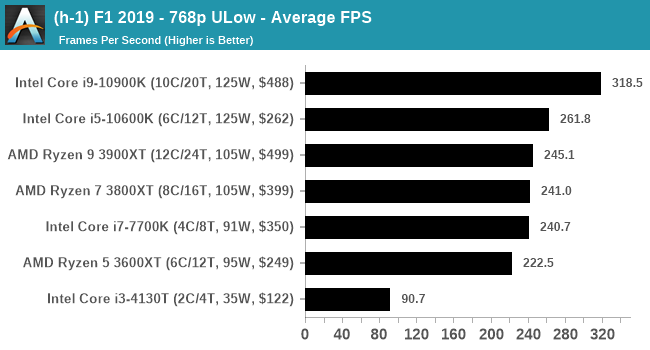
| AnandTech | IGP | Low | Medium | High |
| Average FPS | |
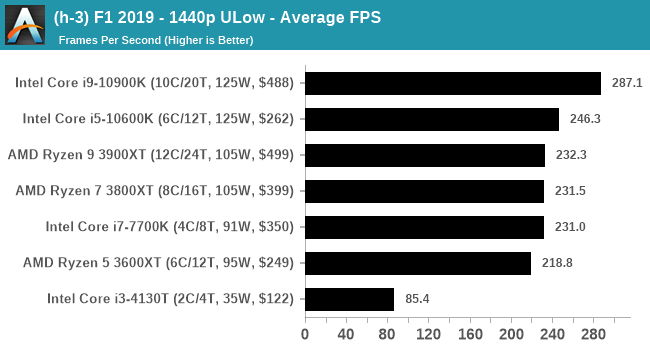 |
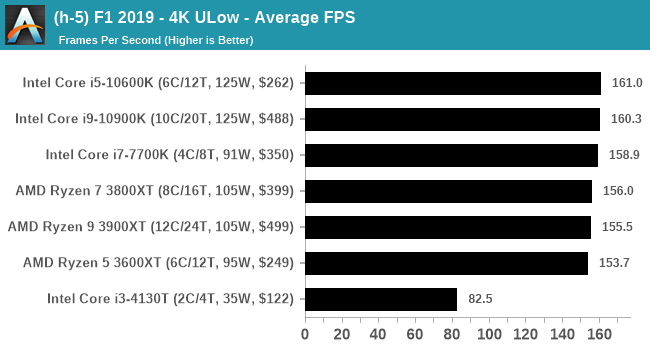 |
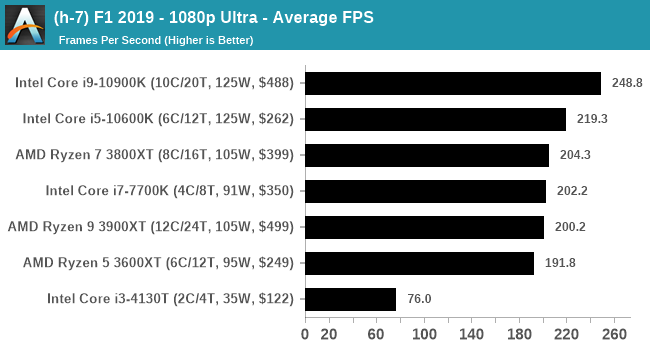 |
| 95th Percentile | 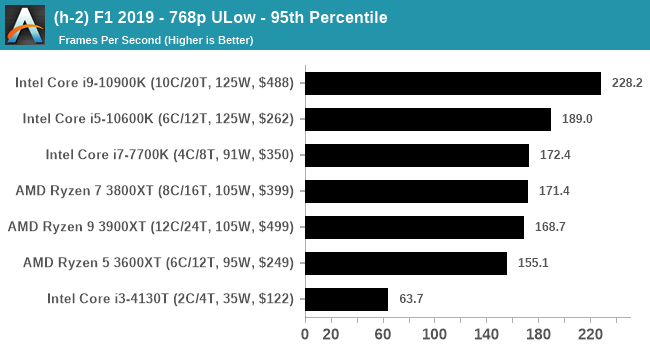 |
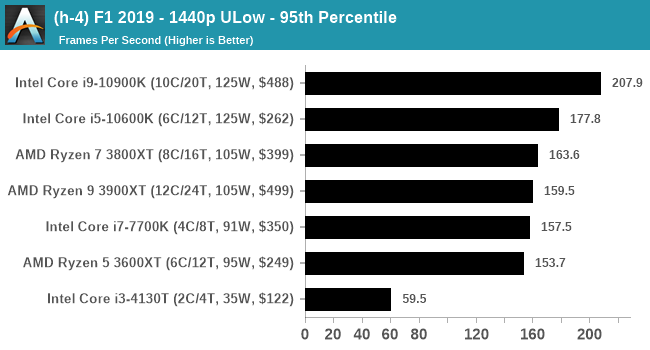 |
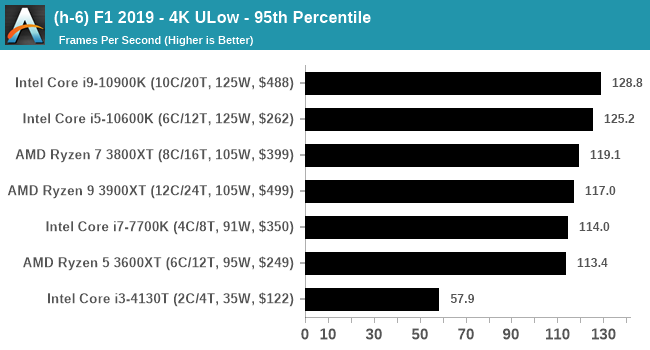 |
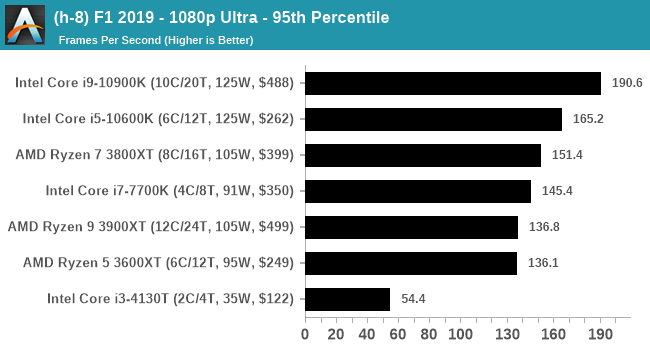 |
All of our benchmark results can also be found in our benchmark engine, Bench.
Originally published at https://www.anandtech.com/show/11425/launching-the-cpu-overload-project-testing-every-x86-desktop-processor-since-2010 (Wayback Machine).