
Soltek KT600-R: Fast & Promising
- Posted in
- Motherboards
Soltek KT600-R: BIOS and Overclocking
Soltek uses AMI BIOS on the KT600R. Our board was tested with the shipping AA1R BIOS. The KT600-R BIOS provides a complete range of options for tweaking and overclocking. As is typical of Soltek, the options are much more than you would expect on a board designed to sell for a low price.
Click image to view a larger picture.
The Main BIOS Screen layout includes the standard options plus selections for Frequency/Voltage Control, Advanced Chipset Features for system timings, and SmartDoc Anti-Burn.
Click image to view a larger picture.
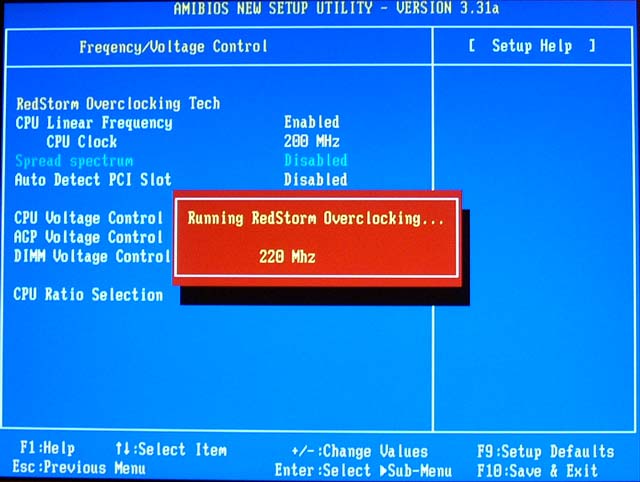
Voltage selection and CPU ratios are adjusted in the Frequency/Voltage Control menu. Voltage adjustments are included for Core Voltage, Dimm, and AGP. The RedStorm Overclocking Utility is also found in this section. This Soltek feature allows the system to determine the best overclock and to set the best overclocking speed. You choose RedStorm, and the system runs until it finds the best OC. It then sets the speed in the BIOS and reboots the system at the new overclocked speed.
System and very limited Memory Timings are adjusted in the Advanced Chipset Features menu. A disappointment for enthusiasts will be the very limited range of memory timing adjustments. You can select base memory speed up to 400, CAS, and Bank Interleave, Command Length, and Command Rate — and nothing else. None of the desirable memory timings other than CAS are here to adjust. As we have seen on all KT600 chipsets so far, there is also not an option to fix AGP/PCI bus speed. Without a PCI fix adjustment, overclocking will be limited. Fortunately, there is a full range of multipliers (Ratios) available that work well on recent Athlon CPUs.

Click image to view a larger picture.
PC Health functions are included in the SmartDoc Anti-Burn Shield section. Monitoring functions include System, CPU, and ABSII temperatures, fan speed monitoring for 3 on-board fan connections, Vcore, and Power Supply readings for all rails. Soltek includes a Hardware monitoring utility on their installation CD for reporting the PC Health values in Windows.
The Anti-Burn Shield II allows you to set temperatures to provide an overheating warning. You can also choose temperatures that will generate an automatic shutdown. With the lack of attention paid to Athlon overheating problems in the past, we are pleased to see this concern addressed by Soltek on a board that will sell into the mainstream market.
BIOS options for the KT600-R are complete except for missing memory timings and the absence of a PCI/AGP lock. Since no KT600 board has provided PCI/AGP lock, we can’t fault Soltek for this omission. The KT600-R BIOS is very much in-line with Soltek’s reputation of building economical boards that will still satisfy the computer enthusiast.
FSB Overclocking Results
In the past, when reviewing AMD motherboards, the only test method used at AnandTech was to remain at default multiplier and default voltage while increasing the FSB until the highest stable FSB was reached. This method does report useful information for comparison, but there is another method for overclocking many recent Athlon motherboards. Most current Athlon XP/Barton CPUs are unlocked or they behave as unlocked on recent motherboards. This allows overclocking by changing the multiplier or ratio of the Athlon CPU. On recent motherboards and Athlon CPUs, this requires no special modification to the board or CPU. It is now a standard feature available to any end-user who wants to use it. We have seen cases, like the Soltek KT600 that we are testing, where the FSB overclock is average or poor due to the lack of a PCI/AGP lock, when in fact, very high overclocks were possible by adjusting just the multiplier or both the multiplier and FSB.Since the multiplier or ratio adjustment is now a standard feature on many nForce2, KT600, and SiS 748 motherboards, we are adding a second overclocking test to Athlon reviews. We will change multipliers and/or voltage on an air-cooling setup to find the highest stable overclock by using multiplier, voltage, and FSB with our standard components. We will be trying to find a stable combination to provide an overclock that can still handle our stress testing and does not show overheating problems. We are not just looking for the highest number we could achieve. Both standard multiplier/highest FSB at default voltage and highest stable overclock will be reported.
The following setup was used on the Soltek KT600 for FSB overclocking:
| Front Side Bus Overclocking Testbed | ||||
| Default Voltage | Maximum Overclock | |||
| Processor: | Athlon XP 2500+ (Barton Core) |
Athlon XP 2500+ (1837MHz) (Barton Core – 11x166) |
||
| CPU Voltage: | 1.65V (default) | 1.775V | ||
| Cooling: | Thermalright SK-7 with 80mm Thermaltake Fan | Thermalright SK-7 with 80mm Thermaltake Fan | ||
| Power Supply: | Powmax 350W | Powmax 350W | ||
| Maximum OC: | 2332MHz 212FSB |
2460MHz (+34.2%) (12 x 205) |
||
The above overclocking setup at default voltage allowed us to reach a stable FSB of 212MHz. This is one of the highest KT600 overclocks we have seen at default multiplier/voltage. Although, considering that the DFI NFII Ultra reached a stable 223MHz at the same default settings, we were disappointed in the Soltek overclocking performance compared to the best nForce2 Ultra 400 board. We can point to the lack of PCI/AGP lock for this limited overclocking performance. However, when we increased our multiplier, FSB, and voltage settings, we were able to reach a stable overclock of 2460MHz at 1.775V. This excellent performance with the Barton 2500+ is near the highest overclock of 2502MHz reached on the DFI NFII Ultra.
Originally published at https://www.anandtech.com/show/1134 (Wayback Machine).