
ECS LIVA Z Fanless Dual-LAN Apollo Lake UCFF PC Review
Power Consumption and Thermal Performance
The power consumption at the wall was measured with a 1080p display being driven through the HDMI port. In the graphs below, we compare the idle and load power of the ECS LIVA-ZN33 with other low power PCs evaluated before. For load power consumption, we ran the AIDA64 System Stability Test with various stress components, as well as our custom stress test,and noted the maximum sustained power consumption at the wall.
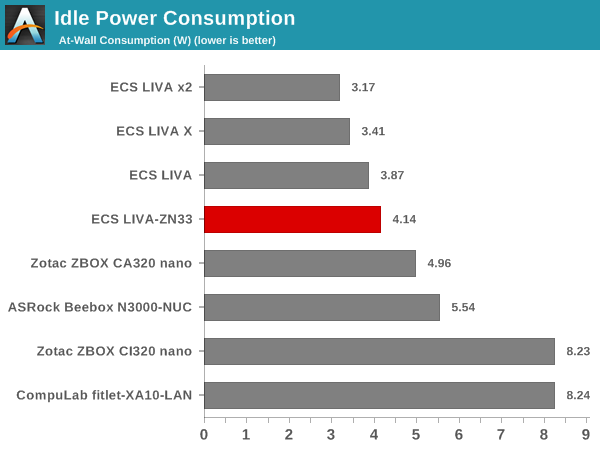
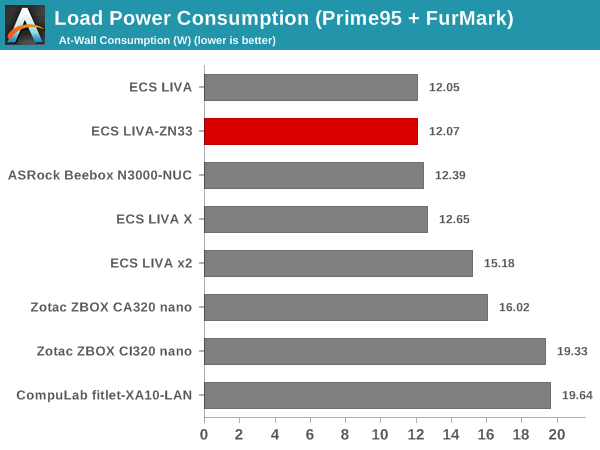
The numbers were recorded for the eMMC-only configuration. Since the load power consumption peak happened in our custom stress test (which doesn't stress the SSD / storage), we didn't feel the need to repeat the custom stress test in the SSD configuration. We, however, noticed that the baseline number (eMMC configuration) shifted up by around 800mW to 1W in the scenarios where the SSD remained relatively idle.
Our thermal stress routine starts with the system at idle, followed by four stages of different system loading profiles using the AIDA64 System Stability Test (each of 30 minutes duration). In the first stage, we stress the CPU, caches and RAM. In the second stage, we add the GPU to the above list. In the third stage, we stress the GPU standalone. In the final stage, we stress all the system components (including the disks). Beyond this, we leave the unit idle in order to determine how quickly the various temperatures in the system can come back to normal idling range. The various clocks, temperatures and power consumption numbers for the system during the above routine are presented in the graphs below. The first set of three graphs correspond to the eMMC-only configuration, while the second set correspond to the SSD + eMMC configuration.


We repeated the same observations with our legacy stress test using the latest versions of Prime95 and Furmark - Prime95 v28.10 for 30 minutes (after launching with the max. stress option), followed by Furmark v1.18.20 for 30 minutes. The Prime95 load is then removed, allowing just the GPU alone to be stressed for 30 minutes. The system is then left idle.


According to the official specifications, the junction temperature of the Intel Celeron N3350 is 90C. The thermal design does manage to keep the core temperatures well below that. We see that the system is essentially limited by the 6W package TDP. Our testing shows that the thermal design can easily handle a sustained 6W power consumption by the SoC for at least 2 hours. The idling temperatures are around 40 - 45C.
Another important aspect to keep note of while evaluating fanless PCs is the chassis temperature. Using the Android version of the FLIR One thermal imager, we observed the chassis temperature after the CPU package temperature reached the maximum steady state value in the above graph.

We have additional thermal images in the gallery below. The FLIR One thermal imager app reported a maximum chassis temperature of around 53C in our measurements.


Given that the heat sink faces downwards. the positioning of the chassis and its all-plastic non-metallic nature ensure that the externally accessible parts remain at a relatively low temperature.
Originally published at https://www.anandtech.com/show/11229/ecs-liva-z-duallan-apollo-lake-ucff-pc-review (Wayback Machine).