
The Intel Optane Memory (SSD) Preview: 32GB of Kaby Lake Caching
BAPCo SYSmark 2014 SE
BAPCo's SYSmark 2014 SE is an application-based benchmark that uses real-world applications to replay usage patterns of business users in the areas of office productivity, media creation and data/financial analysis. In addition, it also addresses the responsiveness aspect which deals with user experience as related to application and file launches, multi-tasking etc. Scores are meant to be compared against a reference desktop (the SYSmark 2014 SE calibration system in the graphs below). While the SYSmark 2014 benchmark used a Haswell-based desktop configuration, the SYSmark 2014 SE makes the move to a Lenovo ThinkCenter M800 (Intel Core i3-6100, 4GB RAM and a 256GB SATA SSD). The calibration system scores 1000 in each of the scenarios. A score of, say, 2000, would imply that the system under test is twice as fast as the reference system.
SYSmark scores are based on total application response time as seen by the user, including not only storage latency but time spent by the processor. This means there's a limit to how much a storage improvement could possibly increase scores. It also means our Optane review system starts out with an advantage over the SYSmark calibration system due to the faster processor and more RAM.
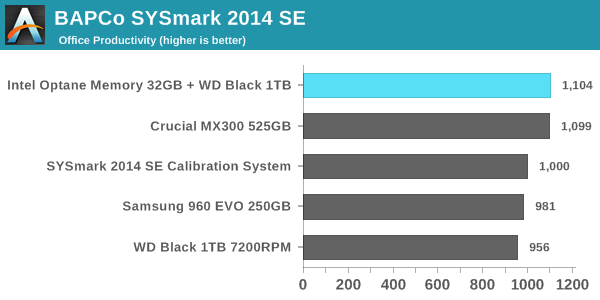
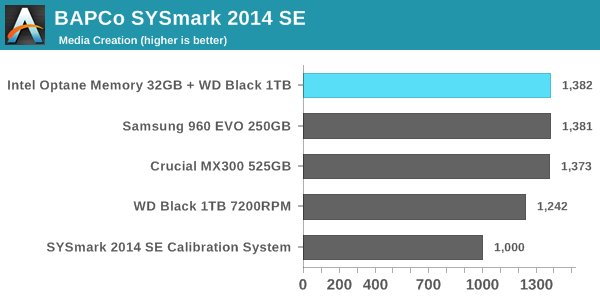
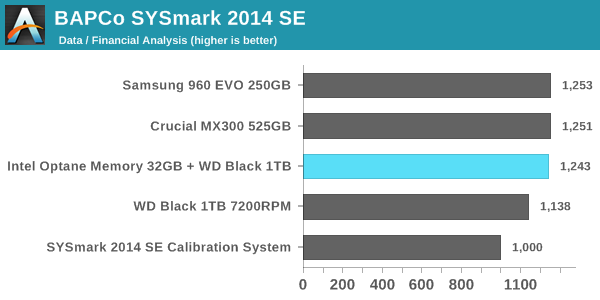
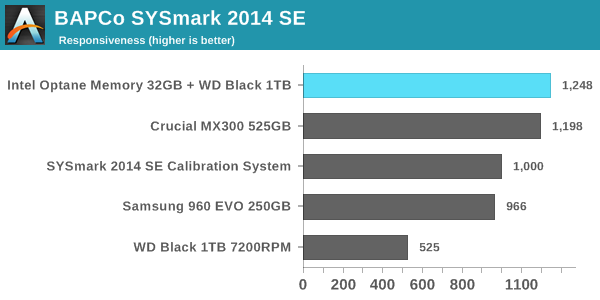
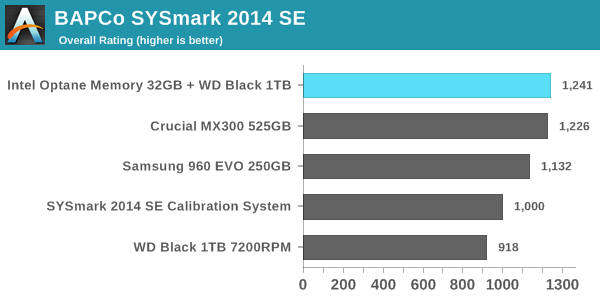
In every performance category the Optane caching setup is either in first place or a close tie for first. The Crucial MX300 is tied with the Optane configuration for every sub-test except the responsiveness test, where it falls slightly behind. The Samsung 960 EVO 250GB struggles, partly because its low capacity and the low degree of parallelism that implies means it often cannot take advantage of the performance offered by its PCIe 3.0 x4 interface. The use of Microsoft's built-in NVMe driver instead of Samsung's may also be holding it back. As expected, the WD Black hard drive scores substantially worse than our solid-state configurations on every test, with the biggest disparity occurring in the responsiveness test: The WD Black hard drive will force users to spend more than twice as much time waiting on their computer than if it has a SSD.
Energy Usage
SYSmark 2014 SE also adds energy measurement to the mix. A high score in the SYSmark benchmarks might be nice to have, but, potential customers also need to determine the balance between power consumption and the efficiency of the system. For example, in the average office scenario, it might not be worth purchasing a noisy and power-hungry PC just because it ends up with a 2000 score in the SYSmark 2014 SE benchmarks. In order to provide a balanced perspective, SYSmark 2014 SE also allows vendors and decision makers to track the energy consumption during each workload. In the graphs below, we find the total energy consumed by the PC under test for a single iteration of each SYSmark 2014 SE workload and how it compares against the calibration systems.
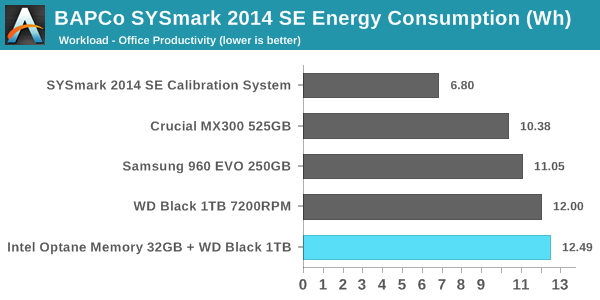
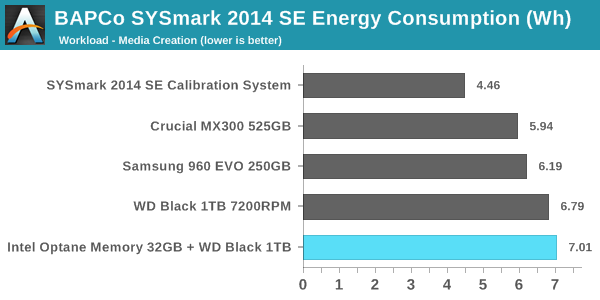
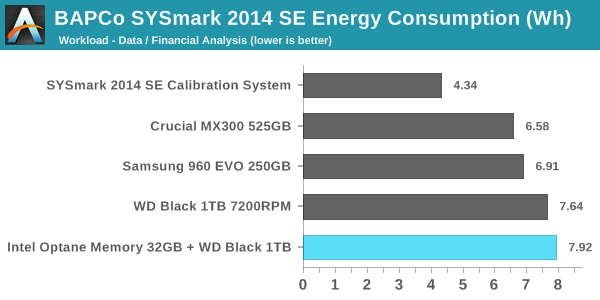
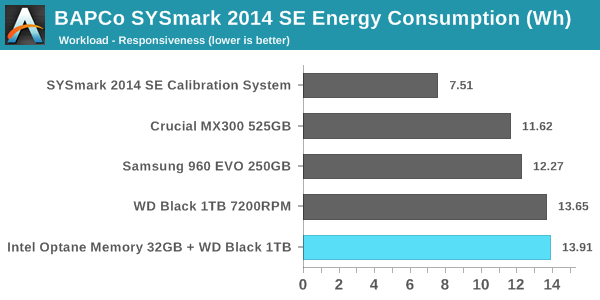
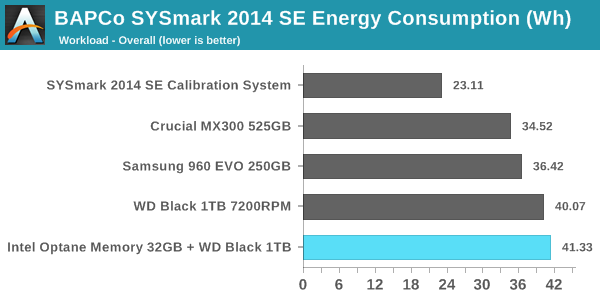
The peak power consumption of a PCIe SSD under load can exceed the power draw of a hard drive, but over the course of a fixed workload hard drives will always be less power efficient. SSDs almost always complete the data transfer sooner, and they can enter and leave their low-power idle states far quicker. On a benchmark like SYSmark, there are no idle times long enough for a hard drive to spin down and save power.
With an idle power of 1W, the Optane cache module substantially increases the already high power consumption of the hard drive-based configurations. It does allow for the tests to complete sooner, but since the Optane module does nothing to accelerate the compute-bound portions of SYSmark, the total time saved is not enough to make up the difference. It also appears that the Optane caching is not being used to enable more aggressive power saving on the hard drive—Intel's probably flushing writes from the cache often enough to keep the hard drive spinning the whole time. What this adds up to is a difference that's quite clear but not big enough for desktop users to be too concerned with unless their electricity prices are high. The Optane Memory caching configuration is the most power-hungry option we tested, while the second-place performing Crucial MX300 configuration was most efficient, using about 16% less energy overall.
For mobile users, the power consumption of the Optane plus hard drive configuration is pretty much a deal-breaker. Our Optane review system is not optimized for power consumption the way a notebook system would be, so for a mobile user the Optane module would account for an even larger portion of the total battery draw, and battery life will take a serious hit.
Originally published at https://www.anandtech.com/show/11210/the-intel-optane-memory-ssd-review-32gb-of-kaby-lake-caching (Wayback Machine).