
The ASUS ROG Strix GL502VS Review: Mainstream GTX 1070 with G-SYNC
Display
ASUS offers two displays on the 15.6-inch GL502VS. The standard model is a 1920x1080 FHD version, which is IPS and includes G-SYNC, and that is the panel in the review unit. They also offer a 3840x2160 UHD model, also with G-SYNC. Both displays are the standard 60 Hz refresh rate, but with G-SYNC available the UHD model would be a nice version to try. The display has a matte finish.
The displays cover “72% NTSC” per ASUS, but it would be nice if manufacturers would stop using NTSC as a measurement stick, since it’s not used at all in computing. 72% is sRGB though, which is the standard for computers.
To test the display accuracy, the X-Rite i1DisplayPro colorimeter is used for brightness and contrast readings, and the X-Rite i1Pro2 spectrophotometer is used for accuracy testing. On the software side, SpectraCal CalMAN 5 Business is used with a custom workflow.
Brightness and Contrast
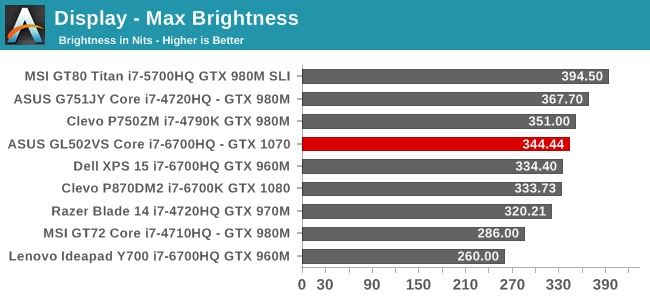
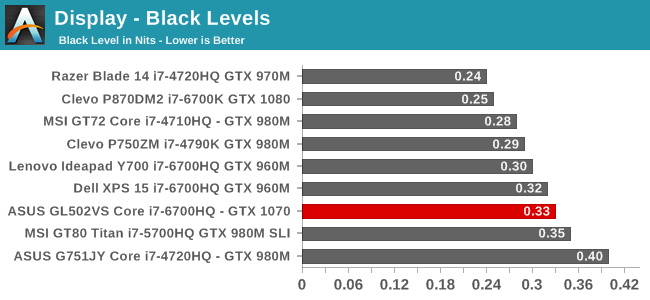
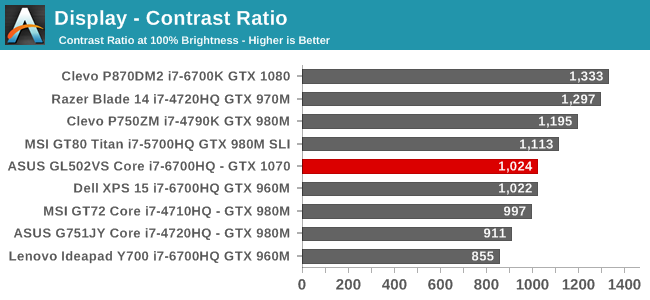
Really high brightness values are most important in very well lit rooms, and the 344 nits output from the ASUS panel is plenty for most situations indoors. However, the black levels are a bit high, so the overall contrast ratio is about mid-pack. 1000:1 is decent for a mid-range laptop though, and it shows just how far laptops have come in the last several years. The minimum brightness is a bit of an issue though, at 38 nits, which is too bright for a very dark room, but for the average laptop on a desk, it shouldn’t be a big issue.
Grayscale Accuracy

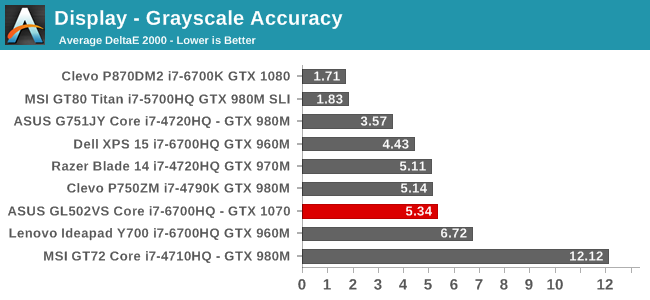
ASUS does not do any sort of display calibration, nor do they ship with an ICC profile, so it has become a bit of an expectation to see they suffer in grayscale. The gamma is very low as well, and despite the CCT Avg being very close to ideal, it just shows how little that number means when you don’t consider all of the primary colors. The reds are far too high, and grayscale errors at 100% white are over 8, which is not ideal. It’s not the worst display around, but it is far from the best. It would be nice to see ASUS do some better calibration, even if it was per batch, to get a handle on their display errors, but they tend to value performance per dollar more, so there is always a trade-off.
Saturation Accuracy

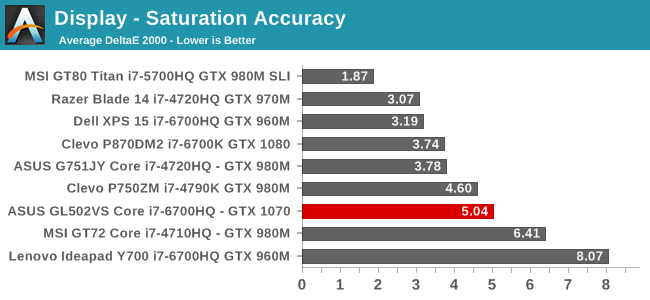
Once again, the lack of calibration does not help the saturation results. Even at just 20% steps, it is very clear that the display is missing its targets. It does not quite cover all of the sRGB space, but it is pretty close, but the blue overshoots and the red falls a bit short. The overall score isn’t helped by the 100% white component which is over 8, but regardless the rest of the color targets have a dE2000 generally over three, and often well over.
Gretag Macbeth

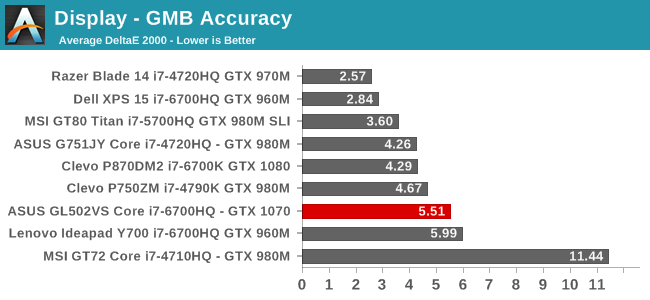
The GMB score is the most comprehensive test, and focuses in on many of the skin tones. The results are not surprising, nor are they very good, with some of the orange, brown, and blue values having error levels approaching 10. The average is much better than practically any laptop from a couple of years ago, but this is a moving target and several of the vendors have focused quite a bit on display quality over the years, and it shows in their results. ASUS still does not factor this in though.
Display Conclusion
Overall the display could use some work, but in the end, it is an IPS display with G-SYNC, so for the gaming market they have the most important boxes checked. It would be great to see ASUS do some work on their displays, but at the same time this would likely add to the bill of materials for the device, possibly increasing prices, and on a value laptop like the GL502VS it is understandable to not see a calibrated display out of the box, but at the end of the day it is still well over $1000, and tablets costing far less do find room in the budget for better results here.
Originally published at https://www.anandtech.com/show/10885/the-asus-rog-strix-gl502vs-review-mainstream-gtx-1070 (Wayback Machine).